How to Connect Zscaler to Microsoft Cloud Security: A Technical Integration Guide
Integrating Zscaler with Microsoft Cloud Security—specifically Microsoft Defender for Cloud Apps—is achieved by establishing a log-streaming pipeline from Zscaler’s Nanolog Streaming Service (NSS) to the Microsoft Defender portal. This...
Integrating Zscaler with Microsoft Cloud Security—specifically Microsoft Defender for Cloud Apps—is achieved by establishing a log-streaming pipeline from Zscaler’s Nanolog Streaming Service (NSS) to the Microsoft Defender portal. This connection allows organizations to gain deep visibility into Shadow IT, analyze user behavior, and automate the blocking of risky applications across the entire corporate network.
Contents
The synergy between Zscaler Internet Access (ZIA) and Microsoft’s Cloud Access Security Broker (CASB) provides a unified security posture. By 2026, this integration has become the standard for enterprises seeking a "best-of-breed" approach to Zero Trust, combining Zscaler's robust secure web gateway (SWG) capabilities with Microsoft’s advanced data protection and behavioral analytics.
Understanding the Architecture of the Integration
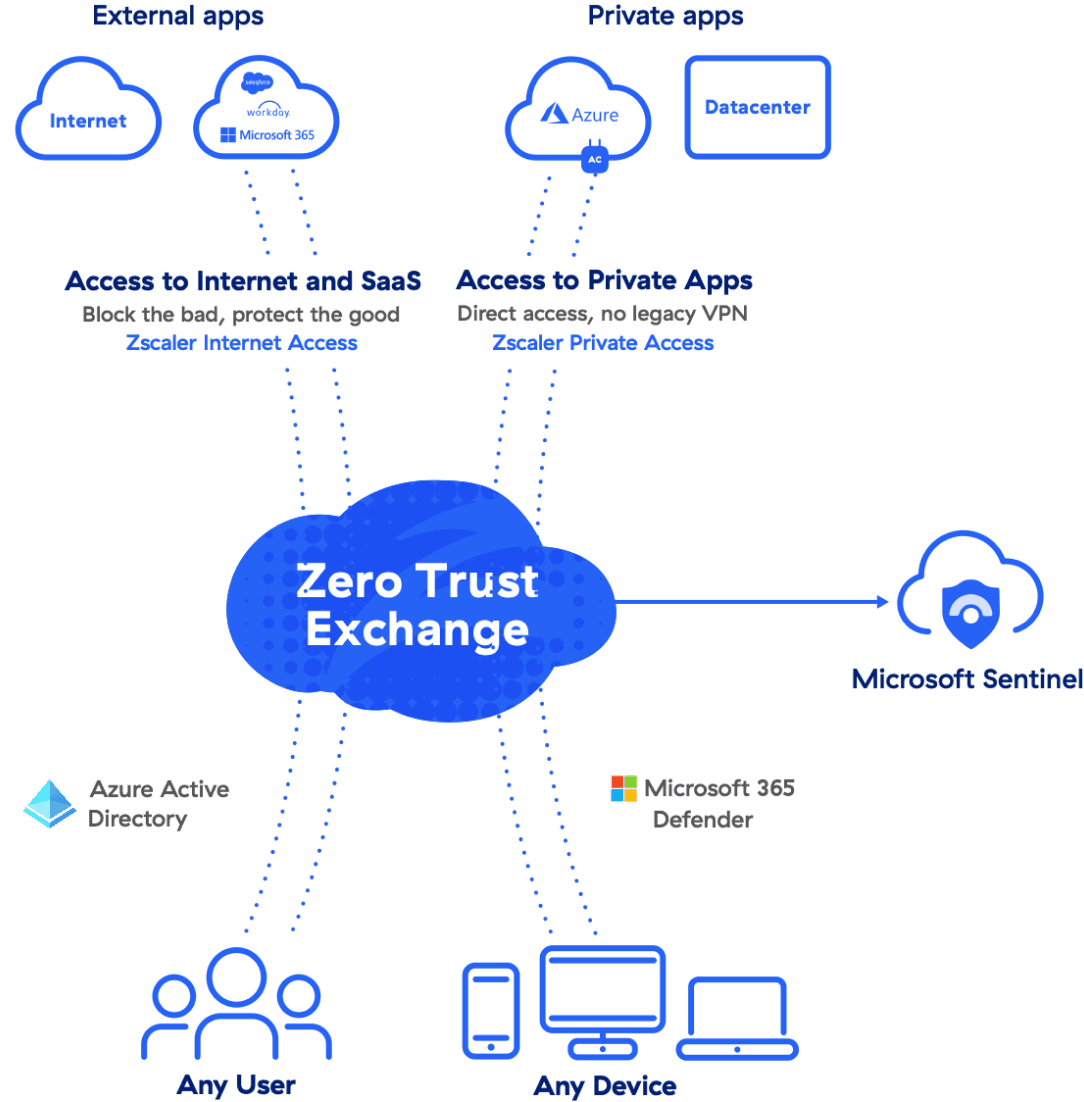
The connection between Zscaler and Microsoft Defender for Cloud Apps is not a simple "on/off" switch; it is a multi-layered architectural alignment. Zscaler sits at the edge, acting as the entry and exit point for all internet traffic. Microsoft Defender for Cloud Apps acts as the central intelligence hub that evaluates the risk of the destinations users are visiting.
The Role of Nanolog Streaming Service (NSS)
Zscaler generates a massive volume of logs known as Nanologs. To get these logs into the Microsoft environment, you must use the Nanolog Streaming Service (NSS). The NSS is a virtual machine (deployed in Azure, AWS, or on-premises) that connects to the Zscaler cloud, compresses the logs, and streams them in real-time to a destination. In this specific integration, the destination is the Microsoft Defender for Cloud Apps log collector.
Cloud Discovery and Governance
Once the logs reach Microsoft, the "Cloud Discovery" engine analyzes the traffic against a database of over 31,000 cloud apps. It assigns risk scores based on over 90 indicators. If an administrator decides to "unsanction" (block) an app in Microsoft Defender, the integration allows this decision to be pushed back to Zscaler, which then enforces the block at the gateway level.
Prerequisites for a Successful Connection
Before initiating the technical configuration, ensure the following requirements are met within your environment:
- Licensing Requirements:
- Zscaler: You must have a Zscaler Internet Access (ZIA) subscription that includes the Nanolog Streaming Service (NSS). Note that Zscaler offers different tiers; ensure your "Transformation" or "Business" bundle supports the necessary log depth.
- Microsoft: A license for Microsoft Defender for Cloud Apps is required. This is typically included in Microsoft 365 E5, Mobility + Security E5, or as a standalone add-on.
- Infrastructure:
- A virtual machine (VM) to host the NSS. For cloud-native organizations, deploying the NSS as a managed instance in Microsoft Azure is highly recommended to minimize latency.
- Network connectivity allowing the NSS to communicate with Zscaler’s Cloud (TCP port 443) and the Microsoft Defender log collector (typically Syslog over UDP or TCP).
- Permissions:
- Zscaler "Super Admin" or "Network Admin" role.
- Microsoft Entra ID (formerly Azure AD) "Security Administrator" or "Global Administrator" role to configure the Defender for Cloud Apps portal.
Step-by-Step Configuration Guide
Connecting these two platforms involves two primary phases: preparing the Microsoft environment to receive logs and configuring Zscaler to send them.
Phase 1: Configuring Microsoft Defender for Cloud Apps
The first step is to create a "Log Collector" and an "Automatic Log Upload" profile within the Microsoft Defender portal.
- Access the Portal: Navigate to the Microsoft Defender portal (security.microsoft.com).
- Define the Data Source: Go to Settings > Cloud Apps > Cloud Discovery > Automatic Log Upload.
- Add a Log Collector:
- Select Add log collector.
- Provide a name (e.g., "Zscaler_NSS_Collector").
- Enter the IP address of the machine where you will host the collector (often the same VM as the NSS or a dedicated intermediary).
- Select the data source type as Zscaler - QRadar/Leeff. While it says QRadar, Zscaler’s CEF (Common Event Format) is highly compatible with this parser.
- Token Generation: The portal will generate a deployment script or a token. Save this securely, as it is required to authenticate the data stream.
Phase 2: Configuring the Zscaler NSS
With the Microsoft side ready to listen, you must now tell Zscaler to talk.
- Deploy the NSS VM: If not already present, deploy the Zscaler NSS virtual appliance. Follow the official Zscaler binary installation for your specific hypervisor (ESXi, Hyper-V, or Azure).
- Configure the Feed in ZIA:
- Log into the ZIA Admin Portal.
- Navigate to Administration > Nanolog Streaming Service.
- Under the NSS Feeds tab, click Add NSS Feed.
- Feed Details:
- Feed Name: Microsoft_Defender_Feed.
- NSS Server: Select your deployed NSS server.
- Log Type: Web Log.
- Feed Output Type: QRadar (LEEF) or CEF. Microsoft Defender for Cloud Apps handles CEF exceptionally well for granular discovery.
- Destination IP: The IP address of your Microsoft Log Collector.
- Destination Port: Usually 514 (Syslog).
- Edit the Filter: You can choose to send all logs or filter for specific traffic. To ensure comprehensive Cloud Discovery, it is best to include all "Web" logs without restrictive filtering.
Comparison of Integration Methods
Depending on your organization's complexity, you might choose between different integration depths.
| Feature | Log-Based Discovery (NSS) | API-Based Governance | Proxy Chaining |
|---|---|---|---|
| Primary Goal | Visibility into Shadow IT | Data Loss Prevention (DLP) | Real-time session control |
| Implementation | Moderate (Requires NSS) | Simple (Oauth2) | Complex (PAC files) |
| Data Latency | Near Real-Time (Seconds) | Polling-based (Minutes) | Real-time (Inline) |
| Best Use Case | Discovering unknown apps | Protecting Sanctioned apps (O365) | High-security environment |
| 2026 Standard | Highly Recommended | Mandatory for Compliance | Optional/Legacy |
Advanced Integration: Automating Block Actions
By 2026, the value of this integration has shifted from mere "viewing" to "actioning." A critical feature of the Zscaler-Microsoft connection is the ability to automate the blocking of apps.
When a security analyst marks a cloud application as Unsanctioned in the Microsoft Defender portal, Microsoft can generate a specific URL list or a script. By using the Zscaler API, you can automate the process where the Microsoft "Unsanctioned" list is periodically pushed to a Zscaler "URL Category" named "Blocked Cloud Apps."
This creates a closed-loop system:
- Zscaler sees a user visiting a new, high-risk file-sharing site.
- The log is sent to Microsoft Defender.
- Microsoft Defender identifies the site as high-risk and flags it.
- An automation task (via Power Automate or a custom Python script using the Zscaler Cloud Browser Isolation API) adds that URL to Zscaler’s block list.
- The next user attempting to access that site is blocked instantly.
Troubleshooting Common Connection Issues
If logs are not appearing in the Microsoft Cloud Discovery dashboard, check the following:
- Time Synchronization: Ensure the NSS VM and the Microsoft Log Collector are synchronized via NTP. Even a few minutes of clock skew can cause log rejection due to timestamp validity checks.
- Log Format Mismatch: Ensure that the feed format in Zscaler matches the parser selected in Microsoft. If you selected "CEF" in Zscaler, ensure the Microsoft Log Collector is set to the Zscaler parser, not a generic Syslog parser.
- Firewall Blockage: Verify that the NSS VM can reach the Microsoft Log Collector on the designated Syslog port (UDP/TCP 514). Use a packet capture tool like
tcpdumpon the NSS VM to confirm data is leaving the server. - NSS Certificate Status: In the Zscaler portal, check if the NSS certificate is valid. If the certificate has expired, the NSS will fail to authenticate with the Zscaler Nanolog clusters and will not stream any data.
Frequently Asked Questions
Does Zscaler replace the need for Microsoft Defender for Cloud Apps?
No. Zscaler and Microsoft Defender for Cloud Apps are complementary. Zscaler acts as the enforcement engine (the "gate"), while Defender for Cloud Apps provides the intelligence and deep behavioral analysis (the "brain"). Zscaler excels at traffic inspection, while Microsoft excels at understanding the context of the data inside the cloud apps.
Can I connect Zscaler to Microsoft Cloud Security without an NSS server?
Yes, by using Cloud NSS. Zscaler now offers a cloud-to-cloud streaming service that eliminates the need for an on-premises virtual machine. This is a direct integration that sends logs from the Zscaler cloud directly to the Microsoft cloud, though it may require specific licensing tiers or "Cloud NSS" credits.
How long does it take for logs to show up in the Microsoft portal?
Typically, once the NSS feed is active, logs appear in the Cloud Discovery dashboard within 5 to 15 minutes. However, the initial processing of a large historical log batch may take up to 24 hours to populate all risk assessment metrics.
Will this integration impact my network performance?
The integration is "out-of-band" for the end-user. Since the NSS streams a copy of the logs rather than the traffic itself, there is zero impact on the user’s browsing speed or latency. The only overhead is the bandwidth used by the NSS to send logs to the Microsoft collector.
Is the data encrypted during transit?
Yes. When using the NSS to stream logs to Azure or the Microsoft collector, it is standard practice to use TLS-encrypted Syslog or a VPN tunnel between the NSS and the log collector to ensure that sensitive user activity data is protected during transit.
Practical Recommendation
For organizations operating in 2026, the most resilient configuration is to deploy the Zscaler Cloud NSS directly to a Microsoft Sentinel workspace, which then feeds Microsoft Defender for Cloud Apps. This "Cloud-to-Cloud" approach removes the management burden of maintaining virtual machines and provides a more scalable solution as traffic volumes grow. If you are currently using a local NSS VM, plan a migration to Cloud NSS to simplify your infrastructure and reduce potential points of failure in your security telemetry pipeline.
Image Gallery