Optimizing Performance and Reliability with Hosting Load Balancing
Hosting load balancing is a core infrastructure strategy that distributes incoming network traffic across multiple servers to prevent any single device from becoming a bottleneck. By managing requests efficiently, load balancing ensure...
Hosting load balancing is a core infrastructure strategy that distributes incoming network traffic across multiple servers to prevent any single device from becoming a bottleneck. By managing requests efficiently, load balancing ensures high availability, reduces latency, and prevents system failures, allowing websites and applications to remain responsive even during periods of heavy traffic or hardware maintenance.
Contents
The Mechanism of Hosting Load Balancing
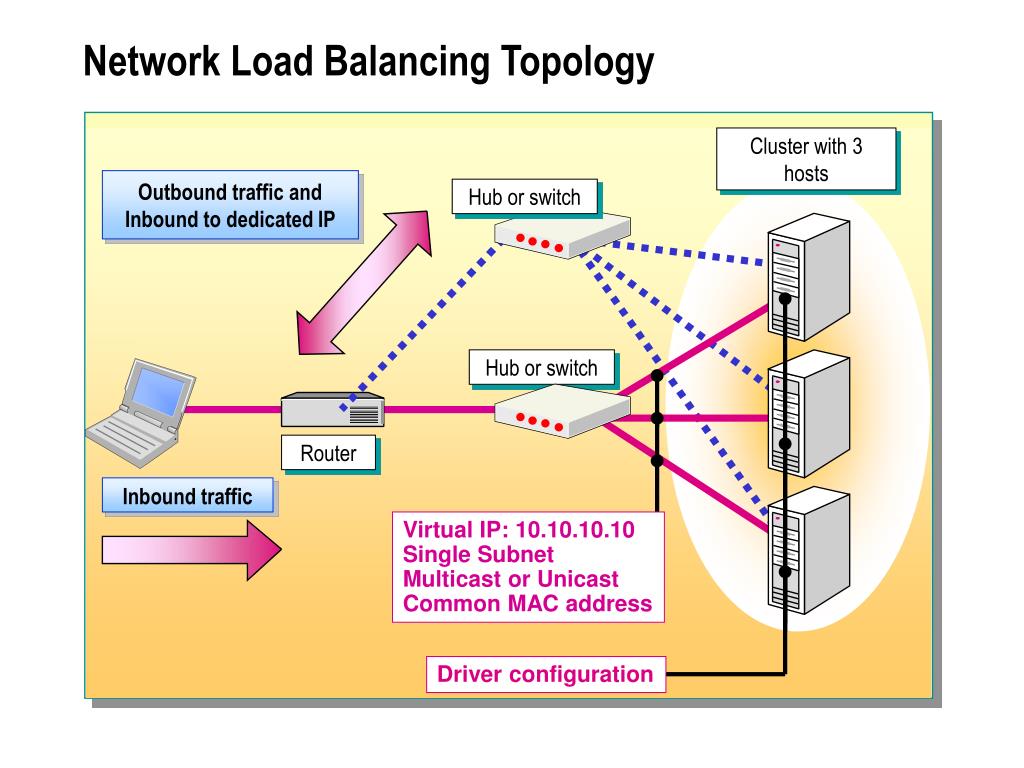
At its simplest, a load balancer acts as an intelligent traffic cop positioned between the internet and your server farm. When a user requests a resource from your website or application, the load balancer intercepts that request and routes it to an appropriate destination server based on predefined algorithms.
The primary objective is to maintain a balance of computational load. If one server is processing a complex database query or handling a surge in concurrent users, the load balancer shifts subsequent traffic to other servers that possess available CPU, RAM, or bandwidth resources. This process is seamless to the end user, who perceives only a fast, consistent connection.
Load balancing also provides an essential safety net through health checks. The load balancer continuously monitors the status of each server in the pool. If a server fails or stops responding to requests, the balancer automatically redirects traffic to the remaining healthy servers. This redundancy is the foundation of high-availability hosting, ensuring that service interruptions are minimized or entirely avoided during server outages.
Comparing Load Balancing Architectures
Load balancing solutions can be deployed at different layers of the networking stack, each offering distinct advantages depending on your technical requirements and budget.
| Type | Operational Layer | Strengths | Ideal Use Case |
|---|---|---|---|
| Layer 4 (Transport) | OSI Layer 4 (TCP/UDP) | Extremely fast; handles high volume. | Simple traffic distribution by IP/port. |
| Layer 7 (Application) | OSI Layer 7 (HTTP/HTTPS) | Intelligent routing; content-aware. | Microservices, API routing, SSL termination. |
| Global Server Load Balancing (GSLB) | DNS Level | Geographic traffic distribution. | Multi-region, disaster recovery strategies. |
Layer 4 Load Balancing
Layer 4 load balancing relies on information available at the transport layer, specifically the IP address and the TCP or UDP port. Because it does not inspect the actual content of the request, it is highly efficient and operates at near-wire speeds. This is the preferred method for high-throughput environments where the primary concern is raw volume rather than specific content inspection.
Layer 7 Load Balancing
Layer 7 load balancing inspects the application traffic itself, including HTTP headers, cookies, and data within the message body. This allows for "smart" routing. For instance, a Layer 7 balancer can route all traffic for /images to one specific server pool and all traffic for /api to another. It also handles SSL termination, meaning it decrypts incoming HTTPS traffic at the balancer level, offloading the processing overhead from the backend servers.
Global Server Load Balancing (GSLB)
GSLB is an advanced configuration that manages traffic across different geographic data centers. By using DNS-based redirection, GSLB sends users to the server pool physically closest to their location. This significantly reduces latency and provides the highest level of disaster recovery; if an entire data center goes offline, the GSLB can reroute global traffic to a functional region.
Prerequisites for Implementation
Before deploying a load balancing solution, your environment must be architected to support a distributed model. You cannot simply enable a load balancer; you must ensure your application state is handled correctly.
- Stateless Application Design: For load balancing to work effectively, your application should not store session information locally on the server (e.g., in a local file or local memory). If a user authenticates on Server A, they must be able to continue their session on Server B without being logged out. Use a centralized session store, such as Redis or a shared database, to maintain state.
- Synchronized Content: If your application serves static files (CSS, images, JavaScript), ensure all servers in the pool have access to the same version of these files. This is typically achieved through a shared network storage solution (like NFS) or a synchronized content delivery network (CDN) strategy.
- Deployment Pipelines: With multiple servers, manual updates become impossible. You must implement automated deployment tools that push code updates to all servers in the load-balanced pool simultaneously to prevent version mismatches.
Common Algorithms and Selection Strategies
The effectiveness of a load balancer depends on the algorithm it uses to distribute traffic. Choosing the right one depends on your specific traffic patterns.
- Round Robin: The simplest method, which cycles through the list of servers sequentially. It works well when all servers in your pool have identical hardware specifications and the traffic load is relatively uniform.
- Least Connections: The balancer tracks the number of active connections for each server and sends new requests to the one currently handling the fewest. This is highly effective for applications where requests vary in complexity and duration, as it prevents overburdening a single server with several long-lived connections.
- IP Hash: The load balancer uses the client’s IP address to determine which server receives the request. This ensures that a specific user is consistently routed to the same server, which can be useful for applications that struggle with session persistence.
Addressing Troubleshooting and Limitations
Even with a robust configuration, challenges can arise. Common issues often stem from misconfigured health checks or session persistence failures.
- False-Negative Health Checks: If a health check is too aggressive, it may mark a server as "down" during a momentary spike in load, leading to a "flapping" state where servers are constantly added and removed. Ensure health checks are configured with adequate timeouts and failure thresholds.
- Session Persistence Issues: If your application requires sticky sessions (keeping a user on the same server for the duration of a visit), ensure your load balancer is configured for "session affinity" or "cookie insertion." Without this, users may experience intermittent login errors or lost shopping carts.
- Increased Complexity: Load balancing adds a layer of infrastructure that must be maintained. If your load balancer itself is a single point of failure, your high availability efforts are compromised. In enterprise environments, load balancers should be deployed in a high-availability pair, where a standby unit takes over if the primary fails.
Frequently Asked Questions
Is a load balancer necessary for small websites? Generally, no. If your website receives low to moderate traffic and runs on a single server, a load balancer adds unnecessary cost and complexity. It is primarily recommended once you exceed the capacity of a single server or require a strict high-availability guarantee.
How does load balancing affect SSL/TLS encryption? You have two main choices: SSL passthrough or SSL termination. In SSL termination, the load balancer decrypts the traffic before sending it to the backend. This simplifies management and reduces the CPU load on backend servers, though you must ensure the connection between the load balancer and the backend is secure.
Does load balancing improve website speed? Yes, by reducing the load on individual servers, response times remain stable even during traffic spikes. Additionally, by routing users to geographically closer servers (using GSLB), you can physically reduce the distance data travels, significantly lowering latency.
Can load balancing replace a backup strategy? No. While load balancing provides high availability during server failures, it does not protect against data corruption, accidental deletion, or catastrophic data center failure. Always maintain an independent, off-site backup protocol.
How do I choose between software and hardware load balancers? Software load balancers (like HAProxy or Nginx) are highly flexible, cost-effective, and easy to deploy in cloud environments. Hardware load balancers offer dedicated performance and specialized features for massive, high-throughput enterprise networks but come with a significantly higher price tag and maintenance overhead.
Next Steps for Implementation
To begin, audit your current traffic patterns. If you are experiencing CPU bottlenecks during traffic spikes, you are likely ready for a load-balanced architecture. Start by selecting a software-based solution, which allows for testing in a virtualized or cloud environment without large capital expenditure. Define your session management strategy first, then implement a small cluster of two servers behind a load balancer to verify that your application handles traffic distribution correctly before scaling to a larger, more complex cluster.
Image Gallery