Understanding FE80 IPv6 Addresses: A Comprehensive Guide to Link-Local Networking
An FE80 IPv6 address is a specialized, non-routable link-local IP address automatically assigned to network interfaces within the IPv6 protocol suite. Defined under the reserved prefix block fe80::/10, these addresses enable immediate...
An FE80 IPv6 address is a specialized, non-routable link-local IP address automatically assigned to network interfaces within the IPv6 protocol suite. Defined under the reserved prefix block fe80::/10, these addresses enable immediate local communication between devices on the same physical or logical network segment without requiring a central router, DHCP server, or manual setup.
Contents
What Is FE80 in IPv6? The Architecture of Link-Local Addressing
In Internet Protocol version 6 (IPv6), link-local addressing is a core design requirement rather than an optional feature. Every active IPv6-enabled network interface automatically generates at least one link-local address starting with the prefix fe80. Unlike IPv4—where link-local addresses (169.254.0.0/16) typically indicate a failed DHCP negotiation—IPv6 link-local addresses operate continuously alongside global unicast addresses (GUAs) and unique local addresses (ULAs).
The formal architectural specification for IPv6 link-local addressing originates in RFC 4291 (the IPv6 Addressing Architecture). The Internet Assigned Numbers Authority (IANA) designated the address block fe80::/10 for link-local unicast communications.
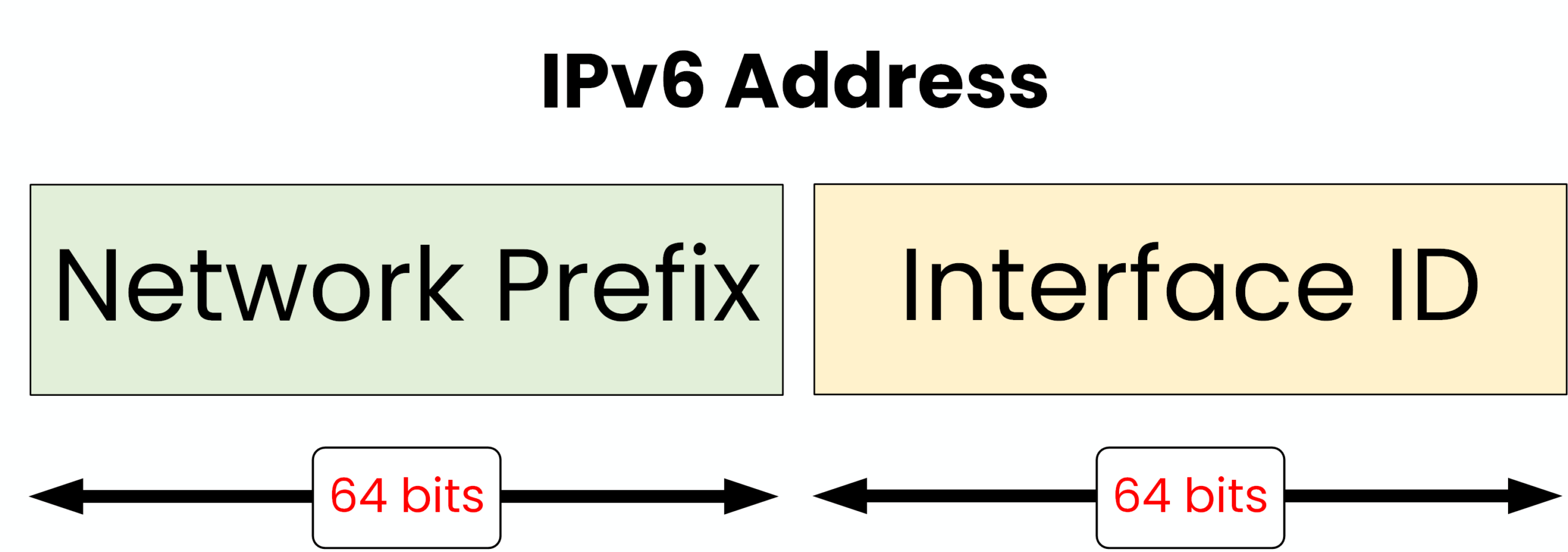
In binary notation, the first 10 bits of an fe80::/10 prefix are strictly fixed to 1111 1110 10. The next 54 bits are required to be set to zero in standard interface implementations. As a result, the practical network prefix assigned to local interface subnets is formatted as fe80::/64. The remaining 64 bits form the Interface Identifier (IID), which uniquely identifies the device interface on that specific link.
Because link-local addresses are restricted to a single broadcast domain or local link, routers will never forward IPv6 packets with an FE80 source or destination address across a network boundary. If a packet destined for an FE80 address arrives at a router interface, the router drops the packet immediately.
10 FE80 IPv6 Address Concepts and Examples Explained
To master IPv6 network operations, system administrators and network engineers must understand how FE80 addresses function across initialization, protocol mechanics, traffic routing, and diagnostics. Below are 10 key concepts and practical examples explaining FE80 IPv6 addresses.
1. The Scope Limitation: Local Link Boundaries
The defining characteristic of an FE80 address is its link-constrained scope. Link-local traffic cannot cross a Layer 3 boundary (a router). This limitation ensures that FE80 addresses remain non-unique across different network segments. Two completely separate local networks can simultaneously use identical FE80 interface identifiers without triggering IP address collisions across the broader internet or corporate intranet. This design conserves global address space and provides a predictable control channel for local node discovery.
2. Automatic Generation via EUI-64 Standard
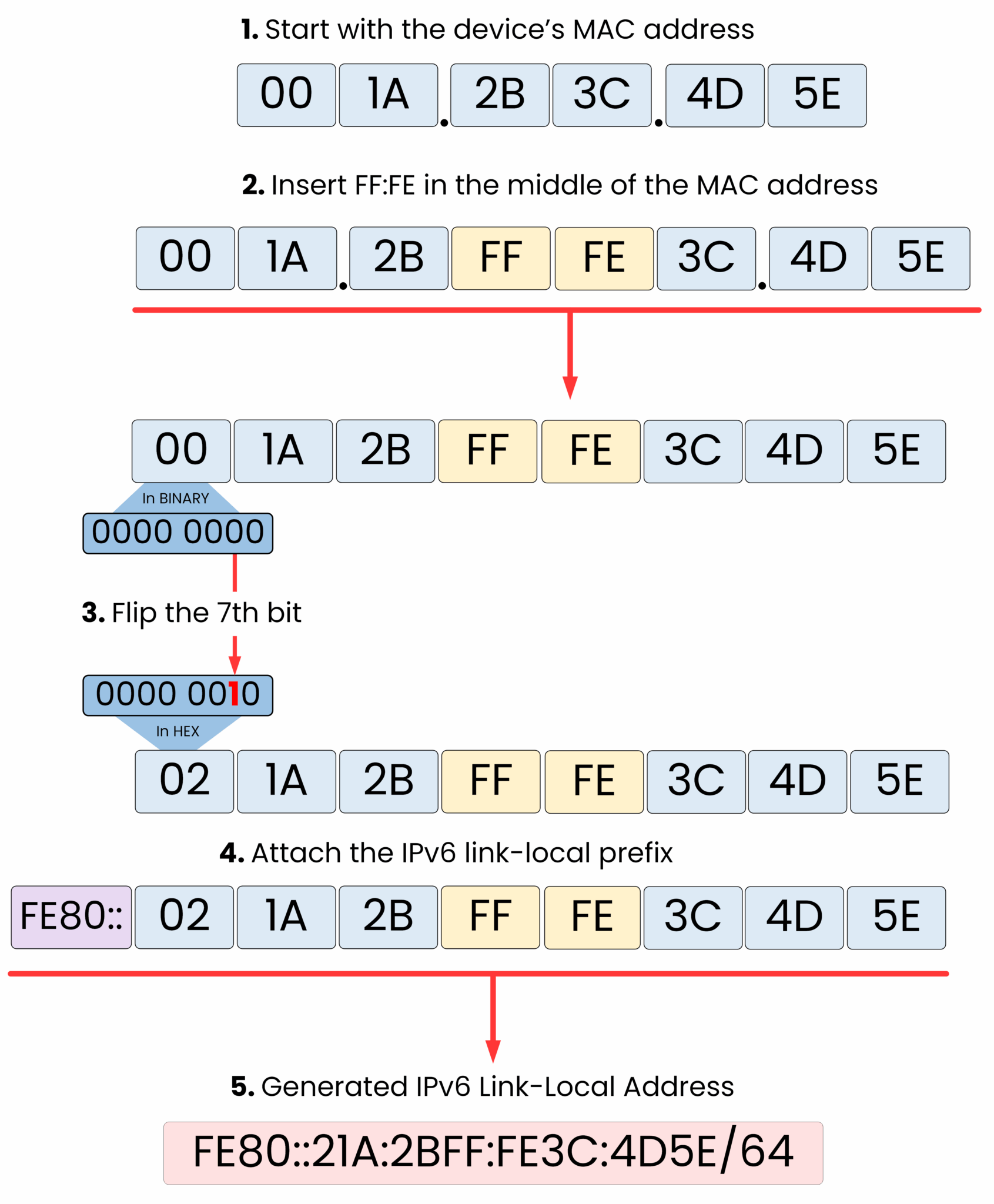
Historically, operating systems generated the 64-bit Interface Identifier for an FE80 address using the IEEE EUI-64 format derived from the device's 48-bit Media Access Control (MAC) physical address.
- The system splits the 48-bit MAC address into two 24-bit halves.
- It inserts the 16-bit hexadecimal value
FF:FEbetween the two halves. - It flips the 7th bit (the Universal/Local bit) of the first byte to indicate local administration.
For example, a network card with the MAC address 00:1A:2B:3C:4D:5E converts into the EUI-64 interface identifier 021A:2BFF:FE3C:4D5E. Combined with the standard prefix, the complete link-local address becomes fe80::21a:2bff:fe3c:4d5e.
3. Privacy Extensions and Stable Opaque Identifiers
Because EUI-64 addresses embed the physical hardware MAC address directly into the IPv6 address, they create potential security and privacy risks, enabling tracking of hardware across networks. Modern operating systems mitigate this through two standards:
- Privacy Extensions (RFC 4941): Generates temporary, randomly changing interface identifiers for outgoing sessions.
- Stable Opaque Identifiers (RFC 7217): Generates a pseudo-random interface identifier that remains static on a specific network link but changes completely when connecting to a different physical or Wi-Fi network.
Consequently, most workstations display FE80 addresses such as fe80::8c31:f4a2:19e8:51b4 rather than predictable EUI-64 formatted addresses.
4. Mandatory Zone Identifiers (Scope IDs)
Because FE80 addresses are valid only on a specific link and can be duplicated on different physical interfaces of a single device (such as a server with four Ethernet ports), network protocol stacks require a Zone Identifier (also known as a Scope ID) when transmitting local traffic.
The Zone Identifier specifies which network interface to use when sending packets to a link-local destination.
- On Linux and macOS systems, the Zone Identifier is appended using a percent sign and the interface name:
fe80::1%eth0orfe80::1%en0. - On Windows systems, the Zone Identifier uses an interface index number:
fe80::1%12.
Without the Zone Identifier, network utilities such as ping or traceroute cannot determine which physical link to transmit the packet through, resulting in routing errors.
5. Neighbor Discovery Protocol (NDP) Integration
FE80 addresses serve as the foundation for the Neighbor Discovery Protocol (NDP), defined in RFC 4861, which replaces the IPv4 Address Resolution Protocol (ARP). Devices use their FE80 addresses to send Neighbor Solicitation (NS) and Neighbor Advertisement (NA) messages to discover the link-layer MAC addresses of neighboring nodes. Because NDP operates exclusively over link-local messaging, local address resolution functions even if no global IP prefix or DHCP server is configured on the link.
6. Router Advertisements (RA) and Gateway Configuration
When an IPv6 node boots up, it sends a Router Solicitation (RS) message from its FE80 address to the all-routers multicast group (ff02::2). Local IPv6 routers respond with a Router Advertisement (RA) message transmitted from the router's own FE80 address to the all-nodes multicast group (ff02::1).
The RA message conveys essential network parameters, including prefix information for Stateless Address Autoconfiguration (SLAAC), Maximum Transmission Unit (MTU) sizing, and DNS server options. Most importantly, nodes automatically record the router’s FE80 address as their default IPv6 gateway.
7. DHCPv6 Initialization and Bootstrap Communication
Dynamic Host Configuration Protocol for IPv6 (DHCPv6) relies heavily on link-local addressing. When a client requests stateful network settings or extra configuration data (such as NTP servers or domain search lists), it transmits DHCPv6 Solicit messages using its local FE80 address to the designated multicast address ff02::1:2. The DHCPv6 server or relay agent responds directly to the client's FE80 address, establishing communication before global addresses are formally assigned.
8. Dynamic Routing Protocol Peering (OSPFv3, BGP, RIPng)
In enterprise networks, interior gateway protocols like OSPFv3 (RFC 5340) and RIPng use FE80 addresses exclusively to form neighbor adjacencies and exchange routing updates. When an OSPFv3 router advertises routes for remote networks, it sets the Next-Hop IPv6 address to its local FE80 interface address rather than a global unicast address. This decouples local routing topology from global addressing schemes, preserving global address space and simplifying network renumbering.
9. Dual-Stack Coexistence and Local Fallback
In dual-stack environments where IPv4 and IPv6 operate concurrently, FE80 addresses provide an independent communication layer. If an IPv4 network service fails due to exhaustion of DHCP pools or ARP table corruption, IPv6 link-local services remain operational. Devices can continue discovering local hardware, communicating via link-local DNS, or executing management commands without reliance on IPv4 infrastructure.
10. Security Vector and Link-Local Filtering
Although FE80 addresses cannot be reached from the internet, they represent a key attack surface within local Layer 2 domains. Unsecured link-local networks are vulnerable to Rogue Router Advertisements, NDP spoofing, and man-in-the-middle attacks. Network administrators harden local networks against these vectors using Layer 2 switch features such as RA Guard, IPv6 Snooping, and ND Inspection, which filter unauthorized FE80 control packets at the access switch port level.
Structural Comparison of IPv6 Address Types
To understand where FE80 link-local addresses fit within the broader IPv6 architecture, compare them against Global Unicast and Unique Local address types.
| Feature / Attribute | Link-Local Address (FE80) | Unique Local Address (ULA) | Global Unicast Address (GUA) |
|---|---|---|---|
| Prefix Range | fe80::/10 (typically fe80::/64) |
fc00::/7 (commonly fd00::/8) |
2000::/3 |
| Scope of Reachability | Single local link / LAN segment | Organization / Internal site network | Globally routable across the internet |
| Routability | Non-routable (routers drop packets) | Routable internally; blocked at internet edge | Routable across public internet networks |
| Assignment Method | Automatic self-assignment (SLAAC/EUI-64) | Static configuration or local ULA generator | SLAAC, DHCPv6, or static assignment |
| Primary Use Cases | NDP, RAs, DHCPv6, local routing next-hops | Private enterprise networks, VPN topologies | Public web servers, internet connectivity |
| Zone Identifier Required? | Yes (e.g., %eth0 or %12) |
No | No |
| IPv4 Equivalent | 169.254.0.0/16 (APIPA) |
10.0.0.0/8, 172.16.0.0/12, 192.168.0.0/16 |
Public IPv4 Addresses |
Command-Line Syntax for FE80 Troubleshooting
When testing network connectivity using FE80 addresses, administrators must include interface scope identifiers in their diagnostic tools. Below are standard command examples across operating systems.
Testing Connectivity on Linux
To send ICMPv6 echo requests to a neighboring link-local address on Linux using interface eth0:
ping fe80::1%eth0
To display detailed interface link-local status:
ip -6 address show dev eth0
Testing Connectivity on Windows
To ping a link-local address on Windows, locate the interface index number via Command Prompt or PowerShell, then append it to the IP address:
netsh interface ipv6 show interfaces
ping fe80::1%12
Testing Connectivity on macOS
On macOS systems, specify the network interface (such as en0 for Wi-Fi or Ethernet):
ping6 fe80::1%en0
Frequently Asked Questions
Why does my computer have an FE80 IPv6 address if I don't use IPv6?
All modern operating systems enable IPv6 by default. As soon as a network interface initializes, the OS automatically generates an FE80 link-local address. This occurs even if your internet service provider (ISP) or local router only supports IPv4. The address is required for internal system processes and local node communication.
Can FE80 addresses be routed over the internet?
No. FE80 addresses are scoped exclusively for single network links. Edge routers and core internet routers drop any packet containing an FE80 address in either its source or destination header. They cannot be routed across subnets or transmitted over public internet paths.
Is an FE80 address the same as an APIPA IPv4 address?
While both serve link-local purposes, their operational roles differ significantly. An IPv4 APIPA address (169.254.x.x) is generated only when DHCP configuration fails. In contrast, an IPv6 FE80 address is permanently active and works alongside normal global IPv6 addresses to manage lower-level protocol tasks like neighbor discovery and router signaling.
How do I find the Zone ID for an FE80 address on my computer?
On Windows, run ipconfig or netsh interface ipv6 show interfaces in Command Prompt to see the interface index numbers listed alongside interface names. On Linux and macOS, run ip addr or ifconfig to identify the interface name (such as eth0, wlan0, or en0), which serves as the Zone ID.
Should I manually disable FE80 addresses for network security?
No. Disabling FE80 addresses or turning off IPv6 link-local support breaks fundamental local networking services, including gateway resolution, neighbor discovery, and IPv6 control protocols. Instead of disabling link-local addressing, secure your network using Layer 2 protection controls such as RA Guard and First-Hop Security policies on your network switches.
Summary and Practical Next Steps
FE80 IPv6 addresses are foundational components of modern networking architecture. Operating within the fe80::/10 block, these addresses facilitate essential local functions—such as neighbor resolution, router discovery, DHCP bootstrap, and routing protocol adjacency—without requiring centralized administration.
To maintain a secure and functional network:
- Always include Zone Identifiers when diagnosing link-local issues via command-line utilities.
- Implement Layer 2 Security Controls (such as RA Guard and IPv6 Snooping) on managed switches to protect FE80 traffic from rogue advertisements and spoofing.
- Leave FE80 addressing enabled across operating systems to preserve standard system diagnostics and local protocol communications.
Image Gallery