You Don’t Have to Pay for Amazon Prime Video: How to Use a Free Trial Successfully
You can access the full library of Amazon Prime Video without paying a subscription fee by signing up for an Amazon Prime free trial. Most new users are eligible for a 30-day trial, while students can often access a 6-month trial. To a...
You can access the full library of Amazon Prime Video without paying a subscription fee by signing up for an Amazon Prime free trial. Most new users are eligible for a 30-day trial, while students can often access a 6-month trial. To avoid being charged, you must cancel the membership before the trial period ends.
Contents
Amazon Prime Video has grown into one of the most comprehensive streaming platforms globally. As of 2026, the service offers a massive library of "Originals," licensed films, and live sports. However, with subscription fatigue becoming a common issue for many households, leveraging the free trial system remains the most effective way to enjoy premium content without an immediate financial commitment.
This guide provides a technical and practical breakdown of how the Amazon Prime Video free trial works, the eligibility requirements you must meet, and the specific steps required to ensure you never see a charge on your bank statement.
Understanding the Amazon Prime Video Free Trial Structure
Amazon traditionally offers two main ways to access its video content for free: through a general Amazon Prime Membership trial or a standalone Prime Video trial. In 2026, the most common route is the full Prime membership trial, as it includes additional benefits like expedited shipping and Amazon Music.
The standard trial duration is 30 days. During this window, you have unrestricted access to the Prime Video catalog, including 4K UHD content and HDR-supported titles. It is important to note that while the subscription fee is waived, certain "add-on" channels (like Paramount+ or Max) and digital rentals/purchases still carry individual costs.
The Student Advantage
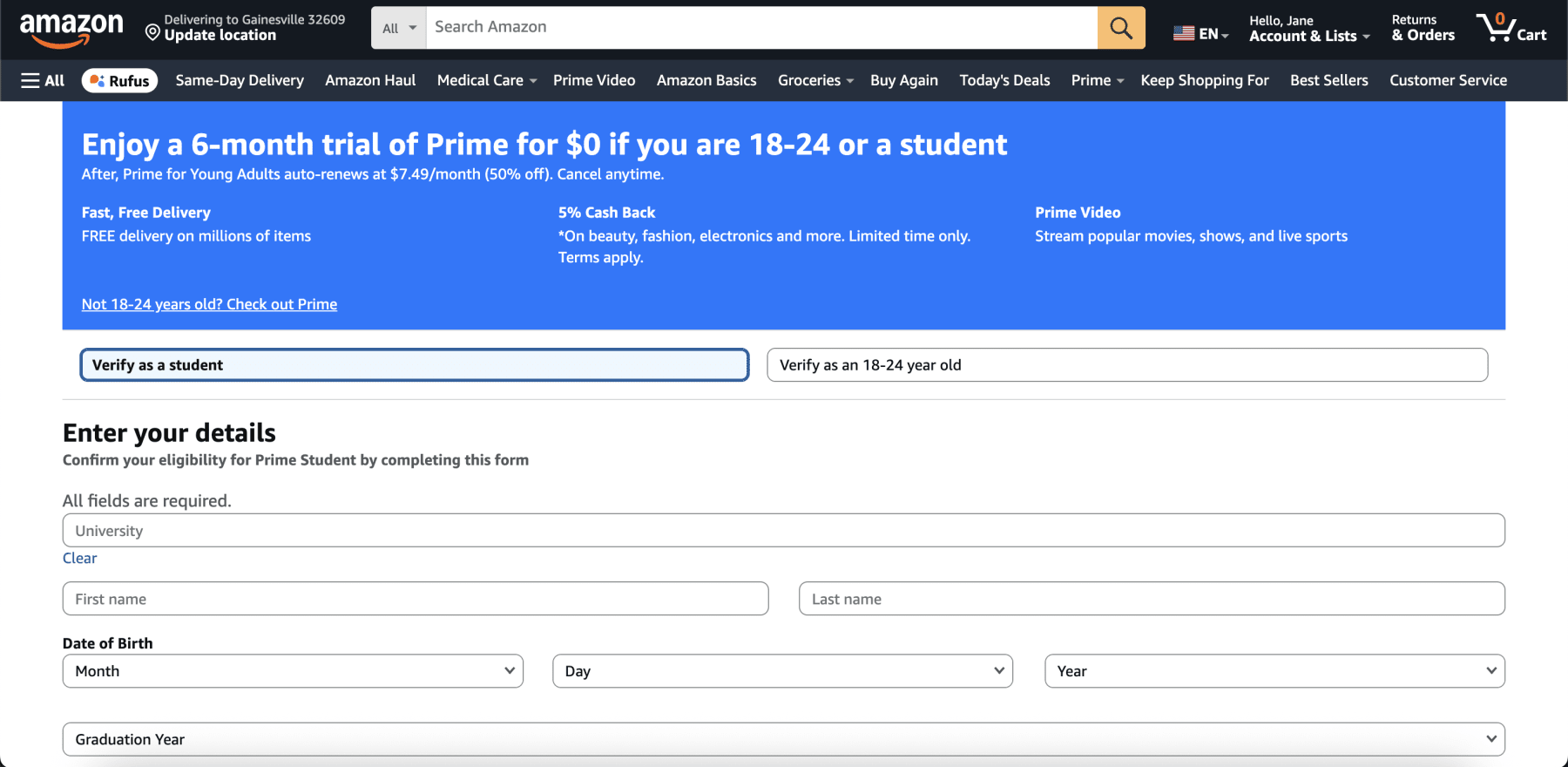
If you are currently enrolled in higher education with a valid .edu email address (or equivalent proof of enrollment), you are likely eligible for Prime Student. This is significantly more generous than the standard trial, typically offering six months of Prime Video at no cost. After the six-month period, the subscription usually transitions into a discounted monthly rate, though the "no-pay" goal requires cancellation before that transition occurs.
Eligibility Requirements for 2026
To successfully start a trial without a fee, you must meet specific criteria set by Amazon’s automated verification systems.
- Account Status: You must be a new member. Amazon generally defines a "new member" as someone who has not had an active Prime membership in the last 12 months. If you previously had a trial three years ago, you are often eligible to start a new one.
- Valid Payment Method: Even though you are not being charged, Amazon requires a valid credit card, debit card, or linked bank account. This is used for identity verification and to facilitate a seamless transition to a paid sub if you do not cancel. Prepaid cards are frequently rejected for trial sign-ups to prevent "trial hopping."
- Unique Identity Markers: Amazon’s fraud detection looks at your IP address, physical shipping address, and phone number. Attempting to create multiple accounts using the same credit card or household address to stack trials may result in the account being flagged or the trial being denied.
Step-by-Step Guide to Signing Up for Free
The process is designed to be user-friendly, but there are specific toggles you should look for to ensure you are entering the trial and not a paid monthly plan.
1. Navigate to the Official Prime Video Portal
While you can sign up via the main Amazon homepage, going directly to the Prime Video landing page often clarifies the specific video benefits. Look for a button labeled "Start your 30-day free trial" or "Watch with Prime."
2. Create or Sign In to Your Amazon Account
If you already shop on Amazon but have never used Prime, sign in with your existing credentials. If you are entirely new, you will need to verify an email address and a mobile phone number.
3. Confirm Your Billing Information
As mentioned, you will be prompted to enter a payment method. Ensure the billing address matches the card issuer's records. At this stage, you may see a "pending authorization" of $0.00 or $1.00 on your bank statement. This is not a charge; it is a temporary verification hold that disappears within a few business days.
4. Select the Membership Plan
Amazon may offer you a choice between a monthly and an annual plan. Since your goal is to use the free trial, it does not matter which one you select for the future, but selecting the monthly option is often safer for those who might forget to cancel, as the accidental charge would be smaller than an annual one.
Technical Prerequisites and Device Compatibility
Once the trial is active, you can access the service across a wide range of hardware. As of 2026, Prime Video supports high-bitrate streaming, which requires a stable internet connection.
| Feature | Requirement / Specification |
|---|---|
| Minimum Bandwidth (SD) | 1.0 Mbps |
| Minimum Bandwidth (HD) | 5.0 Mbps |
| Minimum Bandwidth (4K/UHD) | 15.0 - 25.0 Mbps |
| Supported Devices | Smart TVs, Fire TV, Roku, Apple TV, PlayStation 5, Xbox Series X/S, iOS, Android |
| Simultaneous Streams | Up to 3 devices at once (2 for the same title) |
| Offline Viewing | Supported on mobile devices and tablets via the Prime Video app |
Ad-Supported vs. Ad-Free Tiers
By 2026, the standard Prime Video experience (including the free trial) includes limited advertisements. If you wish to have a completely ad-free experience during your trial, Amazon typically offers an "Ad-Free" upgrade for a small additional monthly fee. However, this upgrade is usually not free and will be billed immediately, even during a trial period. To truly pay $0, you should stick with the standard ad-supported version of the trial.
How to Avoid Getting Charged: The Cancellation Process
The most critical step in ensuring you don't have to pay for Amazon Prime Video is the "graceful exit." You do not have to wait until the 29th day to cancel.
The "Cancel but Keep" Feature
In many jurisdictions, Amazon allows you to cancel the "auto-renewal" immediately after signing up. When you do this, your access to Prime Video does not end instantly; instead, the system marks the account to expire at the end of the 30-day window.
Steps to Cancel:
- Go to Account & Lists on the Amazon website.
- Select Prime Membership.
- Click on Update, cancel and more under the "Manage Membership" section.
- Select End Membership.
- Amazon will likely present several "Are you sure?" screens or offer a "Remind me later" option. Navigate through these by confirming you want to cancel the renewal.
Setting a Manual Reminder
While the digital cancellation is reliable, it is recommended to set a calendar alert for day 28 of your trial. This provides a buffer in case of technical issues with the website or if you need to contact customer support to resolve a billing dispute.
Common Pitfalls and Troubleshooting
Even with a free trial, users sometimes find unexpected charges. Understanding why this happens can help you avoid them.
- Accidental Channel Subscriptions: Clicking on a movie that is part of a "Channel" (like Starz or BritBox) rather than the "Included with Prime" library will trigger a separate trial or a direct charge for that specific channel. Always look for the Prime "Checkmark" logo on the content thumbnail.
- Prime Video "Purchases": The Prime Video interface mixes free-to-stream content with movies available for digital rent or purchase. If you click "Buy" or "Rent," you will be charged the listed price immediately, regardless of your trial status.
- Expired Payment Methods: If your card on file expires during the trial, Amazon may prompt you to update it to continue the trial. If you don't, the trial may be suspended.
Alternatives if You Aren't Eligible for a Trial
If you have used your trial recently and are not currently eligible for another, there are other ways to access Amazon-owned content for free:
- Amazon Freevee: This is a completely free, ad-supported streaming service owned by Amazon. It does not require a Prime membership. While it doesn't have the full Prime Video library, it features many Amazon Originals and a vast selection of movies and TV shows.
- Mobile Carrier Bundles: Many telecommunications providers include a year of Amazon Prime as part of their high-tier data plans. Check with your mobile or home internet provider to see if a Prime subscription is an included "perk" of your existing service.
- Household Sharing: Amazon allows "Amazon Households," where two adults can share Prime benefits. If a family member has an active subscription, they can invite you to their household, granting you Prime Video access without you needing a separate trial or payment.
FAQ
Can I use a virtual credit card for the Prime Video trial? While some virtual cards work, many are identified by Amazon as "prepaid" or "non-reloadable" and may be rejected. It is best to use a standard debit or credit card issued by a major bank to ensure the trial is approved instantly.
What happens if I forget to cancel and get charged? If you haven't used any Prime services (haven't streamed any videos or used shipping) since the charge occurred, you can usually contact Amazon Customer Service for a full refund. However, if you have used the service, they may only offer a partial, pro-rated refund.
Is the Prime Video trial the same as the Amazon Prime trial? Effectively, yes. While Amazon sometimes markets a "Prime Video-only" subscription, the vast majority of free trial offers are for the full Amazon Prime experience, which includes the video library.
Can I watch 4K content during the free trial? Yes. Amazon does not gate video quality behind a paywall. If your device supports 4K and your internet speed is sufficient, you can watch all UHD-enabled titles during your 30-day trial period.
Final Recommendation
To enjoy Amazon Prime Video for free, sign up for the 30-day trial on a desktop browser where the management settings are easiest to navigate. Immediately after sign-up, go to your membership settings and turn off "Auto-Renew." This ensures you get the full 30 days of entertainment without the risk of an automated charge on your statement. For students, always opt for the 6-month Prime Student trial to maximize your "no-pay" window.
Image Gallery