What Roaming on a Phone Means: A Complete Guide to Mobile Networks and Costs
Mobile roaming occurs when your smartphone disconnects from your home carrier's primary network and connects to a visited partner network to maintain cellular coverage. This seamless handoff allows you to make phone calls, send text me...
Mobile roaming occurs when your smartphone disconnects from your home carrier's primary network and connects to a visited partner network to maintain cellular coverage. This seamless handoff allows you to make phone calls, send text messages, and use mobile data when traveling outside your provider’s physical coverage area, either domestically or internationally.
Contents
How Mobile Roaming Works Behind the Scenes
When you purchase a mobile plan, your Subscriber Identity Module (SIM) card or digital embedded SIM (eSIM) is provisioned with a unique identifier known as the International Mobile Subscriber Identity (IMSI). This credential identifies your home carrier’s network—technically called the Home Public Land Mobile Network (HPLMN).
When you travel into an area where your home carrier does not own or operate cell towers, your device continuously scans the radio spectrum for available cellular signals. When it detects a compatible signal from another provider—a Visited Public Land Mobile Network (VPLMN)—the roaming process initiates through a series of automated background protocols:
- Connection Request: Your phone sends an authentication request to the foreign or partner cell tower using your IMSI credentials.
- Identity Verification: The visited network contacts your home carrier's core database—historically the Home Location Register (HLR), or the Unified Data Management (UDM) function in 5G standalone networks—to verify that your account is active and permitted to roam.
- Authorization & Registration: Once verified, the visited network registers your phone in its local database, known as the Visitor Location Register (VLR) or Access and Mobility Management Function (AMF).
- Data Routing Setup: For data session establishmemt, most carriers route your internet traffic from the host country back to your home carrier’s core network before accessing the open internet. This practice, known as Home Routed (HR) roaming, ensures security and consistent content access, though it can introduce noticeable network latency due to the physical distance the data must travel.
Domestic Roaming vs. International Roaming
While the basic technical mechanism remains identical, domestic roaming and international roaming differ significantly regarding costs, bandwidth speed limits, and billing structures.
| DOMESTIC ROAMING | INTERNATIONAL ROAMING |
|---|---|
| • Partner networks in same country | • Networks in foreign countries |
| • Generally included at no cost | • High pay-per-use rates |
| • Often throttled (2G/3G speeds) | • Daily travel passes or eSIMs |
| • Strict monthly data caps | • Subject to bilateral treaties |
Domestic Roaming
Domestic roaming occurs within your home country when you enter a region where your primary carrier lacks infrastructure coverage. Major wireless carriers enter reciprocal coverage agreements, allowing their customers to use partner towers in rural or remote areas.
- Pricing: On modern postpaid plans and many prepaid plans, domestic roaming is included at no additional cost.
- Limitations: Carriers typically impose strict data usage limits or throttle speeds (often reducing data rates to 2G or 3G speeds) while connected to a domestic partner tower. Additionally, extended domestic roaming over several consecutive billing cycles can violate your carrier's fair-use policy, potentially leading to line suspension.
International Roaming
International roaming takes place when you cross national borders and connect to foreign telecommunications providers. Because international network access requires complex settlement contracts between global telecom groups, unmanaged international data usage can generate extreme costs.
- Pricing: Standard "pay-as-you-go" international roaming rates remain exceptionally high, often charging several dollars per megabyte of data or per minute of voice calls.
- Data Speeds: Speeds depend on the specific roaming agreements between carriers, ranging from high-speed 5G connectivity to heavily restricted 4G or 3G pipelines.
Managing Data Roaming Settings on iPhone and Android
Modern smartphones give users direct control over data roaming to prevent accidental background data consumption on foreign networks.
How to Turn Data Roaming On or Off on iOS (iPhone)
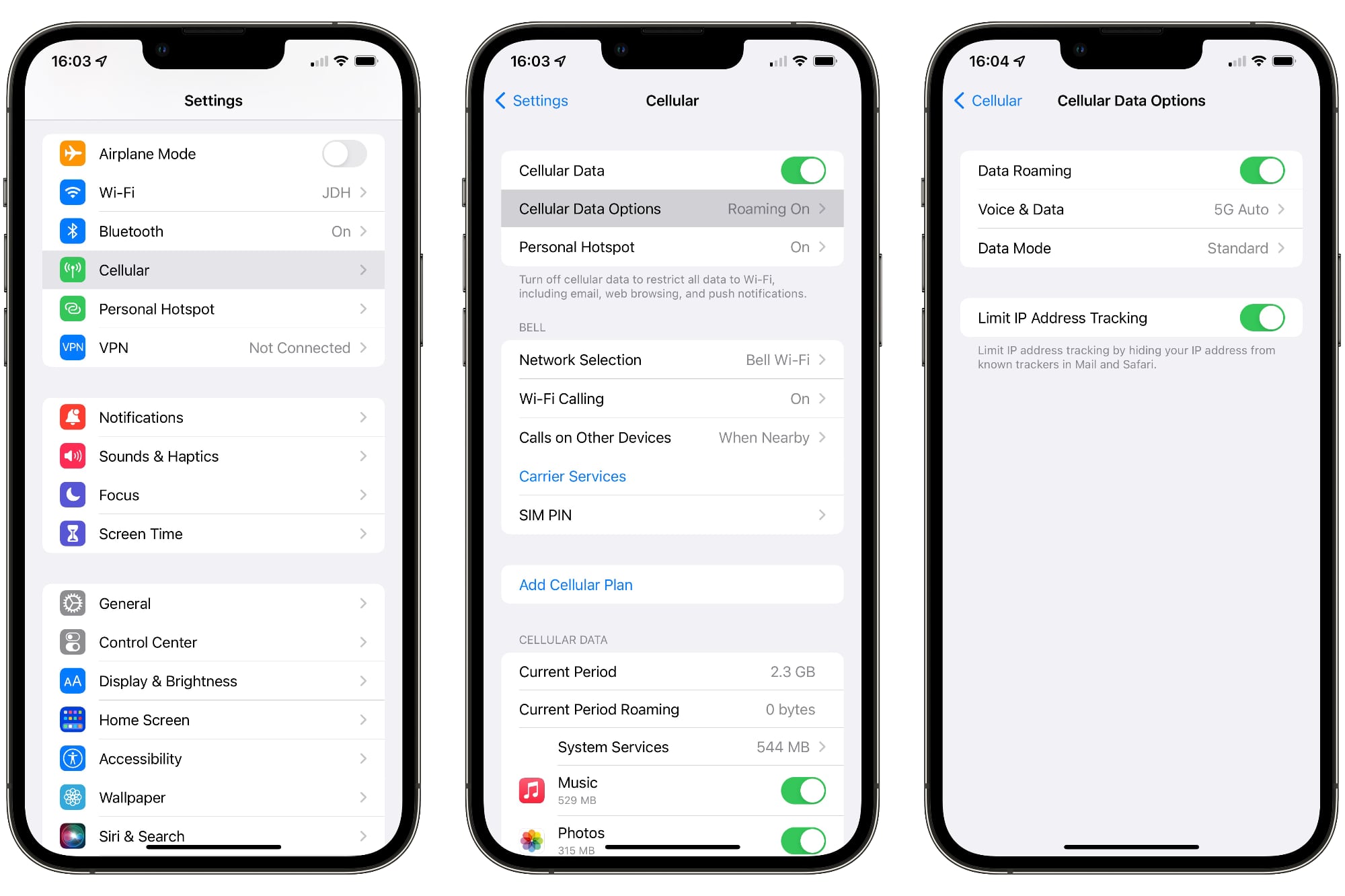
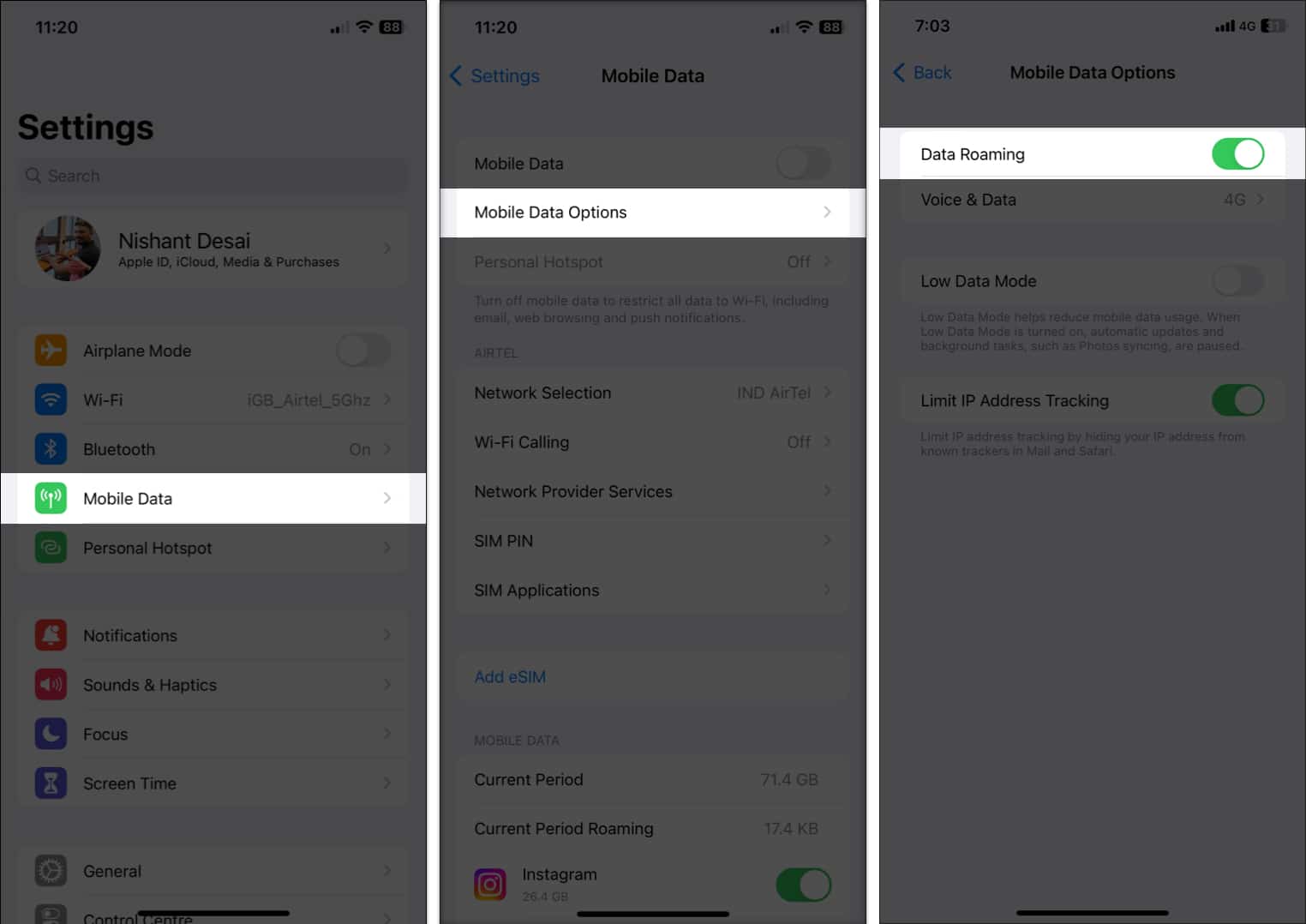
- Open the Settings app.
- Tap Cellular (or Mobile Data depending on your region).
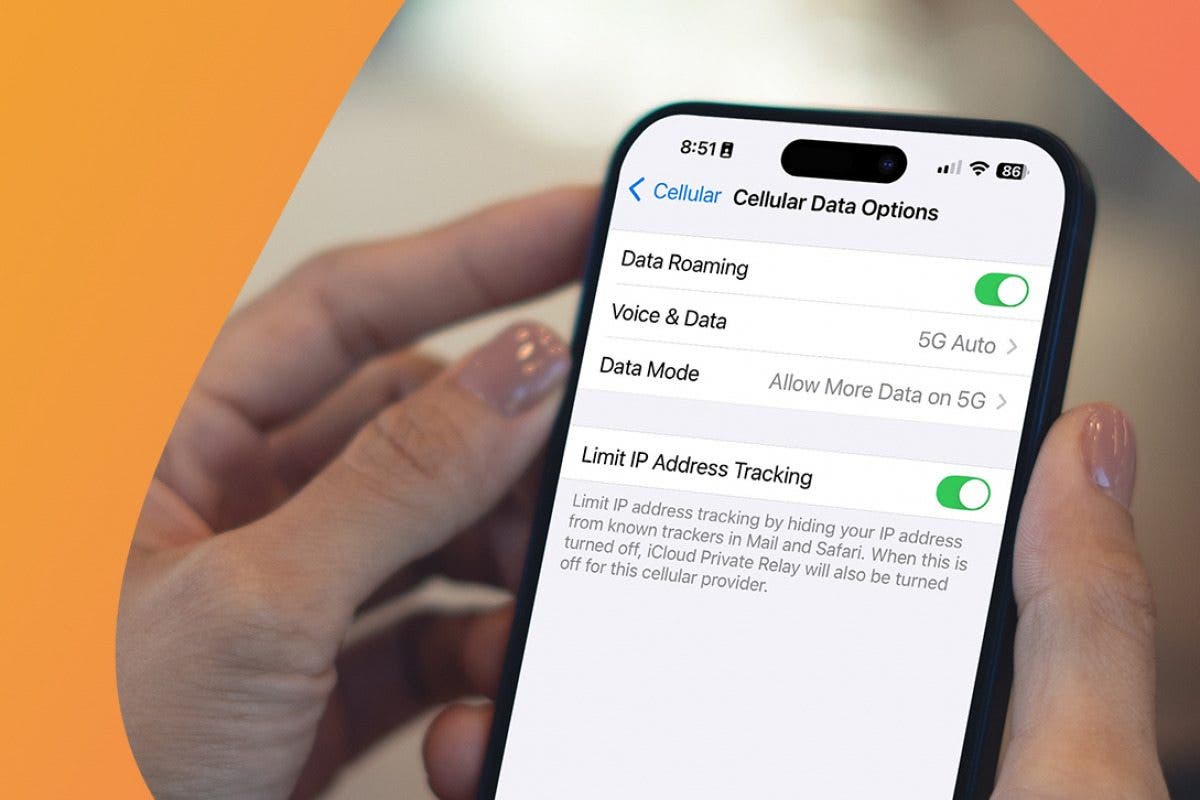
- Select Cellular Data Options (or select your specific SIM if using dual SIMs).
- Toggle Data Roaming to the OFF position to prevent cellular data usage while abroad, or ON if you have purchased an international travel pass or local eSIM package.
How to Turn Data Roaming On or Off on Android
(Note: Exact menu names may vary slightly based on device manufacturer and Android version.)
- Open the Settings app.
- Tap Network & internet or Connections.
- Select Mobile network or SIM manager.
- Locate Data roaming (or Roaming) and toggle the switch to OFF or ON.
Understanding International Roaming Costs and Travel Options
Travelers navigating foreign connectivity have several distinct options, ranging from automatic carrier day passes to digital travel SIMs. Understanding these alternatives helps prevent unexpected charges on your mobile bill.
| Travel Connectivity Option | Ideal For | Typical Pricing Structure | Primary Advantages | Potential Drawbacks |
|---|---|---|---|---|
| Pay-As-You-Go Roaming | Emergency use only | $2.00 – $10.00+ per MB / $1.00+ per minute | Works automatically without pre-configuration | Risk of extreme "bill shock" |
| Carrier Daily Travel Passes | Short trips (1–10 days) | $10.00 – $12.00 per day | Keeps your existing phone number active for voice/text | Can become expensive on longer trips |
| Travel eSIMs (e.g., Airalo, Maya) | Mid-to-long trips, data-heavy users | $5.00 – $30.00 per fixed data block | Highly cost-effective; flexible local data rates | Usually data-only; requires an unlocked phone |
| Local Physical SIM Cards | Extended stays, remote working | Variable local market rates | Native local speeds and local phone number | Requires swapping physical SIMs and identity verification |
| Regional Free Roaming (e.g., EU RLAH) | Travel within the EU/EEA | Included in native plan cost | No added fees within participating countries | Subject to strict fair-use limits for non-residents |
Regulatory Protections
In certain regions, government authorities regulate international roaming fees to safeguard consumers. The most prominent example is the European Union’s Roam Like at Home regulations, which allow residents of EU/EEA member states to use their domestic mobile allocations across member borders without additional surcharges. Similarly, the United States Federal Communications Commission (FCC) requires domestic carriers to provide clear disclosures regarding international rates and options before travelers use voice and data networks abroad.
How to Prevent Unexpected International Roaming Charges
Unexpected background data usage—such as automatic cloud backups, system updates, and email syncing—is the leading cause of international bill shock. Implementing a few precautionary steps ensures your usage stays predictable.
1. Disable Background App Refresh and Auto-Downloads
Even if you leave cellular data active for navigation or messaging apps, disable automatic background tasks:
- iOS: Go to Settings > General > Background App Refresh and turn it off or set it to Wi-Fi Only.
- Android: Go to Settings > Apps, select data-intensive applications, and disable Background data.
2. Utilize Wi-Fi Calling Wisely
Wi-Fi Calling allows your smartphone to route voice calls and text messages over a Wi-Fi connection back to your home carrier network. When active abroad, calls made back to your home country generally count as standard domestic calls. However, placing a call via Wi-Fi Calling to a foreign number in the country you are visiting may still be billed as an international long-distance call from your home country.
3. Pre-Download Offline Maps and Media
Media streaming and digital navigation consume significant data allowances. Before departing, download offline maps via Google Maps or Apple Maps for your destination cities, and save playlists, podcasts, and video streaming content directly to local storage while connected to your home Wi-Fi network.
4. Enable Low Data Mode
Both iOS and Android offer built-in features to conserve cellular bandwidth:
- iOS: Enable Low Data Mode under Settings > Cellular > Cellular Data Options.
- Android: Enable Data Saver mode under Settings > Network & internet > Data Saver.
Troubleshooting Common Mobile Roaming Connection Issues
If your mobile device fails to connect to a cellular network upon arriving in a foreign country, follow these standard diagnostic steps to restore service.
- Confirm Data Roaming is toggled ON in device settings
- Toggle Airplane Mode ON for 10 seconds, then OFF
- Perform a manual network search and select a partner carrier
- Verify Access Point Name (APN) configurations match carrier specs
- Restart device to force SIM re-authentication on local towers
Manual Network Selection
Automated network selection can sometimes stall when transitioning across borders. To force your device to scan and attach to a specific carrier partner:
- Open your phone's Settings.
- Navigate to Cellular / Mobile Network settings.
- Select Network Selection and toggle off Automatic.
- Wait for the scan to complete, then manually select one of your primary carrier's preferred international network partners.
Access Point Name (APN) Verification
When using a travel eSIM or foreign SIM card, mobile data will not function if the Access Point Name (APN) settings are incorrect. Check your prepaid travel provider’s documentation and manually enter the specified APN string under your cellular network options if internet connectivity remains offline despite showing active signal bars.
Frequently Asked Questions
Does receiving a text message cost money while roaming internationally?
On most modern mobile carriers, receiving incoming SMS text messages while abroad is completely free of charge. However, sending outgoing SMS messages or sending multimedia messages (MMS) containing pictures or videos will incur pay-per-use fees or deduct from your active travel plan's allowance.
What is the primary difference between cellular data and data roaming?
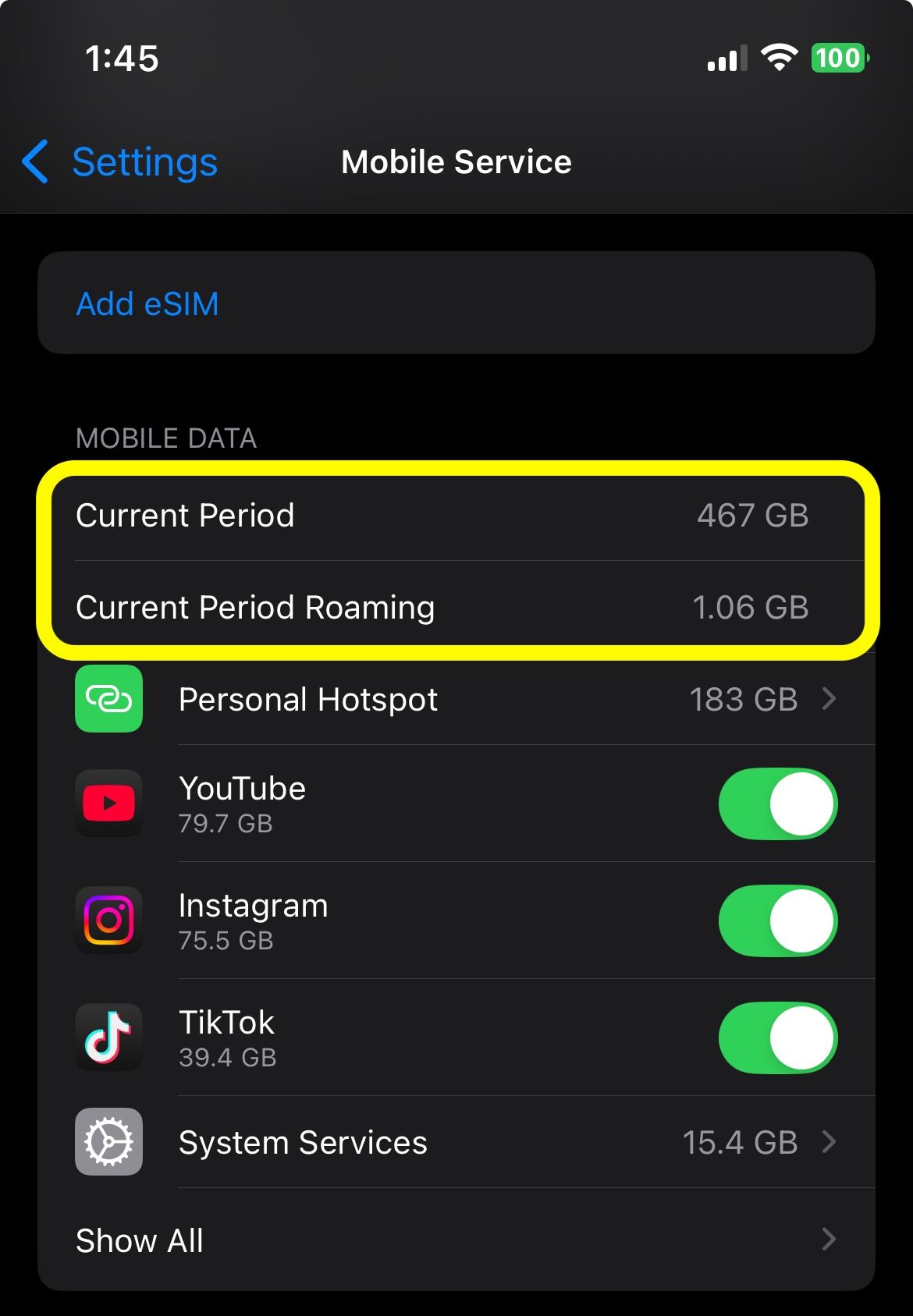
Cellular data refers to all internet data transmitted over any mobile network tower. Data roaming specifically refers to cellular data transmitted when your phone is connected to a network tower owned by a company other than your primary mobile provider.
Can I use Wi-Fi without triggering roaming fees?
Yes. Using Wi-Fi does not route traffic through cellular towers and will not trigger cellular roaming fees. To eliminate any risk of accidental cellular data transmission while using local Wi-Fi networks abroad, place your smartphone into Airplane Mode and re-enable Wi-Fi manually.
Is domestic roaming completely free?
For the majority of modern postpaid plans provided by national carriers, domestic roaming is included at no extra monetary cost. However, domestic roaming data is frequently subject to strict speed throttling or lower data caps compared to your home network coverage area.
What happens if I keep data roaming turned on in my home country?
Leaving the data roaming switch turned on while in your home country has no negative impact on your bill or battery life. Your smartphone will always prioritize your primary carrier's home towers first and will only enter roaming mode if home coverage drops entirely.
Recommended Next Steps for Travelers
To ensure reliable, affordable mobile connectivity on your next trip, complete this preparation checklist prior to departure:
- Verify Home Carrier Policies: Contact your cellular carrier or check their account app to review your plan's specific international policies, rates, and supported destination countries.
- Unlock Your Smartphone: Ensure your mobile phone is fully unlocked by your carrier so it can accept foreign physical SIM cards or third-party digital travel eSIMs.
- Set Up Alternative Connectivity Early: If choosing an international travel eSIM, install the eSIM profile prior to departure while connected to a stable home Wi-Fi network, and leave the line toggled off until landing at your destination.
- Configure Device Safeguards: Disable automatic app updates, turn on Data Saver or Low Data Mode, and download all necessary offline navigation maps before boarding your flight.
Image Gallery