SSO ISD: Enterprise Single Sign-On Architecture, Security, and Access Guide (2026)
Identity Architecture Overview Single Sign-On (SSO) within an Independent School District (ISD) serves as the centralized identity provider (IdP) and authentication gateway. This framework federates credentials across core Student Info...
Contents
Identity Architecture Overview Single Sign-On (SSO) within an Independent School District (ISD) serves as the centralized identity provider (IdP) and authentication gateway. This framework federates credentials across core Student Information Systems (SIS), learning management platforms, digital textbooks, and state reporting databases. If you are a student, guardian, or educator attempting to reach a local campus portal, access your specific regional district domain (such as Austin, Frisco, or Houston ISD launchpads) directly.
Modern K-12 school districts manage hundreds of cloud-based applications, ranging from state-mandated assessment testing engines to localized learning management software. Managing individual usernames and passwords for thousands of students and faculty creates an unacceptable security footprint and an unsustainable burden on district help desks. Implementing a robust Single Sign-On (SSO) infrastructure across an Independent School District (ISD) resolves credential fatigue, automates student roster provisioning, and hardens campus digital perimeters against credential harvesting and ransomware attacks.
District technology directors in 2026 balance accessibility for early learners against stringent state and federal cybersecurity frameworks. Achieving this requires seamless interoperability between identity providers, centralized identity orchestration platforms, and third-party education software vendors.
Technical Architecture of Modern ISD Single Sign-On Environments
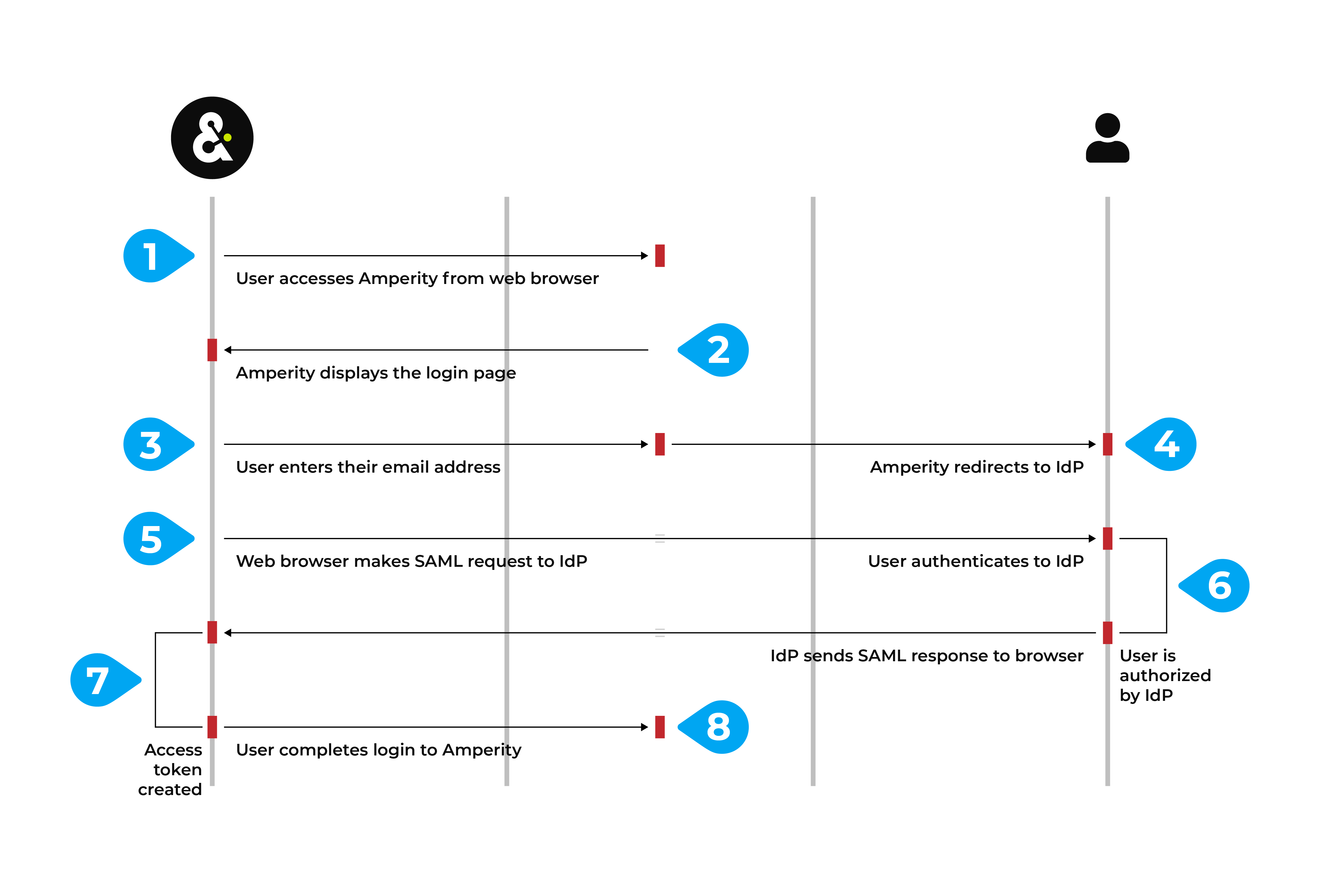
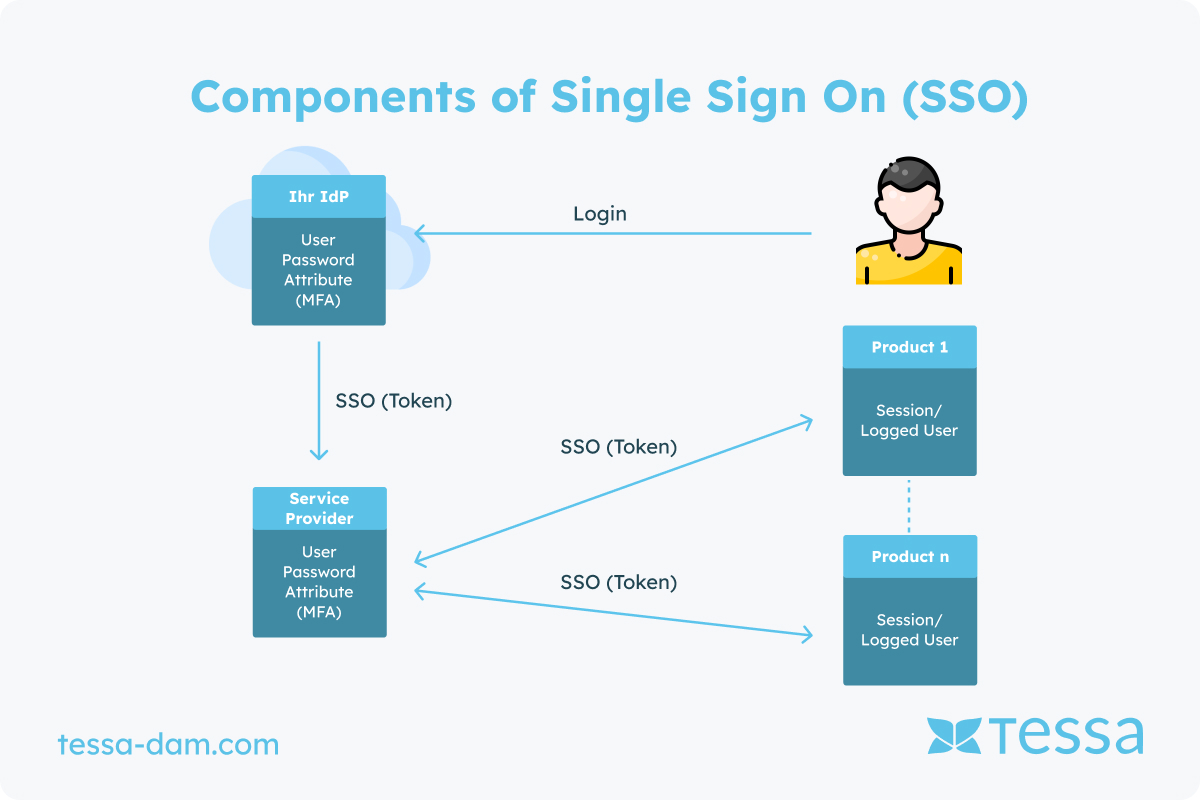
A standard ISD SSO ecosystem does not rely on a single isolated server; it functions through federated identity protocols that securely pass cryptographic authentication tokens between an Identity Provider (IdP) and downstream Service Providers (SPs).
The foundation of modern district identity systems rests on three open standards:
- SAML 2.0 (Security Assertion Markup Language): The enterprise standard for staff, faculty, and administrative portals. SAML exchanges XML-based assertions between the district directory and web-based applications, eliminating the transmission of raw passwords over the network.
- OIDC (OpenID Connect) and OAuth 2.0: Lightweight identity layers built on JSON Web Tokens (JWT). ISDs predominantly leverage OIDC for mobile educational apps, Chromebook integration, and tablet-based interactive curricula due to its low bandwidth overhead and native mobile framework support.
- 1EdTech OneRoster and LTI (Learning Tools Interoperability): Unlike corporate single sign-on, an ISD must synchronize academic context alongside authentication. OneRoster extracts enrollment rosters from the district Student Information System (SIS)—such as PowerSchool, Skyward, or Infinite Campus—and maps students and teachers directly to their designated course sections inside the SSO portal.
+---------------------------------------------------------------------------------------+ | Note: Visual architectural diagrams are replaced with direct structural descriptions | +---------------------------------------------------------------------------------------+
The standard authentication pipeline moves sequentially: The user navigates to the district portal, the central orchestrator redirects the request to the authoritative directory (such as Microsoft Entra ID or Google Workspace for Education), the identity provider confirms local authorization and compliance flags, issues a cryptographically signed token, and the launchpad unlocks the authorized learning tools.
Leading K-12 SSO Platforms: Features, Security, and Compliance
Most independent school districts contract with dedicated K-12 identity orchestration platforms to bridge enterprise directories with academic software vendors. The primary systems deployed across districts in 2026 include ClassLink, Identity Automation (RapidIdentity), and Clever.
| Platform | Primary Authentication Protocols | Rostering & Data Interoperability | Multi-Factor Authentication (MFA) Capabilities | K-2 Sign-In Technology |
|---|---|---|---|---|
| ClassLink OneClick | SAML 2.0, OAuth 2.0, OIDC, ADFS | OneRoster (API & CSV), SIF, direct SIS database connectors | Native contextual MFA, time/location fencing, push notifications | QuickCard (Encrypted QR Code) with facial recognition options |
| RapidIdentity (Identity Automation) | SAML 2.0, OIDC, CAS, WS-Federation, LDAP | Automated identity lifecycle provisioning, automated OneRoster export | Granular risk-based adaptive MFA, hardware security keys (FIDO2) | Pictorial authentication, QR badges with PIN enforcement |
| Clever Portal | SAML 2.0, OAuth 2.0, OIDC | Automated Secure Sync, OneRoster, manual SFTP sync | SMS, TOTP authenticator apps, security questions (primarily staff) | Clever Badges (QR codes) with optional secondary PIN protection |
| Microsoft Entra ID (K-12 Tier) | SAML 2.0, OIDC, WS-Fed | Microsoft School Data Sync (SDS), Graph API, OneRoster | Conditional Access, FIDO2 keys, Microsoft Authenticator push | Tap-to-sign-in FIDO cards, Windows Hello for Education |
Directory Synchronization and Roster Automation
The defining operational requirement of an ISD deployment is automated provisioning and de-provisioning. In typical corporate structures, user accounts change gradually. In an ISD, tens of thousands of student records shift simultaneously during annual grade rollovers, mid-term schedule changes, and intradistrict transfers.
Through API-driven rostering protocols, the SSO orchestrator queries the SIS nightly. When a registrar enrolls a student or changes an instructional roster, the SSO identity orchestrator provisions software licenses, generates cloud storage folders, and assigns the correct application icons to the student's launchpad without manual human intervention.
Cybersecurity Mandates and Threat Mitigation in District Identity Systems
K-12 educational institutions represent prime targets for malicious threat actors due to high-value personally identifiable information (PII) and vulnerable, decentralized network endpoints. Deploying SSO is an imperative defensive posture under current state and federal standards, including the Family Educational Rights and Privacy Act (FERPA), the Children’s Online Privacy Protection Rule (COPPA), and state-level cybersecurity directives.
Zero Trust Endpoint Compliance Managing an ISD identity gateway requires treating every campus network as potentially compromised. SSO portals must enforce conditional access policies that evaluate device compliance, network origin, and geographic location before releasing authorization tokens to core grading, payroll, and state reporting databases.
Defending Against Primary Identity Attack Vectors
- Phishing and Credential Harvesting: Centralizing logins reduces the number of disparate websites where users type credentials. By implementing phishing-resistant FIDO2 hardware tokens or application-based push verification for staff, districts neutralize 99% of bulk credential-harvesting schemes.
- Account Takeover via Legacy Protocols: Attackers frequently bypass portal security by hitting unprotected legacy endpoints. District administrators must systematically disable legacy Basic Authentication and outdated POP/IMAP protocols in their primary tenant, routing all incoming queries strictly through modern SAML/OIDC SSO gateways.
- Session Hijacking and Token Theft: Modern K-12 SSO engines implement strict session expiration timelines. For staff accessing sensitive SIS records or financial databases, idle session timeouts must be capped at 15 to 30 minutes, combined with automated token invalidation upon network anomaly detection.
Troubleshooting Common ISD SSO Failures: IT Administrator and Campus Support Guide
Authentication failures within an ISD typically stem from three failure domains: identity directory synchronization breaks, cryptographic certificate expirations, or localized browser state corruption.
1. The "Infinite Authentication Loop"
- Root Cause: A mismatch between the Identity Provider's Assertion Consumer Service (ACS) URL and the Service Provider’s entity configuration, or an expired SAML signing certificate.
- Resolution: Verify the expiration timestamp of the X.509 signing certificate inside the district IdP management console. If the certificate is valid, verify whether third-party cookies or cross-site tracking protections in modern web browsers are blocking the secure transmission of the authentication assertion. Whitelist the parent SSO domain in local managed browser policies.
2. "User Not Found" or Missing Application Launchpad Icons
- Root Cause: An automated roster synchronization failure between the SIS and the SSO platform.
- Resolution: Check the nightly SFTP or API sync logs between the SIS and the orchestrator. If the student was enrolled within the previous 24 hours, confirm whether an ad-hoc sync is required. For missing application tiles, verify that the student’s specific state course code matches the sharing permissions configured within the SSO application filter rules.
3. QR Code Badge Failure (Clever Badges / ClassLink QuickCards)
- Root Cause: Low-resolution camera hardware, improper ambient lighting, or token revocation following a user directory update.
- Resolution: Check the user's account status in the admin directory to ensure the account is active and not locked by abnormal login threshold triggers. If the account is healthy, revoke the existing badge via the campus registrar portal and issue a newly generated badge. Ensure that campus webcams operate at minimum 720p native resolution and have permission to access video feeds within managed device settings.
Step-by-Step Implementation Guide for ISD SSO Modernization
Upgrading or deploying a district-wide SSO environment requires careful planning to prevent campus downtime.
- Audit District Application Portfolio: Catalog every digital educational tool, administrative platform, and local database currently operating across campus networks. Classify each vendor by supported identity protocols (SAML 2.0, OIDC, or unverified password-vaulting tools).
- Consolidate Identity Directories: Establish a single authoritative directory. Integrate local Active Directory instances with a master cloud tenant (Microsoft Entra ID or Google Workspace), establishing clean metadata attributes for staff IDs, student identification numbers, grade levels, and home campus identifiers.
- Establish SIS Integration Architecture: Connect the Student Information System to the SSO orchestration layer using OneRoster certified REST APIs. Minimize direct database read queries to maintain SIS performance during peak grading cycles.
- Deploy Contextual Multi-Factor Authentication: Require phishing-resistant MFA across all administrative and faculty accounts. For students in grades 6 through 12, roll out managed token-based verification or device-bound trust profiles, while reserving encrypted visual badges for primary students (Pre-K through Grade 5).
- Conduct Sandbox and Disaster Recovery Testing: Spin up mock student and instructor profiles representing every academic department and special program. Execute synthetic authentications, verify role-based security tier boundaries, and conduct a full directory rollover simulation before live district-wide rollout.
Frequently Asked Questions
What is an SSO ISD portal?
An SSO ISD portal is a centralized, secure authentication launchpad used by an Independent School District to allow students, teachers, and staff to log in once and securely access all assigned educational applications, grading systems, and digital learning platforms.
By consolidating access through an Identity Provider (IdP) like ClassLink, Clever, or Microsoft Entra ID, the district eliminates the need for users to remember dozens of different passwords while allowing IT staff to manage security, roster data, and compliance from one unified location.
How do elementary students use Single Sign-On without typing passwords?
Elementary students use secure visual badges—such as ClassLink QuickCards or Clever Badges—which contain an encrypted, high-density QR code that the student holds up to their device's webcam to authenticate instantly.
These systems translate the encrypted code into a secure authorization token through the district’s identity platform. To prevent unauthorized use if a badge is lost or shared on campus, district technology teams often pair these visual badges with a simple pictorial password or a short secondary numeric PIN.
Why does a student or teacher receive an "Unauthorized / Access Denied" error inside an SSO portal?
An "Access Denied" or "Unauthorized" error typically indicates that the user's current academic schedule or role assignment in the district's Student Information System (SIS) does not grant permission to view or use that specific application.
Applications within an ISD launchpad are dynamically filtered using roster rules. If a student drops a course, changes campuses, or if the teacher has not yet published the roster section, the SSO engine will hide the application icon or refuse to generate a SAML/OIDC assertion until the next directory sync cycle completes.
How does Single Sign-On protect student data under FERPA and COPPA?
SSO protects student privacy by preventing third-party educational software vendors from directly collecting, managing, or storing raw student credentials and unnecessary personal identification metrics on disparate servers.
When a student authenticates through a district SSO portal, the vendor receives an encrypted token and strictly scoped directory attributes permitted by the district’s data-sharing agreements. This zero-trust boundary prevents outside platform leaks from exposing broader district records.
What should an IT team do if the central SSO gateway experiences an outage during testing or school hours?
District IT teams should design identity platforms with secondary break-glass administrator access and regional Identity Provider redundancies that bypass single web launchpads during unexpected gateway outages.
If an SSO portal goes offline, administrators can direct mission-critical systems (such as state assessment platforms or critical administrative databases) to run independent authentication via direct federated enterprise links in Google Workspace or Microsoft Entra ID until the primary orchestration layer recovers.
Fortifying Identity and Access Management
Modernizing identity architecture across an Independent School District safeguards campus data while granting students rapid access to essential classroom learning tools. By adopting open standards like SAML 2.0 and OneRoster, enforcing adaptive authentication policies, and eliminating manual provisioning bottlenecks, district technology leaders establish a secure, reliable foundation for academic continuity. Audit your district's application configurations, enforce phishing-resistant credentials across all administrative accounts, and ensure your identity fabric delivers high performance and enterprise protection.
Image Gallery