Comprehensive Guide to Navigating the Santa Clara County Docket in 2026
Note: This guide specifically focuses on the judicial and court docket systems of Santa Clara County, California, designed for legal professionals, researchers, and self-represented litigants seeking public case records and scheduling...
Note: This guide specifically focuses on the judicial and court docket systems of Santa Clara County, California, designed for legal professionals, researchers, and self-represented litigants seeking public case records and scheduling information.
Contents
Navigating the legal landscape of California requires precision, and accessing the Santa Clara County docket is a fundamental requirement for anyone tracking litigation, civil disputes, family law proceedings, or criminal matters in the region. As court administration modernizes its digital infrastructure for 2026, understanding how to search, interpret, and manage court dockets efficiently saves valuable time and ensures compliance with local judicial rules. The Superior Court of California, County of Santa Clara, handles millions of filings annually across multiple courthouse locations, making digital docket access an indispensable tool for modern legal practice.
Understanding the Santa Clara County Superior Court Infrastructure
The Santa Clara County judicial system operates across several specialized facilities, each handling distinct types of cases. Knowing where a case is filed dictates how the docket is maintained and how records are accessed. The primary courthouses include the Hall of Justice for criminal matters, the Downtown Superior Court for civil and probate cases, the Family Justice Center Courthouse for domestic relations, and regional facilities such as the South County Courthouse in Gilroy and the Palo Alto Courthouse.
When examining a Santa Clara County docket, users must recognize the specific department and division handling the matter. Case numbers follow a standardized state format that encodes the year, case type, and sequential filing number. For instance, a civil unlimited case filed in 2026 will carry a distinct prefix differentiating it from family law or probate matters. Familiarity with these structural nuances prevents errors when querying the court's public portal.
Digital Access Portals and Search Mechanics
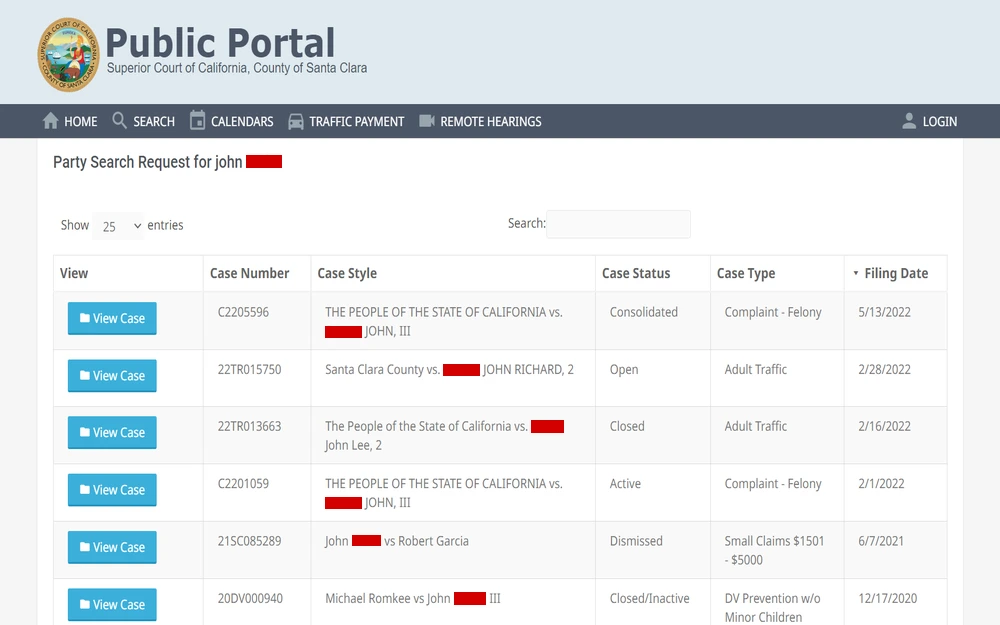
The Superior Court of California, County of Santa Clara, provides online public access portals that allow users to search court calendars, view register of actions, and review document dockets. In 2026, these systems have been upgraded to streamline remote retrieval while maintaining strict privacy standards for confidential records, such as juvenile and certain mental health proceedings.
Executing an effective docket search requires adhering to specific query parameters. Users can typically search using:
- Full party names (corporate entities require precise legal naming conventions)
- Complete or partial case numbers
- Attorney state bar numbers
- Hearing dates and judicial department numbers
Comparison of Santa Clara County Docket Access Methods
| Access Method | Primary Use Case | Cost/Access Level | Best For |
|---|---|---|---|
| Online Public Portal | Real-time docket review, register of actions, calendar checks | Free basic search / nominal fees for document downloads | Daily case tracking, remote research |
| On-Site Courthouse Terminals | Accessing restricted digital files, viewing historical physical records | Free access at courthouse public kiosks | Comprehensive historical research, viewing sealed or restricted non-confidential exhibits |
| Clerk's Office Requests | Certified copies, complex archival pulls, physical file inspection | Standard court fee schedule applies | Formal legal filings, certified evidentiary documentation |
Key Components of a Santa Clara County Court Docket
A standard docket entry in the Santa Clara County system functions as the official chronological timeline of a lawsuit. Interpreting this timeline correctly requires understanding the standardized nomenclature used by court clerks. Every motion, order, minute entry, and proof of service is logged with a timestamp and a brief descriptive text.
Anatomy of a Docket Entry
- Filing Date: The exact date the document was received and processed by the court clerk.
- Document Title/Description: A concise summary of the filing, such as "Notice of Motion and Motion for Summary Judgment" or "Case Management Statement."
- Filing Party: The specific plaintiff, defendant, or third party responsible for submitting the document.
- Action/Status: Indicates whether the filing was accepted, scheduled for a hearing, or rejected due to local rule non-compliance.
- Minute Orders: Official records generated by the courtroom clerk detailing judicial rulings made during hearings or trials.
Local Rules and Procedural Requirements for 2026
Practicing or litigating within Santa Clara County requires strict adherence to the Local Rules of Court. These rules dictate formatting, electronic filing (e-filing) mandates, and timelines that directly affect docket management.
Electronic filing is mandatory for most represented parties in civil, probate, and family law matters. Documents submitted via approved Electronic Filing Service Providers (EFSPs) must comply with specific PDF conversion standards, bookmarking requirements, and text-searchability rules. Failure to meet these criteria often results in docket rejections, which can jeopardize statutory deadlines.
Crucial Compliance Tip: Always cross-reference the Santa Clara County Local Rules with the California Rules of Court before submitting documents to ensure your filings are processed without delay, preventing negative docket entries such as "Notice of Rejection."
Troubleshooting Common Docket Search Challenges
Users frequently encounter obstacles when querying court databases. Implementing targeted troubleshooting steps resolves most access issues.
- Common Issue: No results returned for a common party name.
- Remedy: Utilize wildcards if supported, or search by date ranges and case types to narrow down extensive corporate or common personal names.
- Common Issue: Document text is unavailable or restricted.
- Remedy: Certain documents, such as family law financial disclosures or unredacted medical records, are restricted from public remote viewing under California law. Physical visits to the courthouse clerk's office may be required to view these files in person.
- Common Issue: Outdated calendar or missing minute orders.
- Remedy: Allow up to 24 to 48 hours for courtroom clerks to process and upload minute orders following the conclusion of a hearing.
Frequently Asked Questions About Santa Clara County Dockets
How can I access a Santa Clara County court docket online?
You can access public dockets through the official website of the Superior Court of California, County of Santa Clara, by navigating to their online case inquiry and calendar portals. Basic register of actions checks are typically available without charge, though downloading complete PDF documents may require a user account and applicable statutory fees.
Are all Santa Clara County court records available to the public?
No, certain case types and documents are legally restricted from public view to protect privacy and confidentiality. Juvenile court proceedings, mental health commitments, adoption records, and specific family law filings containing sensitive personal information are routinely sealed or restricted to authorized parties only.
What should I do if a docket entry appears to be incorrect?
If you identify a clerical error in a docket entry, such as a misspelled party name or an incorrect hearing date, you should contact the specific clerk's office of the department handling your case. Clerks have the authority to correct administrative errors upon verification of the official court file.
How far back do digital Santa Clara County docket records go?
Digital availability varies by case type and historical archiving practices, with modern electronic dockets extending back multiple decades for civil and criminal matters. However, very old or archived cases may require an explicit records request and retrieval fee through the clerk's office.
Do I need a special software subscription to view Santa Clara County court documents?
Standard web browsers are sufficient for navigating the court's online portal, but you will need a PDF reader to view downloaded documents. If you are e-filing documents into the docket, you must utilize one of the court-approved Electronic Filing Service Providers operating within the California judicial network.
How are criminal court dockets handled compared to civil dockets?
Criminal dockets are maintained through the Hall of Justice systems and reflect scheduled arraignments, preliminary hearings, motions, and sentencing trials. While many criminal case summaries are public, certain statutory limitations apply regarding the public display of dismissed or sealed arrest records.
Conclusion and Next Steps for Docket Management
Successfully utilizing the Santa Clara County docket system requires a combination of technological familiarity, attention to local court rules, and strategic case tracking. Whether you are monitoring an active commercial dispute, conducting due diligence, or managing family law proceedings, maintaining vigilant oversight of court updates prevents missed deadlines and procedural missteps. To begin your search or review active calendars, visit the official Superior Court of California, County of Santa Clara portal or contact the clerk's office directly for specialized record requests.
Image Gallery