Cloud-Managed Security Appliances: Complete Architecture and Deployment Guide
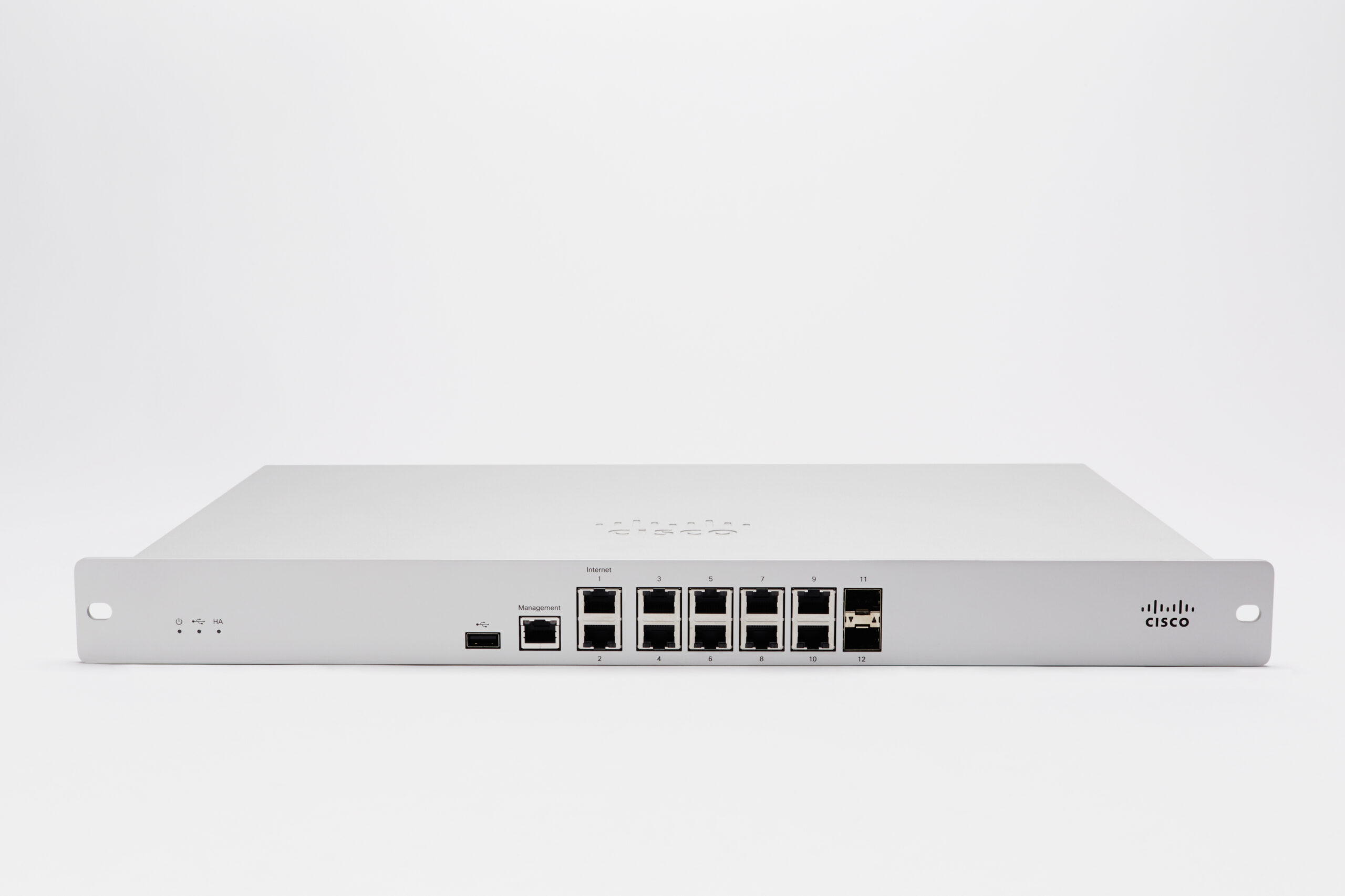
A cloud-managed security appliance is an enterprise network protection device—deployed either as physical hardware or a virtual machine—whose configuration, monitoring, and policy management are administered through a centralized cloud...
A cloud-managed security appliance is an enterprise network protection device—deployed either as physical hardware or a virtual machine—whose configuration, monitoring, and policy management are administered through a centralized cloud console. By separating the cloud-based control plane from the local data plane, these appliances provide edge firewalling, intrusion prevention, SD-WAN, and threat intelligence without requiring dedicated on-premises management servers.
Contents
The term "cloud managed security applicate" typically refers to cloud-managed security appliances—edge hardware or virtual gateways managed via cloud dashboards—though it can also touch upon cloud security software applications. In enterprise networking, the shift toward cloud management has fundamentally altered how distributed organizations protect branch offices, retail locations, and data center perimeters.
Traditional security appliances required localized command-line access, static VPN tunnels, and manual firmware updates at every physical site. Cloud-managed security appliances replace this fragmented model with unified dashboards, automated zero-touch provisioning, and continuous synchronization with global threat intelligence networks.
Architecture: Control Plane vs. Data Plane Separation
To evaluate cloud-managed security appliances effectively, network architects must understand the structural separation between the control plane and the data plane.
- Centralized Cloud Management Console
- Security Policies
- Global Dashboard & Logs
- Telemetry Engine
- Firmware Management
- Encrypted Control Plane Connection (TLS)
- Local Security Appliance (Edge)
- High-Speed Packet Inspection (Data Plane)
- Stateful Firewall & IPS
- SD-WAN Path Routing & Failover
- Local Network Traffic (Zero Cloud Latency)
The Control Plane
The control plane resides entirely within the cloud vendor's multi-tenant or dedicated SaaS infrastructure. It handles administration, policy creation, event log aggregation, configuration storage, and reporting. Administrators interact solely with this web-based interface or RESTful APIs to define rules, set up virtual private networks (VPNs), and review security alerts.
The Data Plane
The data plane executes locally on the physical hardware or hypervisor deployed at the edge site. All network packet routing, deep packet inspection (DPI), stateful firewalling, and intrusion prevention system (IPS) processing occur directly on the appliance hardware.
This design guarantees that operational network traffic never routes through the vendor's cloud management servers. If an Internet service provider (ISP) outage disconnects the appliance from the cloud control plane, local network traffic, active routing tables, and cached security policies continue operating without disruption.
For guidelines on aligning edge security architectures with national cybersecurity standards, review the NIST Computer Security Resource Center frameworks on network boundary protection.
Key Functional Capabilities
Modern cloud-managed security appliances consolidate multiple point solutions into unified threat management (UTM) platforms and Secure Access Service Edge (SASE) edge nodes.
1. Zero-Touch Provisioning (ZTP)
Zero-Touch Provisioning eliminates the need to send specialized network engineers to remote sites for device installation. Devices are shipped directly to the target location. Once an administrator assigns the appliance's serial number or claim code to an organization's cloud management tenant, the appliance automatically contacts the cloud registration server upon receiving an IP address via DHCP. It retrieves its cryptographic identity, downloads its assigned configuration profile, and updates its firmware to the organization's standardized baseline.
2. Next-Generation Firewalling (NGFW) and Deep Packet Inspection
Cloud-managed appliances go beyond traditional Layer 3 and Layer 4 port filtering by incorporating application-layer visibility (Layer 7). The platform identifies specific applications—such as cloud storage providers, video conferencing tools, or social media platforms—regardless of the port or protocol used. Integrated Intrusion Detection and Prevention Systems (IDS/IPS) leverage signature databases and heuristic analysis to block malicious exploits, command-and-control (C2) callbacks, and unauthorized lateral movement.
3. Integrated Software-Defined WAN (SD-WAN)
Multi-site deployments rely heavily on integrated SD-WAN capabilities. Cloud-managed appliances evaluate WAN link quality in real time, measuring metrics such as packet loss, jitter, and round-trip latency. Network administrators can establish dynamic policy-based routing rules—for instance, automatically steering voice traffic over primary fiber links while directing bulk backup traffic over secondary broadband links—and execute seamless sub-second failover if a primary connection degrades.
4. Cloud Threat Intelligence Synchronization
Because control planes connect continuously to vendor-operated security intelligence centers, threat databases stay synchronized across all enterprise nodes. When a new malware hash or malicious IP address is identified globally, the vendor pushes signature updates to all managed appliances worldwide within minutes, eliminating manual patch management for threat feeds.
Comparing Managed Models: Cloud-Managed vs. On-Premises Architecture
Selecting between cloud-managed appliances and traditional on-premises security hardware depends on organizational topology, compliance mandates, and operational bandwidth.
| Architectural Feature | Cloud-Managed Security Appliance | Traditional On-Premises Appliance |
|---|---|---|
| Management Interface | Centralized web dashboard hosted in cloud SaaS | On-premises management server or local CLI/WebUI |
| Deployment & Provisioning | Zero-touch shipping, automated policy pulling | Manual staging, console cable setup, onsite engineers |
| Control Plane Redundancy | Vendor-managed multi-region availability | Customer-managed redundant server infrastructure |
| Offline Resilience | Data plane runs independently if cloud link drops | Operates independently; local changes require console access |
| Scalability | Add hundreds of sites seamlessly via dashboard | Requires scaling local management servers and databases |
| Licensing Model | Recurring subscription (hardware + cloud license) | Perpetual license often paired with annual maintenance |
| Threat Intelligence Updates | Automated background sync from cloud feeds | Scheduled or manual signature download jobs |
| Compliance & Log Storage | Cloud log retention with optional syslog export | On-premises SIEM collection or localized log storage |
Step-by-Step Deployment and Configuration Lifecycle
Successfully deploying cloud-managed security appliances requires structured preparation to avoid configuration conflicts and security gaps.
- STEP 1: Pre-Deployment Architecture & Dashboard Hierarchy
- Define organization structures, administrator roles (RBAC), and network templates.
- STEP 2: Device Claiming and Provisioning
- Assign hardware serial numbers to designated cloud sites before physical unboxing.
- STEP 3: Baseline Policy and Security Rule Configuration
- Apply firewall rules, VLAN mappings, content filters, and SD-WAN path preferences.
- STEP 4: Physical Installation and Uplink Validation
- Connect WAN/LAN interfaces; verify automatic cloud registration and baseline sync.
- STEP 5: Verification, High Availability Setup, and Logging
- Confirm state synchronization, test warm-spare failover, and link syslog stream.
Step 1: Pre-Deployment Architecture & Dashboard Hierarchy
Before unboxing physical hardware, design your organization's cloud dashboard hierarchy. Establish administrative access boundaries using Role-Based Access Control (RBAC), integrating external identity providers (IdP) via SAML 2.0 or Single Sign-On (SSO) systems. Define configuration templates for site types (such as retail outlets, regional offices, or manufacturing plants) to maintain consistent security policies across all locations.
Step 2: Device Claiming and Provisioning
Log into the cloud administration console and register the device order numbers or individual MAC/serial numbers. Assign each claimed device to its corresponding virtual network within the dashboard hierarchy. This step prepares the configuration profile so that the moment the physical unit connects to the internet, it pulls down its correct network assignments.
Step 3: Baseline Policy and Security Rule Configuration
Configure network and security parameters within the management console:
- VLAN & Addressing Structure: Define internal subnets, DHCP scopes, and inter-VLAN routing permissions.
- Firewall Rules: Standardize Layer 3 egress rules, blocking non-essential outbound ports and enforcing default-deny policies. Apply Layer 7 rules to restrict high-risk application categories.
- Threat Protection Filters: Enable Intrusion Prevention System (IPS) rules, set the inspection mode (such as Connectivity-Balanced or Security-Focused), and turn on malware scanning and web content filtering.
- SD-WAN Policy Rules: Map critical business applications (e.g., VoIP, CRM) to high-priority uplink rules with dynamic performance targets.
Step 4: Physical Installation and Uplink Connection
Mount the appliance in the site's server rack or network enclosure. Connect primary and secondary WAN uplinks to ISP demarcation equipment, then attach internal LAN switches to designated trunk ports. Power on the device. The unit automatically requests an IP address via DHCP (or uses pre-configured static IP parameters set via a local status page), establishes an encrypted TLS tunnel to the vendor's cloud control platform, and updates its local firmware image to match network baseline requirements.
Step 5: Verification, High Availability Setup, and Telemetry Integration
Verify that device status indicators transition to online status in the central console. For mission-critical sites, deploy a secondary appliance in a High Availability (HA) or warm-spare pairing, using Virtual Router Redundancy Protocol (VRRP) or proprietary state-synchronization protocols to ensure seamless hardware failover. Finally, configure real-time log forwarding from the cloud platform to your Security Information and Event Management (SIEM) system.
For additional information on secure deployment practices and cloud architecture guidelines, consult the official CISA Secure Cloud Architecture Framework.
Operational Considerations, Costs, and Technical Limitations
While cloud-managed security appliances streamline ongoing IT management, enterprise architects must account for specific operational and financial dynamics.
Licensing and Ongoing Expense Structures
Unlike traditional network hardware sold under standard perpetual licensing, cloud-managed appliances require active subscriptions to maintain management access. Subscriptions generally bundle the cloud management console access, continuous software updates, hardware warranty coverage, and security threat intelligence feeds into a single annual or multi-year cost per device.
If a subscription lapses, management functionality for that device is suspended in the cloud console, and in some vendor models, the hardware may stop processing traffic altogether until licensing is restored. Organizations must align renewal schedules carefully within their operational expenditure (OpEx) budgets.
Total Cost of Ownership (TCO) Components:
- Capital Expenditure (CapEx)
- Physical/Virtual Appliance Hardware Purchase
- Network Infrastructure & Cabling Upgrades
- Operational Expenditure (OpEx)
- Cloud Management & Security Intelligence Subscription (1, 3, or 5-year terms)
- ISP WAN Connectivity Services (Fiber, Broadband, 5G/LTE Backup)
- Centralized Security Monitoring & SIEM Aggregation Costs
Out-of-Band Management Connectivity Dependencies
Because administrators rely entirely on an internet-based console to adjust configurations, management accessibility depends on internet availability. If an enterprise branch site loses all WAN uplinks simultaneously, administrators cannot push configuration changes remotely until connectivity is restored. However, advanced hardware models include built-in cellular (4G LTE/5G) modems dedicated to out-of-band management, ensuring cloud console access remains accessible even when primary wireline connections fail.
Regulatory and Data Residency Boundaries
Organizations operating in highly regulated environments—such as healthcare, banking, or government services—must evaluate where management telemetry and configuration logs are stored. Ensure the security vendor offers cloud dashboard hosting within your required jurisdiction (e.g., EU-only regions for GDPR compliance, or FedRAMP-certified environments for United States federal agencies). Verify that packet capture utilities provided by the cloud interface comply with your data privacy guidelines, as unencrypted data payloads captured during troubleshooting could be exposed to cloud storage nodes.
Frequently Asked Questions
What happens to local network traffic if the cloud connection is lost?
If the connection to the cloud management console drops, the local security appliance continues operating normally using its last-known valid security policies and routing tables. The data plane functions independently of the control plane. However, administrators will be unable to modify network policies, add firewall rules, or view real-time logs in the cloud dashboard until internet connectivity to the control plane is re-established.
How do cloud-managed appliances receive security updates?
Security updates—including IPS signature files, malicious URL blocklists, and anti-malware definitions—are compiled by the vendor's threat research centers and automatically pushed from the cloud control plane to the appliances. Firmware upgrades for the core operating system can be scheduled through the central administration console during maintenance windows, allowing automated, zero-touch software maintenance across hundreds of sites simultaneously.
Can a cloud-managed security appliance integrate with on-premises SIEM tools?
Yes. Although logging data originates on the device and reports to the cloud management console, cloud management platforms provide continuous streaming APIs, cloud event webhooks, or direct syslog forwarding options. This allows enterprise security operational teams to stream event logs, access attempts, and IDS/IPS detections directly into centralized SIEM platforms like Splunk, Microsoft Sentinel, or Elastic.
Is zero-touch provisioning secure against supply chain attacks?
Zero-touch provisioning relies on cryptographic hardware roots of trust, such as integrated Trusted Platform Modules (TPM) chipsets installed during manufacturing. When an unconfigured appliance boots, it uses its factory-installed X.509 digital certificate to authenticate its identity mutually with the vendor's cloud registration server. A rogue device cannot claim a corporate profile unless its specific cryptographic serial number and authentication key have been authorized inside that organization's management portal.
What is the difference between a cloud-managed security appliance and a SASE architecture?
A cloud-managed security appliance is physical or virtual security gateway hardware deployed at a local site perimeter and managed via cloud servers. Secure Access Service Edge (SASE) is a broader architecture that routes traffic directly from end-user devices or remote sites into cloud-native security points of presence (PoPs) where security processing occurs in the cloud itself. Many cloud-managed security appliances function as localized edge nodes within a comprehensive enterprise SASE deployment.
Strategic Recommendations for Infrastructure Teams
To deploy cloud-managed security appliances efficiently across distributed environments, follow these practical implementation steps:
- Establish Enterprise Naming and Tagging Conventions: Standardize administrative tags, network naming schemes, and rule structures inside your cloud tenant before onboarding hardware. Consistent tagging simplifies bulk policy changes and dynamic rule assignments across geographically dispersed sites.
- Implement Multi-Factor Authentication (MFA) and RBAC: Secure your centralized management dashboard using strong SAML/SSO integration, mandatory multi-factor authentication, and strict least-privilege roles. Gaining control of a centralized cloud management portal provides total access to an enterprise's entire network edge infrastructure.
- Enforce Dynamic WAN Redundancy: Always equip critical remote sites with diverse WAN connections—such as primary fiber paired with an secondary 5G cellular uplink. Ensure out-of-band management channels are configured so administrative access remains functional during ISP outages.
- Audit License Lifecycle Schedules: Maintain an accurate inventory of hardware asset claim dates and cloud subscription expiration terms. Build renewal windows into operational planning at least 90 days prior to license expiration to avoid management access lockouts or service interruptions.
EDITORIAL CATEGORY METADATA:
Image Gallery