How to Protect Your Virtual Machines from Attack
To protect virtual machines from attack, you must implement a multi-layered defense-in-depth strategy that secures the hypervisor, hardens guest operating systems, and isolates network traffic through micro-segmentation. Essential prac...
To protect virtual machines from attack, you must implement a multi-layered defense-in-depth strategy that secures the hypervisor, hardens guest operating systems, and isolates network traffic through micro-segmentation. Essential practices include encrypting virtual disks, enforcing strict identity and access management (IAM), and maintaining a rigorous patch management cycle across all abstraction layers.
Contents
Virtualization remains the backbone of modern enterprise infrastructure, yet the abstraction layers that provide flexibility also introduce unique vulnerabilities. In 2026, threat actors increasingly target the management plane and the hypervisor itself to execute "escape" attacks, where a breach in a single virtual machine (VM) allows movement into the underlying host or adjacent guests. Securing these environments requires moving beyond legacy perimeter security toward a Zero Trust model specifically tuned for virtualized assets.
The Virtual Machine Attack Surface
Understanding the attack surface is the first step toward effective defense. A virtualized environment consists of three primary layers, each requiring distinct security controls: the hardware and host OS, the virtualization software (hypervisor), and the guest VMs themselves.
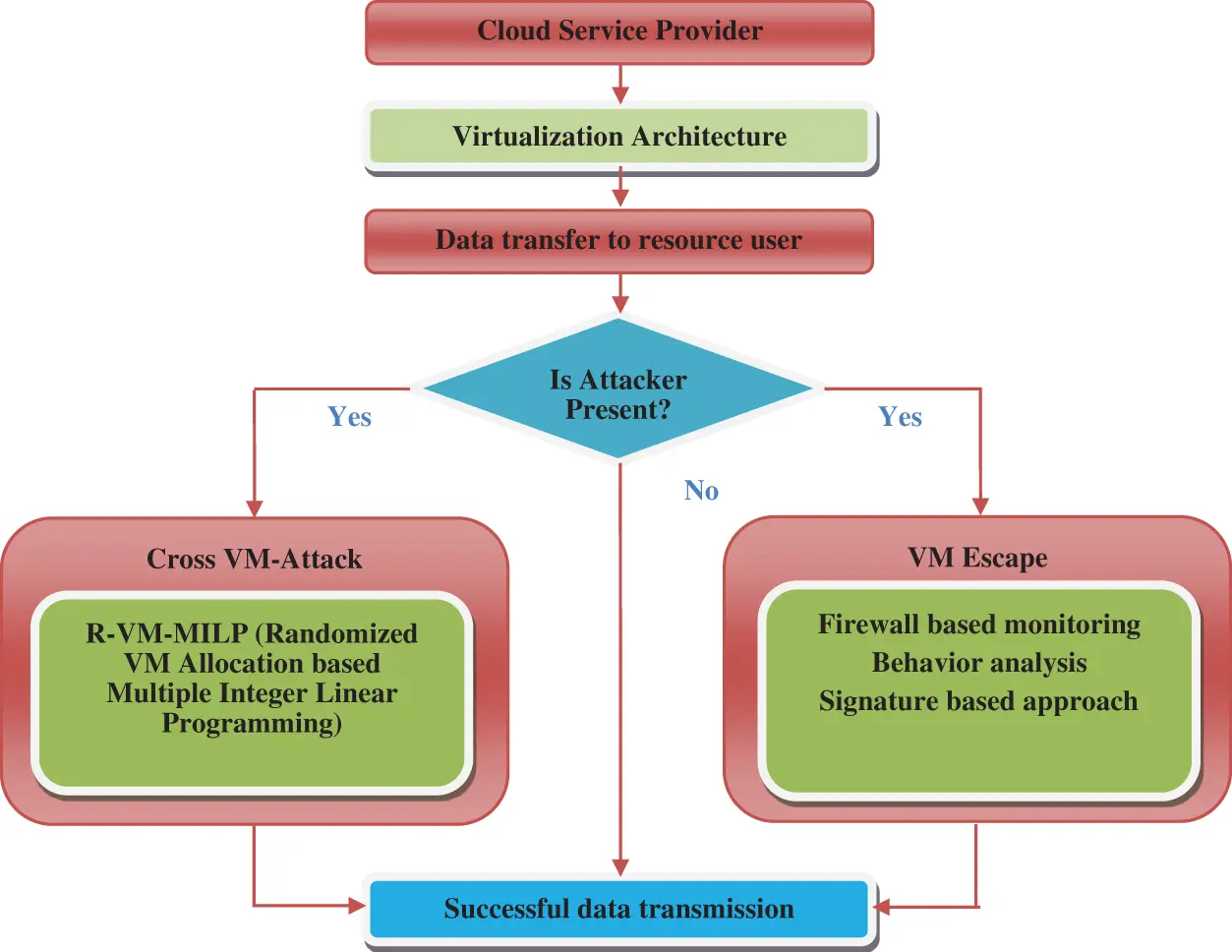
The hypervisor is the most critical component. If an attacker gains control of the hypervisor, they effectively control every VM running on that host. Common attack vectors include exploiting vulnerabilities in the hypervisor’s API, or "VM Escape" vulnerabilities, where code running inside a guest VM can break out and execute on the host.
The management plane includes tools like VMware vCenter, Microsoft System Center, or cloud-based consoles. This is a high-value target because it provides centralized control over the entire virtual estate. Compromising a single administrative account can lead to mass data exfiltration or the deletion of entire server clusters.
Finally, the network layer within virtual environments is often overlooked. Internal "East-West" traffic—traffic moving between VMs on the same host—frequently bypasses traditional physical firewalls, allowing malware to spread laterally with ease unless internal virtual boundaries are established.
Hardening the Hypervisor and Host
The hypervisor must be treated as a Tier 0 asset. To protect it from compromise, administrators should follow a strict hardening protocol.
Minimal Installation and Surface Reduction
Always use "thin" or "core" versions of the hypervisor (such as VMware ESXi or Windows Server Core) that exclude unnecessary drivers, graphical user interfaces, and services. A smaller code base naturally results in fewer exploitable vulnerabilities. Disable any unused hardware ports on the physical host, such as USB or serial ports, to prevent local physical attacks.
Hypervisor Patch Management
Patching the hypervisor can be disruptive, as it often requires migrating VMs or scheduled downtime. However, delayed patching is a primary cause of hypervisor escape exploits. Utilize "Live Patching" technologies where available to apply critical security updates to the hypervisor kernel without rebooting the host.
Disabling Inter-VM Communication Channels
Modern hypervisors often include features that allow guest VMs to share clipboards or folders with the host. In a high-security environment, these features should be explicitly disabled via the VM configuration files (e.g., .vmx files in VMware). These channels can be used by sophisticated malware to leak data from the guest to the host.
Securing the Guest Operating System
Protecting the VM from the "inside out" involves many of the same principles as physical server security, but with specific considerations for the virtualized context.
The Role of Gold Images
Start with a secure foundation by using "Gold Images." These are pre-configured, hardened VM templates that have been stripped of unnecessary services and pre-loaded with security agents. By deploying from a central, verified image, you ensure that every new VM meets your organization's security baseline from the moment it is provisioned. The Center for Internet Security (CIS) provides excellent benchmarks for OS hardening that should be integrated into these images.
vTPM and Secure Boot
In 2026, the use of Virtual Trusted Platform Modules (vTPM) is a standard requirement for modern guest operating systems. A vTPM allows the guest OS to perform cryptographic operations and store secrets securely, independent of the host's physical TPM. Enabling UEFI Secure Boot ensures that only digitally signed, trusted bootloaders and drivers are loaded, preventing rootkits from embedding themselves during the VM boot process.
Endpoint Detection and Response (EDR)
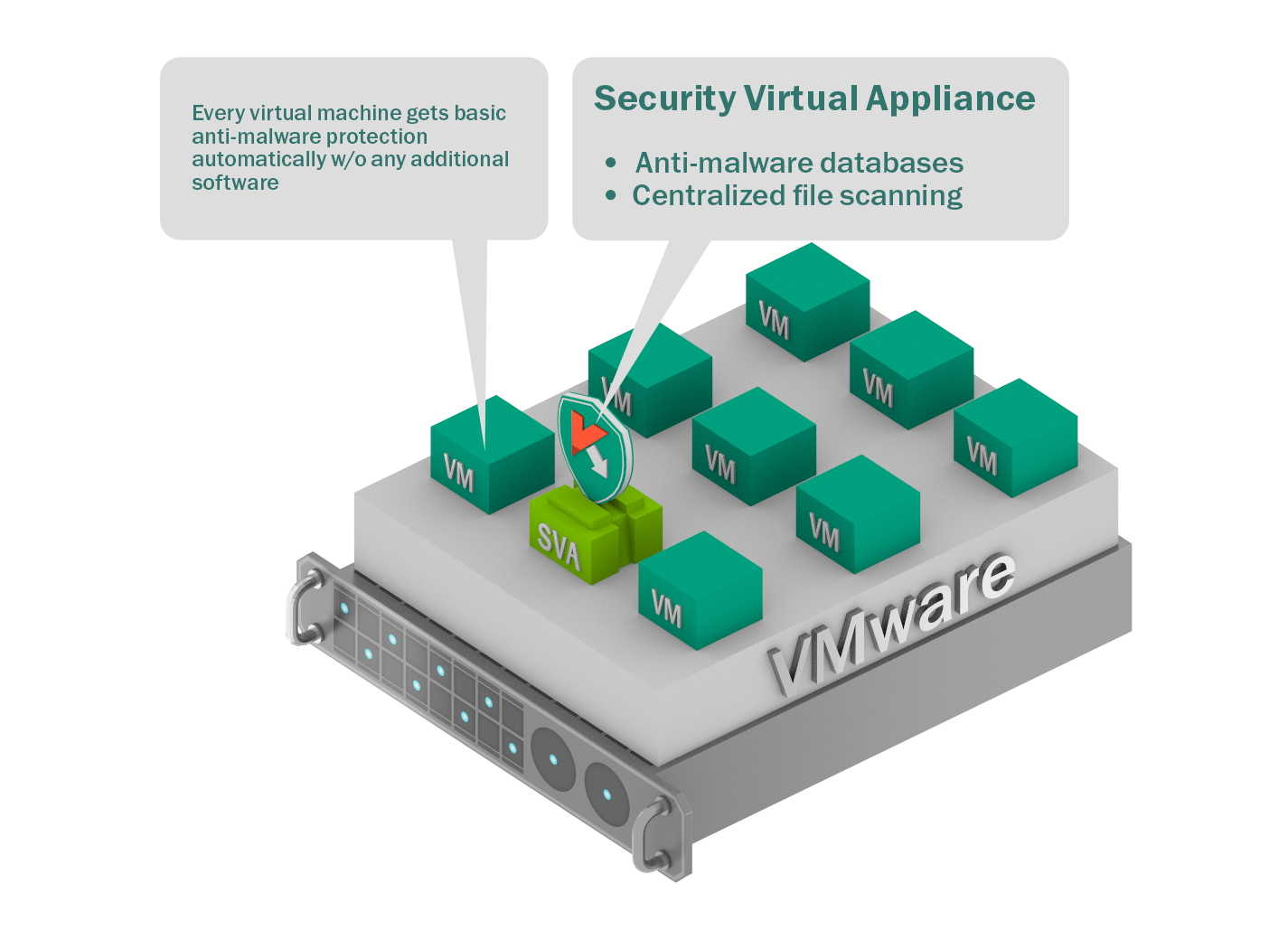
Traditional antivirus is often insufficient for virtual environments because "AV storms" (where multiple VMs run scheduled scans at the same time) can crash host performance. Use virtualization-aware EDR solutions that offload scanning to a dedicated security appliance or use light-weight agents designed to minimize IOPS (Input/Output Operations Per Second).
Implementing Network Micro-segmentation
In a virtualized world, the network is defined by software. This allows for micro-segmentation, the process of creating granular security zones for individual workloads or even individual VMs.
Unlike traditional firewalls that sit at the edge of the data center, micro-segmentation applies firewall rules at the Virtual Network Interface Card (vNIC) level. This means that even if two VMs are sitting on the same VLAN and the same physical host, they can be prevented from communicating with each other. This is the single most effective way to stop the lateral movement of ransomware.
| Security Layer | Component | Primary Protection Mechanism |
|---|---|---|
| Physical/Host | BIOS/Firmware | Secure Boot, TPM 2.0, physical port locking. |
| Hypervisor | Management Kernel | API encryption, role-based access control (RBAC). |
| Network | Virtual Switch | Micro-segmentation, Distributed Firewalls (DFW). |
| Guest OS | Virtual Disk | AES-256 Encryption, vTPM, EDR agents. |
| Management | Console/API | Multi-Factor Authentication (MFA), IP whitelisting. |
Data Protection: Encryption and Snapshots
Data residing within a VM is vulnerable both when the VM is running and when it is stored as a file on a Storage Area Network (SAN).
Virtual Disk Encryption
Encrypting the virtual machine files (VMDK, VHDX) ensures that if the storage backend is compromised or a backup tape is stolen, the data remains unreadable. Encryption should ideally be handled at the hypervisor level rather than inside the guest OS to simplify management and reduce performance overhead. This prevents "cold boot" attacks where an attacker attempts to read data from the VM’s memory or swap files.
The Risks of VM Snapshots
Snapshots are invaluable for recovery, but they represent a significant security risk. A snapshot captures the entire state of a VM, including its RAM. If a VM is snapshotted while a user is logged in, an attacker who gains access to that snapshot file can extract cleartext credentials or session tokens from the captured memory.
- Retention Policies: Never keep snapshots for more than 24-48 hours.
- Deletion: Ensure that when a snapshot is deleted, the blocks are actually zeroed out on the underlying storage.
- Access Control: Limit who can create and revert snapshots, as reverting a VM can inadvertently roll back security patches or re-enable deleted user accounts.
Identity and Access Management (IAM)
The management console is the "keys to the kingdom." Securing access to the virtualization platform is as important as securing the VMs themselves.
- Enforce Multi-Factor Authentication (MFA): No user, regardless of their privilege level, should access the management plane without MFA.
- Role-Based Access Control (RBAC): Use the principle of least privilege. A backup operator needs permission to snapshot a VM, but they do not need permission to modify virtual networks or access the VM console.
- Just-In-Time (JIT) Access: For highly sensitive tasks, use JIT elevation. This grants administrative permissions for a limited window (e.g., two hours) and logs all actions taken during that period.
- Audit Logging: Forward hypervisor and management logs to a centralized Security Information and Event Management (SIEM) system. Watch for "impossible travel" logins or bulk VM exports, which are indicators of account compromise.
Frequently Asked Questions
Is a virtual machine safer than a physical server?
Virtual machines are not inherently "safer," but they offer better isolation and recovery capabilities. While a VM can be isolated via micro-segmentation more easily than a physical server, it also introduces the risk of hypervisor-level attacks that do not exist in purely physical environments. The safety of a VM depends entirely on the configuration of the virtualization stack.
Can malware spread from one VM to another?
Yes, malware can spread through standard network connections if the VMs are on the same network and lack internal firewalls. In rare cases, "guest-to-guest" attacks can occur if there is a vulnerability in the hypervisor's memory management or if shared features like clipboards are enabled, allowing the malware to move without a network connection.
How does vTPM differ from a physical TPM?
A physical TPM is a chip on the motherboard, whereas a vTPM is a software-based representation of that chip. The vTPM uses the physical TPM on the host as a "root of trust" to generate and store keys for the guest OS. This allows the VM to use features like BitLocker or Windows Hello without being tied to a specific piece of physical hardware, facilitating VM migration between hosts.
Why is micro-segmentation better than VLANs?
VLANs are often too broad and difficult to manage at scale; they typically group hundreds of servers together. Micro-segmentation allows for "Zero Trust" at the individual workload level, meaning a web server can be blocked from talking to another web server even if they are in the same department, which significantly limits the blast radius of an attack.
Should I encrypt the guest OS or the hypervisor storage?
Hypervisor-level encryption is generally preferred for enterprise environments. It provides a consistent security posture across all VMs regardless of the OS they are running and is usually more efficient because it can take advantage of hardware acceleration on the host CPU (like Intel AES-NI). However, for public cloud environments, guest-level encryption (like BitLocker or dm-crypt) provides an extra layer of privacy from the cloud provider.
Final Recommendation
To maintain a secure virtual environment in 2026, transition your infrastructure to a Zero Trust Architecture. Start by implementing micro-segmentation to eliminate unnecessary lateral movement and enforce Multi-Factor Authentication for all administrative access. Regularly audit your VM configurations against established benchmarks like those from the NIST Special Publication 800-125B regarding secure virtualization. Security is not a one-time setup but a continuous cycle of hardening, monitoring, and rapid patching.
Image Gallery