How to Use the Loan Simulation: A Comprehensive Guide for Borrowers
A loan simulation is a digital financial tool that allows prospective borrowers to calculate estimated monthly payments, interest rates, and total borrowing costs based on specific loan amounts, repayment terms, and interest structures...
A loan simulation is a digital financial tool that allows prospective borrowers to calculate estimated monthly payments, interest rates, and total borrowing costs based on specific loan amounts, repayment terms, and interest structures. By inputting custom variables, users can preview different borrowing scenarios before formally applying for credit.
Contents
Navigating the financial landscape requires precision, foresight, and an accurate understanding of how debt obligations will impact your long-term budget. Whether you are looking to purchase a residential property, finance higher education, or consolidate high-interest debt, entering an agreement blindly can lead to severe financial strain. This is where a loan simulation tool becomes indispensable. By projecting various financial outcomes before signing a contract, you protect your cash flow and gain clarity on how changing interest rates or repayment terms affect your obligations.
Understanding how to use the loan simulation effectively bridges the gap between raw financial data and sound decision-making. This guide walks you through the mechanics of loan calculators, the data points you need to prepare, how to interpret the results, and the common pitfalls to avoid during the process.
Understanding the Core Components of a Loan Simulation
Before operating any financial calculator, it is vital to understand the primary variables that drive the simulation engine. Every standard loan simulator relies on a mathematical formula that weighs the principal amount, the interest rate, and the duration of the loan to generate a scheduled payment structure.
The Principal Amount
The principal refers to the total sum of money you intend to borrow from a financial institution. In a simulation, this is the baseline figure. Changing this number scales your monthly financial obligation proportionally. When running a simulation, enter the exact amount you expect to receive, keeping in mind any upfront origination fees or closing costs that might be added to the final financed balance.
The Interest Rate
Interest represents the cost of borrowing money, typically expressed as an annual percentage rate (APR). In a simulation, you can either input a fixed rate offered by a specific lender or test hypothetical rates to see how they impact your total costs. Even a fractional change in the interest rate can alter the total cost of a long-term loan by thousands of dollars.
Repayment Term (Duration)
The loan term dictates how long you have to pay back the borrowed funds. Terms are typically measured in months or years—such as a 36-month personal loan, a 60-month auto loan, or a 30-year mortgage. Short terms feature higher monthly payments but lower overall interest costs, while extended terms lower your monthly commitment at the expense of significantly higher cumulative interest charges.
Step-by-Step Guide to Executing an Accurate Loan Simulation
Using a loan simulator efficiently requires a structured approach. Rushing through the data-entry phase can produce inaccurate projections, leading to misplaced expectations when you eventually submit a formal application to a lender.
| Step | Action Required | Key Focus |
|---|---|---|
| 1. Gather Financial Inputs | Collect your target loan amount, estimated credit score, and desired timeline. | Precision in budget assessment |
| 2. Select the Appropriate Calculator | Choose a tool specific to your loan type (mortgage, auto, personal, or business). | Alignment with financial products |
| 3. Input Variable Data | Enter the principal, interest rate, and term length into the simulation fields. | Testing baseline scenarios |
| 4. Account for Hidden Costs | Add insurance, property taxes, or administrative fees if supported by the tool. | Realistic cash flow planning |
| 5. Analyze the Amortization Schedule | Review the breakdown of principal versus interest paid over time. | Long-term cost evaluation |
Step 1: Define Your Financial Objective and Gather Data
Before opening a simulation tool, establish what you are trying to achieve. Are you testing whether you can afford a new monthly payment, or are you comparing two different loan offers? Gather accurate figures regarding your current monthly income, existing debt obligations, and cash reserves for down payments or upfront fees.
Step 2: Choose the Correct Simulator Type
Not all loans are calculated equally. While a basic amortizing loan formula underpins many calculators, specialized simulators account for specific nuances:
- Mortgage Simulators: Often factor in property taxes, homeowners insurance, private mortgage insurance (PMI), and homeowners association (HOA) fees.
- Auto Loan Simulators: May include trade-in values, sales tax, and dealer documentation fees.
- Personal Loan Simulators: Focus heavily on unsecured fixed-rate structures and origination fee deductions.
Step 3: Input Variables and Test Scenarios
Enter your baseline figures into the simulation software. Once the initial calculation appears, do not stop there. Run alternative scenarios to stress-test your budget:
- What happens if interest rates rise by one percentage point?
- Can you comfortably manage the monthly payment if you shorten the term by 12 months?
- How does increasing your down payment by 10% alter your monthly obligation?
Interpreting Your Simulation Results
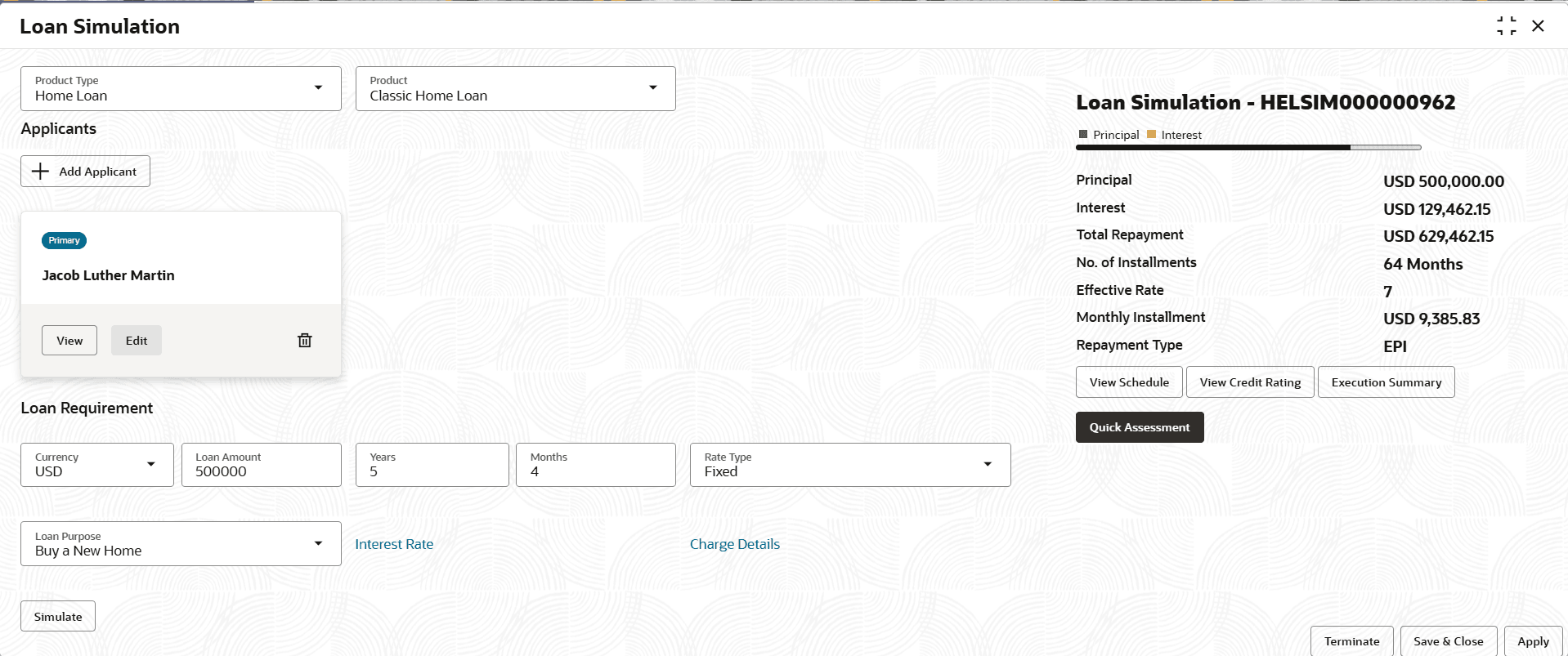
Once you execute the simulation, the tool will output several key metrics. Knowing how to read these outputs ensures you do not overlook critical cost indicators.
| SIMULATION OUTPUT SUMMARY | |
|---|---|
| Monthly Payment: | $452.15 |
| Total Principal: | $20,000.00 |
| Total Interest Paid: | $7,128.40 |
| Total Cost of Loan: | $27,128.40 |
The Monthly Payment
This figure represents the exact amount you must pay each calendar period to keep the loan in good standing. Ensure this number fits comfortably within your monthly net income guidelines, keeping your debt-to-income (DTI) ratio in mind. Most financial advisors recommend that total debt service payments do not exceed 36% to 43% of your gross monthly income.
The Amortization Schedule
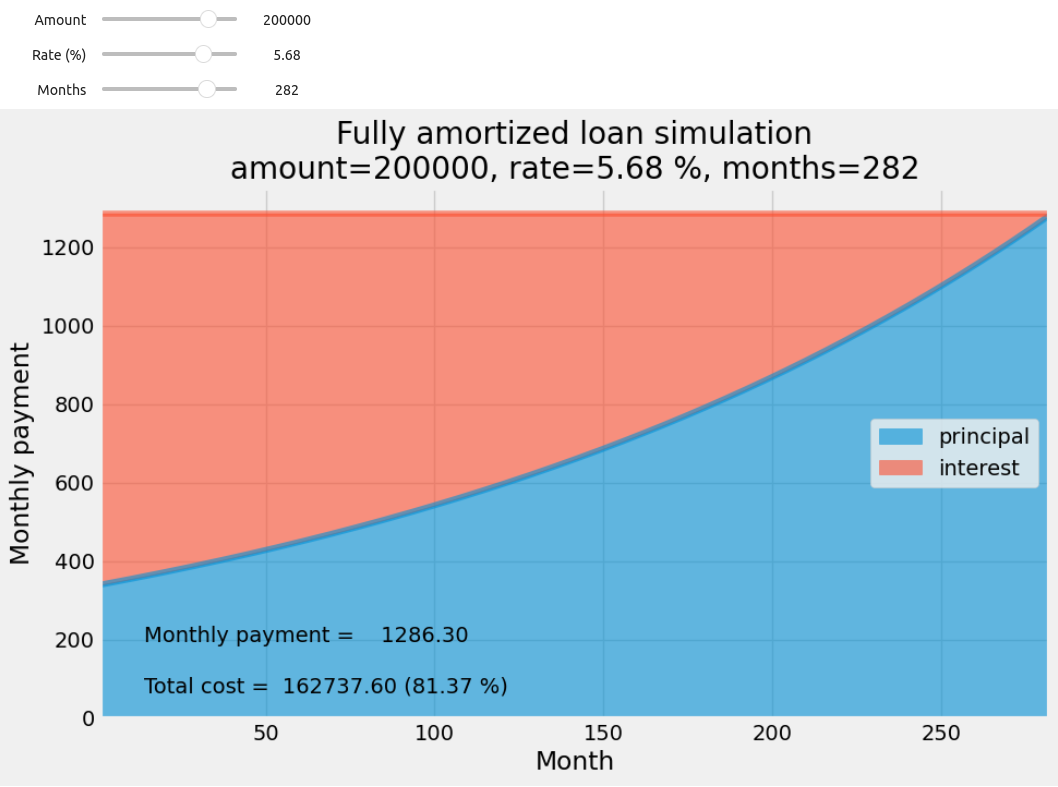
A comprehensive loan simulation should generate an amortization table. This schedule breaks down every single payment over the life of the loan, showing the exact portion going toward the principal balance versus the interest charge. In the early stages of a long-term loan, you will notice that the vast majority of your payment services interest rather than reducing the principal. As time progresses, this ratio flips.
Common Mistakes to Avoid When Using Loan Simulators
Even advanced financial tools can yield misleading results if operated incorrectly. Keep these common pitfalls in mind to ensure your simulations reflect reality:
- Ignoring Fees and Charges: Many basic calculators only compute principal and interest (P&I). Failing to account for origination fees, closing costs, or administrative charges will leave you underfunded.
- Assuming Guaranteed Approval Rates: A simulation lets you input any interest rate you choose. However, the rate you input should reflect your actual credit tier, not the promotional "rates starting as low as" figures advertised by lenders.
- Overlooking Variable Rate Risks: If you simulate a loan with an adjustable or variable interest rate, remember that the initial payment is only valid for the introductory period. Future rate hikes will increase your monthly obligations.
- Neglecting Prepayment Penalties: Some loan products charge fees if you pay off the principal ahead of schedule. Ensure your simulation accounts for the terms governing early repayment if you plan to clear the debt early.
Frequently Asked Questions
Do loan simulations affect my credit score?
No. Running a loan simulation is an entirely internal calculator process that does not involve a credit bureau inquiry. It has zero impact on your credit score, allowing you to run as many scenarios as needed.
Why does my actual lender offer differ from the simulation?
Lenders evaluate your credit history, debt-to-income ratio, employment stability, and collateral valuation before issuing a formal quote. If your credit profile differs from the assumptions made in the simulation, the final APR and terms will adjust accordingly.
Can I use a loan simulation to plan early payoffs?
Yes. Many advanced simulators allow you to input extra monthly or annual principal payments. This feature shows you how much time and cumulative interest you can save by accelerating your payoff timeline.
Are loan simulations legally binding?
No. A loan simulation is purely an educational and planning tool. It does not constitute a loan offer, pre-approval, or binding contract from any financial institution.
How accurate are mortgage simulations regarding taxes and insurance?
Mortgage simulations provide estimates for property taxes and insurance based on regional averages or user inputs. Because local tax assessments and insurance premiums vary widely by location and property value, these figures should be verified directly with local authorities and insurance providers.
Next Steps for Borrowers
Armed with the insights from your loan simulation, you are ready to approach the borrowing process strategically. Begin by checking your credit report for accuracy to ensure you qualify for the interest rates you simulated. Next, shop around by requesting official pre-qualification or pre-approval quotes from multiple financial institutions. Compare these formal offers against your simulation baseline to identify the most competitive product for your financial situation. Always review the final loan agreement thoroughly, paying close attention to fine print regarding fees, default clauses, and prepayment rules before signing.
Image Gallery