How to Tell If a Credit Card Is a Valid Card
To determine if a credit card is valid, you must verify its mathematical structure using the Luhn algorithm, inspect its physical security features, and confirm its status through an authorization request. A valid card requires a corre...
To determine if a credit card is valid, you must verify its mathematical structure using the Luhn algorithm, inspect its physical security features, and confirm its status through an authorization request. A valid card requires a correct 16-digit sequence, a future expiration date, a matching Security Code (CVV), and an active account status with the issuing bank.
Contents
Determining the validity of a credit card is a multi-step process that involves checking both the technical construction of the card number and the functional status of the underlying account. In 2026, with the prevalence of both physical and virtual payment methods, understanding these verification steps is essential for merchants, consumers, and security professionals alike. Validity is not merely about the card "looking" real; it is about the card being recognized by the global financial network as a legitimate instrument for payment.
The Anatomy of a Valid Credit Card Number
The most fundamental way to check if a card is valid is to analyze the number itself. Credit card numbers are not random strings of digits; they follow a specific structure governed by international standards (ISO/IEC 7812).
The Major Industry Identifier (MII)
The first digit of any credit card is the Major Industry Identifier. This tells you the category of the entity that issued the card. For example, cards starting with 1 or 2 are typically issued by airlines, while those starting with 4 or 5 are issued by banking and financial institutions. Knowing these helps identify if a card is even in the correct category for consumer use.
The Issuer Identification Number (IIN/BIN)
Historically known as the Bank Identification Number (BIN), the first six to eight digits of the card identify the specific institution that issued the card. As of 2026, the transition to eight-digit BINs is the industry standard to accommodate the growing number of card issuers globally. By checking the BIN against a database, you can verify if the card was issued by a legitimate bank, such as Chase, Barclays, or HSBC, and identify the card type (e.g., Debit vs. Credit, Gold vs. Platinum).
The Individual Account Number
The digits following the BIN up to the very last digit represent the individual’s account number. This is a unique identifier assigned by the bank. While this number doesn’t have an external "check" for the average person, it is the core data point used during a transaction's routing process.
The Check Digit
The final digit of a credit card number is known as the "check digit." This digit is specifically calculated to allow for the mathematical verification of the entire number sequence. If a single digit is entered incorrectly or if the number is fabricated without following the correct formula, the check digit will not match.
The Luhn Algorithm: The Mathematical Validity Test
The Luhn algorithm, also known as the "Mod 10" algorithm, is the primary technical method used to validate a credit card number. It is a simple checksum formula used to validate a variety of identification numbers.
To manually perform a Luhn check, follow these steps:
- Drop the last digit: This is the check digit you are trying to verify.
- Reverse the remaining digits: Start from the right and move left.
- Double every second digit: For the digits in the even positions (2nd, 4th, 6th, etc.), multiply them by two.
- Subtract 9 from products over 9: If doubling a digit results in a number greater than 9 (e.g., 7 x 2 = 14), add the digits of the product together (1 + 4 = 5) or simply subtract 9.
- Sum all digits: Add up all the modified digits and the digits that were not doubled.
- Calculate the check digit: The total sum plus the check digit must be a multiple of 10.
If the final sum ends in a zero, the card number is mathematically valid. While this does not guarantee the card has money or is active, it confirms that the number itself is a legitimate credit card sequence rather than a random guess or a simple typo.
Physical and Visual Security Features
If you are handling a physical card, there are several tactile and visual markers that distinguish a valid, government-regulated financial instrument from a counterfeit or "blank" card.
Holograms and UV Markings
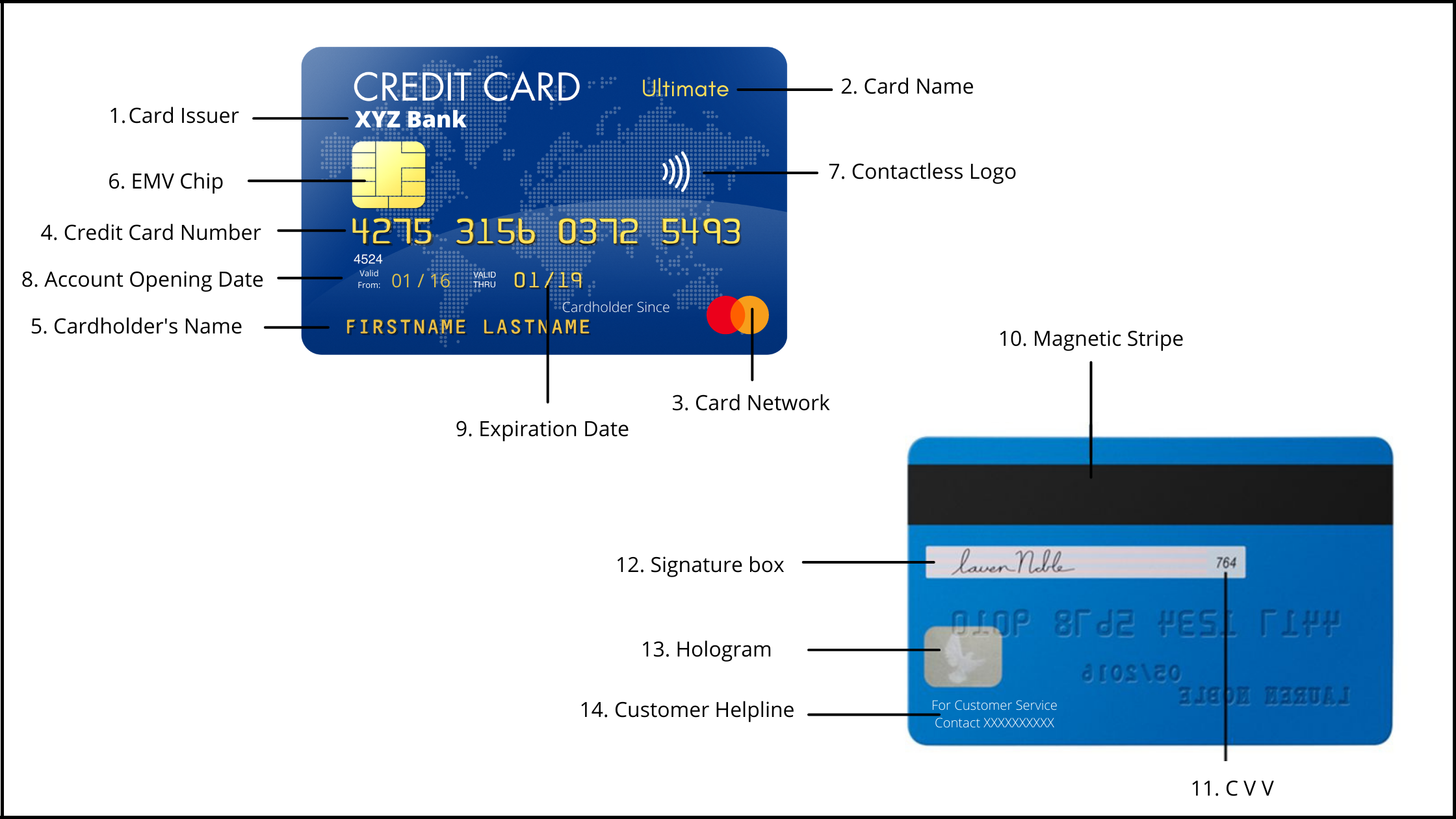
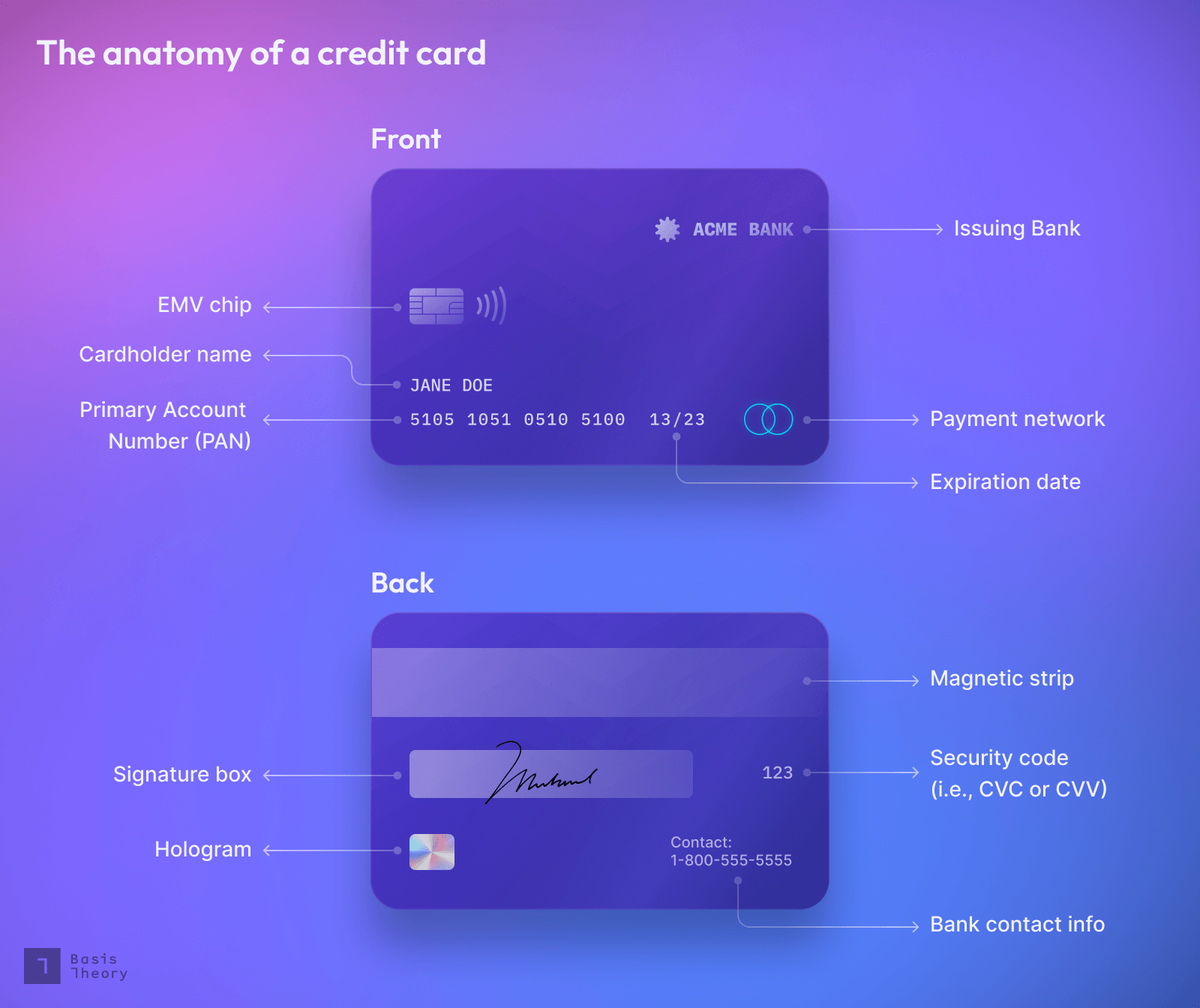
Most major networks use three-dimensional holograms that appear to move when the card is tilted. For example, Visa cards typically feature a dove hologram, while Mastercard uses interlocking globes. In 2026, advanced cards also include ultraviolet (UV) markings. When placed under a UV light, a Visa card may show a hidden "V," and a Mastercard may show "MC."
The Signature Strip and CVV
A valid physical card must have a signature strip on the back. Tampering with this strip—such as trying to erase a signature or tape over it—usually reveals the word "VOID" underneath. Next to or on the signature strip is the Card Verification Value (CVV or CVC). This 3-digit (Visa/MC) or 4-digit (Amex) code is essential for "Card Not Present" transactions. A valid card will have this code printed clearly, not embossed, to ensure it cannot be easily altered.
EMV Chips and Contactless Symbols
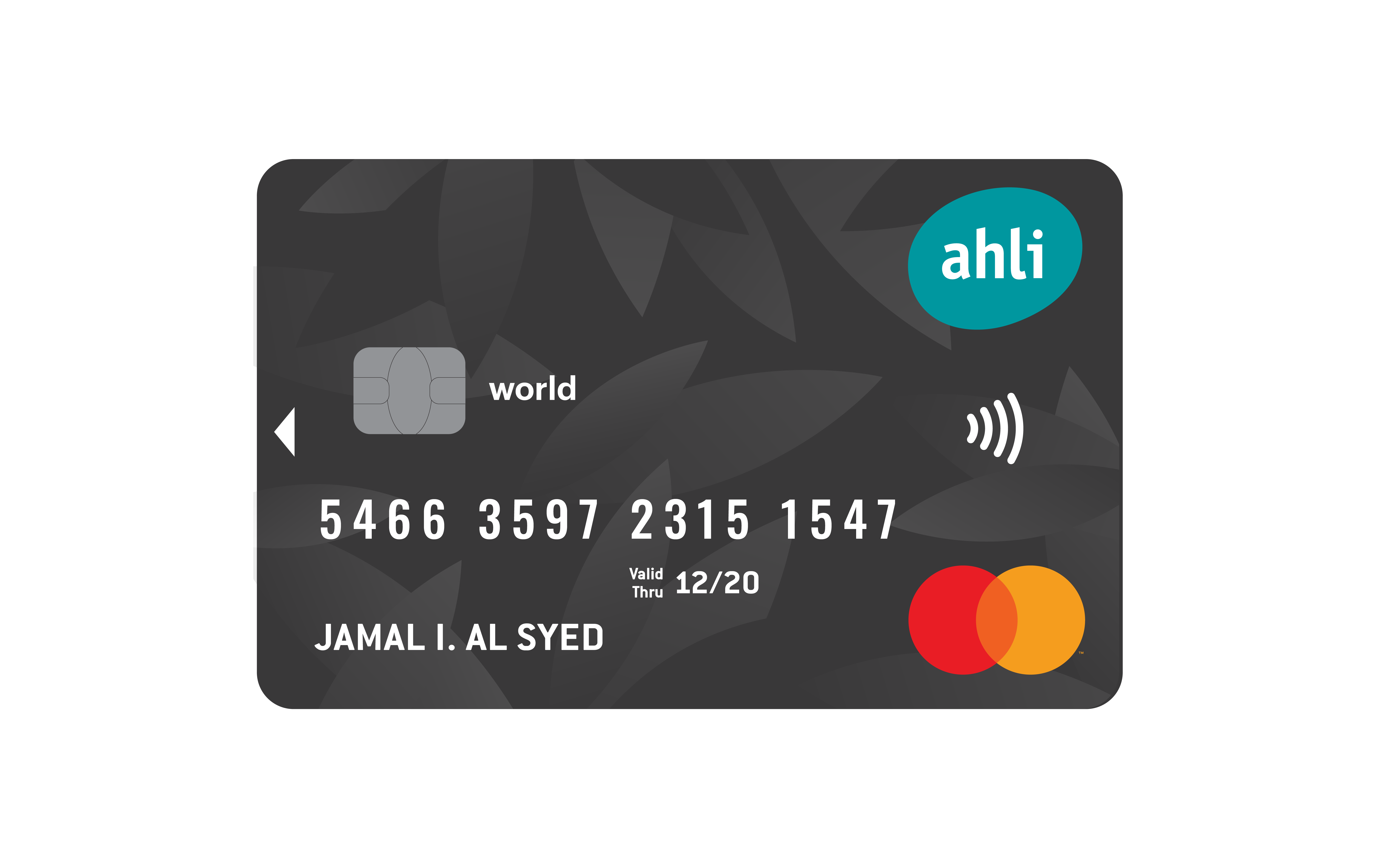
Modern validity is also tied to the EMV (Europay, Mastercard, and Visa) chip. A card without a chip is almost certainly invalid or outdated in the current financial ecosystem. Furthermore, valid cards in 2026 almost universally feature the contactless indicator (resembling a sideways Wi-Fi symbol), indicating the card supports Near Field Communication (NFC) technology.
Digital Verification and Authorization
The only 100% certain way to tell if a card is valid—meaning it is active and has available credit—is through a real-time authorization request. This process checks the card against the issuer's live database.
The $0 or $1 Authorization Hold
Merchants often perform a "pre-authorization" to verify a card's validity without actually charging the customer. The payment processor sends a request for a $0.00 or $1.00 transaction. If the bank responds with an "Approved" code, the card is valid, active, and belongs to a legitimate account. These holds usually disappear from the cardholder's statement within a few business days.
Mobile Wallet Verification
When a card is added to a digital wallet like Apple Pay or Google Pay, the service performs a rigorous validity check. This includes "tokenization," where the real card number is replaced with a secure token. If a card can be successfully digitized and "green-lit" by a mobile wallet, it is a strong indicator of the card's validity, as the bank must provide direct authentication during the setup process.
Using Issuer Apps
For individual cardholders, the most direct way to check validity is through the issuer's official mobile app. These apps provide real-time status updates. If a card has been locked, canceled, or flagged for suspicious activity, the app will display its current status.
Identifying Card Networks by Number Format
Different card networks have specific rules for how their numbers start and how many digits they contain. Use the following table to identify if a card matches the standard formatting for its claimed network.
| Card Network | Starting Digit(s) | Number Length | Security Code Location |
|---|---|---|---|
| Visa | 4 | 13 or 16 | Back (3 digits) |
| Mastercard | 2221-2720 or 51-55 | 16 | Back (3 digits) |
| American Express | 34 or 37 | 15 | Front (4 digits) |
| Discover | 6011, 644-649, or 65 | 16 | Back (3 digits) |
| Diners Club | 36, 38, or 300-305 | 14 to 16 | Back (3 digits) |
| JCB | 3528-3589 | 16 | Back (3 digits) |
Why a Technically Valid Card Might Be Rejected
A card may pass the Luhn algorithm and have all the correct physical markings but still be "invalid" for use. This usually happens for one of the following reasons:
- Expiration: The card has passed the "Valid Thru" date printed on the front or back. Banks automatically deactivate cards on the first day of the month following the expiration date.
- Administrative Lock: The cardholder may have "frozen" the card via their banking app to prevent unauthorized use.
- Geographic Restrictions: Some cards are valid only in their country of issuance. If a card is used internationally without prior notification, the issuer may flag it as invalid for that specific transaction.
- Reported Lost or Stolen: Once a card is reported, the specific number is blacklisted across the global network. Even if the physical card is found later, it remains invalid.
- Insufficient Funds/Credit Limit: While the card itself is "legitimate," it is invalid for a specific purchase if it cannot cover the transaction cost.
Frequently Asked Questions
Can I check if a credit card is valid without charging it?
Yes, you can check validity through the Luhn algorithm or by using a BIN checker tool to see if the number sequence is legitimate. However, to see if the account is currently active, a $0.00 authorization (pre-auth) through a payment gateway is required.
Is it legal to use a credit card validator?
Using a validator tool to verify your own cards or to check the legitimacy of a card during a business transaction is legal and a standard security practice. However, using generators or validators to create or find active card numbers for fraudulent purposes is a serious crime.
What should I do if my card is technically valid but keeps declining?
First, check your banking app to see if the card is "locked." If it is active, contact your bank's fraud department. In 2026, many declines are caused by automated AI systems flagging unusual spending patterns, even if the card itself is perfectly valid.
Does a valid card always have a chip?
As of 2026, virtually all valid credit cards issued by major global banks contain an EMV chip. Cards that only have a magnetic stripe are increasingly rare and may be rejected by modern point-of-sale systems due to security protocols.
What is the difference between a "valid" card and an "authorized" card?
A "valid" card refers to the card's status as a legitimate, unexpired, and correctly formatted payment tool. "Authorized" refers to the specific approval of a single transaction by the bank, confirming that the valid card has enough credit to cover a purchase.
Practical Recommendations
To ensure you are dealing with a valid card, always prioritize real-time digital verification over visual inspection. If you are a merchant, utilize a payment processor that automatically runs Luhn checks and CVV verification. If you are an individual verifying your own card, use your bank's official app to check the card's "Live" status. For physical cards, always look for the hologram and the EMV chip, as these are the hardest features for counterfeiters to replicate accurately. If any part of the card number fails the Luhn Algorithm check, the card is counterfeit or the number has been typed incorrectly.
Image Gallery