Comprehensive Guide to Orca AI Security Cloud: Architecture, AI-SPM, and Enterprise Security Management
The Orca Cloud Security Platform is an agentless, Cloud-Native Application Protection Platform (CNAPP) that leverages artificial intelligence and out-of-band snapshot technology to deliver full-stack visibility across multi-cloud envir...
The Orca Cloud Security Platform is an agentless, Cloud-Native Application Protection Platform (CNAPP) that leverages artificial intelligence and out-of-band snapshot technology to deliver full-stack visibility across multi-cloud environments. By combining Cloud Security Posture Management (CSPM), workload protection, and AI Security Posture Management (AI-SPM), Orca identifies critical risks, toxic combinations, and shadow AI without performance degradation.
Contents
What Is Orca AI Security Cloud?
Modern enterprise cloud environments suffer from severe security friction: thousands of disconnected alerts, unmonitored workloads, and high agent maintenance overhead. The Orca AI security cloud platform addresses these challenges by replacing traditional host-based agents with out-of-band scanning technology known as SideSampling™, while integrating specialized artificial intelligence to contextualize threats and automate remediation.
Rather than relying on invasive third-party software installed on individual Virtual Machines (VMs) or containers, Orca connects directly to cloud provider APIs and reads the block storage of workloads out-of-band. This architecture enables enterprise security teams to achieve 100% coverage across Amazon Web Services (AWS), Microsoft Azure, Google Cloud Platform (GCP), and Kubernetes clusters within minutes.
Beyond workload and configuration monitoring, Orca integrates AI Security Posture Management (AI-SPM) and generative AI assistant capabilities. These features detect exposed Large Language Model (LLM) keys, shadow AI training datasets, misconfigured AI pipelines, and complex multi-stage attack paths that human analysts might miss.
Core Architecture: How Agentless SideSampling Works
Understanding Orca’s underlying architecture requires evaluating how traditional Cloud Workload Protection Platforms (CWPP) operate compared to out-of-band snapshot analysis.
- Cloud Infrastructure
- AWS EC2 / Azure VM / GCP Compute Engine / Kubernetes Containers
- Connected via Cloud Provider API
- Orca SideSampling™ Engine
- Takes Read-Only Storage Snapshots out-of-band
- Reconstructs File System, OS, & Installed Software Applications
- Analyzes OS Vulnerabilities, Malware, Secrets, & Misconfigurations
- Orca AI Context Engine
- Evaluates Attack Paths & Toxic Combinations
- Correlates Identity (CIEM), Data (DSPM), & AI Models (AI-SPM)
- Generates Prioritized Alerts & Natural Language Remediation
Out-of-Band Snapshot Analysis
Traditional security approaches require deploying a software agent inside the operating system of every cloud instance. Agents consume CPU and RAM, frequently crash applications during updates, and often fail to cover unmanaged legacy assets or ephemeral cloud instances.
Orca’s SideSampling approach separates the security scanning process from the operational workload:
- API Integration: Orca requests read-only access to cloud infrastructure via native Cloud Provider APIs (such as AWS IAM roles or Azure Service Principals).
- Snapshot Creation: Orca triggers temporary, read-only block storage snapshots of instances and volume storage.
- Out-of-Band Reconstruction: Orca mounts these snapshots in a secure, isolated analysis engine running off-instance.
- Deep Data Extraction: The platform reconstructs the underlying file systems, operating system binaries, applications, container images, and database configurations.
- Immediate Snapshot Removal: Once the static analysis completes, the temporary snapshot is destroyed.
Because analysis takes place entirely outside the production environment, there is zero computational overhead on production databases or compute nodes, and zero risk of breaking active applications.
Unified Data Model and Context Graph
Data gathered via SideSampling is combined with cloud control plane metadata (IAM policies, network security groups, routing tables, and API logs) inside Orca’s Unified Data Model.
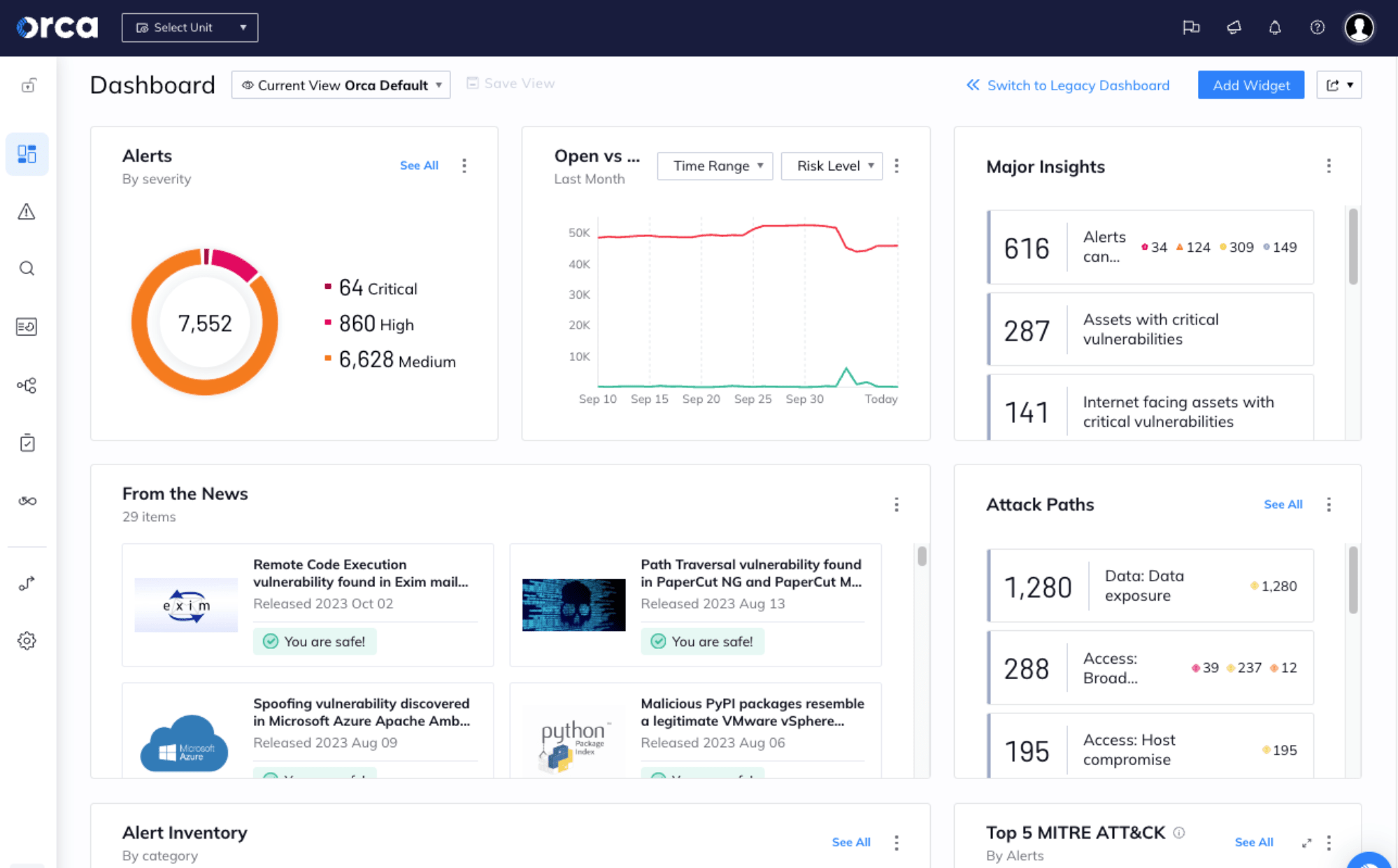
Instead of treating alerts as isolated events—such as an open port or an outdated library—Orca constructs an enterprise Unified Context Graph. This graph maps out how assets relate to one another, identifying whether a vulnerability is exposed to the internet, holds administrative IAM permissions, or maintains access to sensitive enterprise databases.
Key Capabilities: CNAPP and AI Security Posture Management (AI-SPM)
Orca brings together multiple security disciplines into a single consolidated cloud security platform.
1. Cloud Security Posture Management (CSPM)
Orca continuously monitors cloud control planes against industry benchmarks such as CIS (Center for Internet Security), NIST SP 800-53, ISO 27001, and SOC 2. It detects structural misconfigurations, such as public S3 buckets, exposed management ports (SSH/RDP), weak password policies, and disabled audit logging.
2. Cloud Workload Protection Platform (CWPP)
By reading runtime storage snapshots, Orca scans host operating systems and container images for:
- Known Vulnerabilities (CVEs): Matched against National Vulnerability Database (NVD) entries and vendor security advisories.
- Malware and Rootkits: Scanning files for signature-based and behavioral indicators of compromise (IoCs).
- Exposed Secrets: Finding API keys, SSH private keys, database credentials, and cloud tokens embedded in code base files or configuration scripts.
- End-of-Life (EOL) Software: Flagging outdated operating systems and runtime environments (such as legacy Python or Node.js versions) that no longer receive security patches.
3. AI Security Posture Management (AI-SPM)
As enterprises integrate artificial intelligence and generative AI into their products, security teams face new attack vectors. Orca’s AI-SPM suite specifically monitors AI resources and pipelines across multi-cloud deployments:
- Shadow AI Discovery: Detects unapproved AI models, custom PyTorch/TensorFlow scripts, and unauthorized connections to third-party LLM APIs.
- Vulnerability Management for AI/ML Libraries: Scans Python environments for vulnerable machine learning frameworks (e.g., vulnerable versions of Transformers, Ray, or LangChain).
- Sensitive Data & Training Model Exposure: Identifies whether proprietary training datasets or sensitive customer data used in fine-tuning models reside in unprotected storage buckets.
- Exposed AI Credentials: Locates hardcoded OpenAI, Anthropic, Hugging Face, or Azure OpenAI API keys in codebases and server environments.
4. Generative AI Remediation Assistance
Orca incorporates generative AI to streamline security operation workflow tasks. When Orca identifies a critical attack path, the platform's AI assistant provides:
- Natural Language Summaries: Explaining complex attack paths in clear, context-rich prose.
- Copy-Paste Remediation Code: Generating custom Infrastructure-as-Code (Terraform, AWS CloudFormation) or CLI scripts to fix the exact configuration flaw immediately.
- AI Search Querying: Allowing security analysts to query cloud security posture using natural language (e.g., "Show me all unpatched web servers exposed to the internet that have access to PII storage").
Technical Comparison: Agentless Orca Security vs. Agent-Based Solutions
Selecting the appropriate cloud security framework requires comparing deployment architecture, operational overhead, and security depth.
| Capability / Metric | Orca AI Security Cloud (Agentless) | Traditional Agent-Based CWPP/CSPM |
|---|---|---|
| Primary Mechanism | Out-of-band SideSampling™ via Cloud APIs | In-guest daemon/agent software on every host |
| Deployment Time | Less than 30 minutes for multi-cloud enterprise | Weeks to months (requires agent distribution & deployment pipelines) |
| Workload Coverage | 100% of discovered resources (including legacy/dormant) | Partial (typically 60-80% due to missing or failed agents) |
| Production Impact | Zero CPU, memory, or network overhead on workloads | 1%–5% CPU/RAM consumption; potential application crashes |
| In-Memory Attack Detection | Limited (relies on API logs, network flows, & disk analysis) | Real-time in-memory process monitoring & kernel tracing |
| Contextual Risk Analysis | High (combines configuration, data, identity, & vulnerabilities) | Medium to Low (often silos configuration from host data) |
| AI-SPM Integration | Built-in AI asset discovery and LLM key monitoring | Requires separate add-on or niche security tools |
| Maintenance Overhead | Zero host updates or kernel driver compatibility checks | Ongoing agent maintenance, updates, and OS kernel troubleshooting |
Deployment and IAM Configuration Workflow
Deploying Orca across AWS, Azure, or GCP requires granting permission to take read-only snapshots and read cloud API configurations. The following workflow outlines standard deployment using AWS IAM integration as a model.
Step 1: Establish Read-Only IAM Role Architecture
Orca uses cross-account IAM roles to execute API calls without storing long-term credentials.
{ "Version": "2012-10-17", "Statement": [ { "Sid": "OrcaReadOnlySecurityAccess", "Effect": "Allow", "Action": [ "ec2:Describe*", "ec2:CreateSnapshot", "ec2:CopySnapshot", "ec2:DeleteSnapshot", "s3:GetBucketLocation", "s3:ListAllMyBuckets", "iam:GenerateCredentialReport", "iam:Get*", "iam:List*" ], "Resource": "*" } ] }
Step 2: Configure Snapshot Permissions
To read volume content without invading live workloads:
- Orca issues a call to
ec2:CreateSnapshotfor targeted EBS volumes. - The read-only snapshot is shared securely with Orca's isolated account in the same cloud region.
- Orca mounts the snapshot on a temporary analysis VM to extract file system state, package manifests, OS hashes, and configuration data.
- Upon completion of the out-of-band scan, Orca deletes both the shared snapshot and its internal analysis mount.
Step 3: Implement Automated Infrastructure-as-Code Onboarding
For multi-account enterprises (e.g., using AWS Organizations or Azure Management Groups), deployment is automated using Terraform or CloudFormation StackSets across hundreds of accounts simultaneously:
module "orca_cloud_connector" { source = "orca/orca-connector/aws" version = "~> 2.0" orca_account_id = "123456789012" external_id = "orca_unique_enterprise_token" enable_ai_spm = true }
Operational Considerations: Alert Fatigue and Attack Path Prioritization
A common failure mode in cloud operations is alert fatigue. Traditional scanners flood security engineers with thousands of high-severity CVE alerts, regardless of whether those vulnerabilities are actually reachable or exploitable.
Toxic Combinations vs. Isolated Vulnerabilities
Orca addresses alert fatigue by scoring risk based on Toxic Combinations—situations where multiple minor issues align to form a critical attack path.
- Scenario A (Low Risk): An unpatched Apache HTTP server vulnerable to Remote Code Execution (RCE) resides on an internal VPC, has no public IP address, and holds no access keys to external storage buckets. Orca ranks this issue as Low/Medium severity.
- Scenario B (Critical Risk / Toxic Combination): The same unpatched Apache server is connected to an Internet Gateway, contains hardcoded credentials for an administrative IAM role, and has access to an S3 bucket containing unencrypted PII and custom AI training models. Orca flags this as a Critical Toxic Combination, prioritizing it at the top of the queue.
- Internet
- Public-Facing Web Server
- Unpatched Vulnerability: Internal System Access
- Contains Hardcoded AWS Key
- Admin IAM Permission
- Sensitive Data Bucket
- Admin IAM Permission
Incident Response Integrations
To integrate into existing enterprise workflows, Orca exports prioritized findings and actionable data to external systems:
- SIEM / SOAR: Real-time alert forwarding to platforms such as Microsoft Sentinel, Splunk, Datadog, or IBM QRadar.
- ITSM: Automatic ticket creation in ServiceNow or Jira with step-by-step remediation commands.
- Collaboration: Instant notification alerts to dedicated Slack or Microsoft Teams channels.
Frequently Asked Questions
Does Orca Security require any agents installed on cloud workloads?
No. Orca is entirely agentless. It reads cloud asset configurations via cloud provider APIs and performs deep workload file system analysis by taking out-of-band snapshots of storage volumes (SideSampling™).
Can Orca scan live RAM or perform real-time kernel memory protection?
No. Because SideSampling operates out-of-band on disk snapshots, it does not analyze live memory (RAM) or perform real-time kernel protection (such as blocking malicious processes as they execute). For in-memory runtime execution blocking, organizations complement Orca with dedicated lightweight runtime agents or extended detection and response (EDR) platforms.
How does Orca discover AI security risks (AI-SPM)?
Orca identifies AI security risks by scanning block storage snapshots for AI model binaries, framework libraries (e.g., PyTorch, TensorFlow, vLLM), training datasets, and embedded API keys for services like OpenAI or Anthropic. It also checks cloud APIs to ensure managed AI resources, such as AWS Bedrock or Azure OpenAI instances, follow proper encryption and network restriction settings.
Does taking storage snapshots impact production workload performance?
No. Cloud provider snapshot mechanisms (such as AWS EBS snapshots or Azure Managed Disk snapshots) operate at the cloud storage fabric layer. They are point-in-time baseline updates that execute without causing performance degradation, latency spikes, or downtime on the live compute instance.
Is data copied out of the organization’s cloud region during scanning?
By default, Orca processes snapshot data within the same geographical region as the source cloud environment to meet strict data sovereignty regulations (such as GDPR and HIPAA). Temporary snapshots are held in isolated, single-tenant scanning environments and automatically destroyed upon scan completion.
How long does it take to complete an initial deployment of Orca?
Initial cloud integration typically takes under 30 minutes. Once cross-account IAM roles or Service Principals are applied at the root organization level, Orca discovers all accounts, assets, and storage volumes automatically, generating initial context graphs without manual tagging.
Recommendations and Implementation Roadmap
To deploy and maximize the value of the Orca AI security cloud platform in enterprise environments, follow this strategic implementation sequence:
Establish Root-Level Cloud IAM Integrations: Deploy Orca cross-account connector roles at the root of your cloud organization (AWS Organizations, Azure Management Groups, or GCP Organizations). This guarantees immediate 100% visibility across legacy, shadow, and newly created cloud infrastructure.
Enable AI Security Posture Management (AI-SPM): Ensure AI resource discovery rules are active across production and non-production accounts. Audit environments for unapproved generative AI integrations, hardcoded API keys, and unencrypted training data stores.
Incorporate Infrastructure-as-Code (IaC) Guardrails: Connect Orca to deployment pipelines (GitHub Actions, GitLab CI/CD, Terraform Cloud). Shifting security left prevents misconfigured storage buckets and over-privileged IAM roles from reaching production environments.
Streamline Security Operations via Remediation Workflows: Configure alerting rules so that only prioritized "Toxic Combinations" generate high-priority tickets in Jira or ServiceNow. Leverage Orca’s natural language AI assistant to distribute automated fix scripts directly to application development teams.
Review Compliance and Governance Benchmarks Quarterly: Map Orca’s continuous compliance checks against required frameworks (such as SOC 2 Type II, ISO 27001, PCI-DSS, or NIST). Use automated report generation to maintain continuous audit readiness.
Image Gallery