Master Your Apple Genius Bar Appointment Booking and Support Options for 2026
Navigating hardware repairs, software diagnostics, and technical inquiries requires a clear understanding of the official support ecosystems available. This guide details how to efficiently secure an Apple Genius Bar appointment, lever...
Navigating hardware repairs, software diagnostics, and technical inquiries requires a clear understanding of the official support ecosystems available. This guide details how to efficiently secure an Apple Genius Bar appointment, leverage digital booking tools, and utilize alternative support channels in 2026 to resolve device issues without unnecessary friction.
Contents
Evolving Support Landscapes: Apple Support in 2026
The modern Apple support infrastructure blends physical retail experiences with robust remote diagnostic ecosystems. Securing help for an iPhone, Mac, iPad, or Apple Watch involves navigating automated pre-screening tools designed to resolve software glitches before routing you to a physical technician.
When software resets, iCloud restorations, and remote troubleshooting fail, physical intervention at a retail location becomes mandatory. Understanding the underlying mechanisms of the scheduling portal ensures you secure a time slot quickly, minimizing wait times at local Apple Stores or authorized service providers.
Step-by-Step Guide to Booking a Genius Bar Appointment
Securing a slot requires interacting with Apple's official digital touchpoints. Utilizing the designated applications or web portals streamlines the intake process, allowing technicians to pull up your device diagnostics before you even walk through the doors.
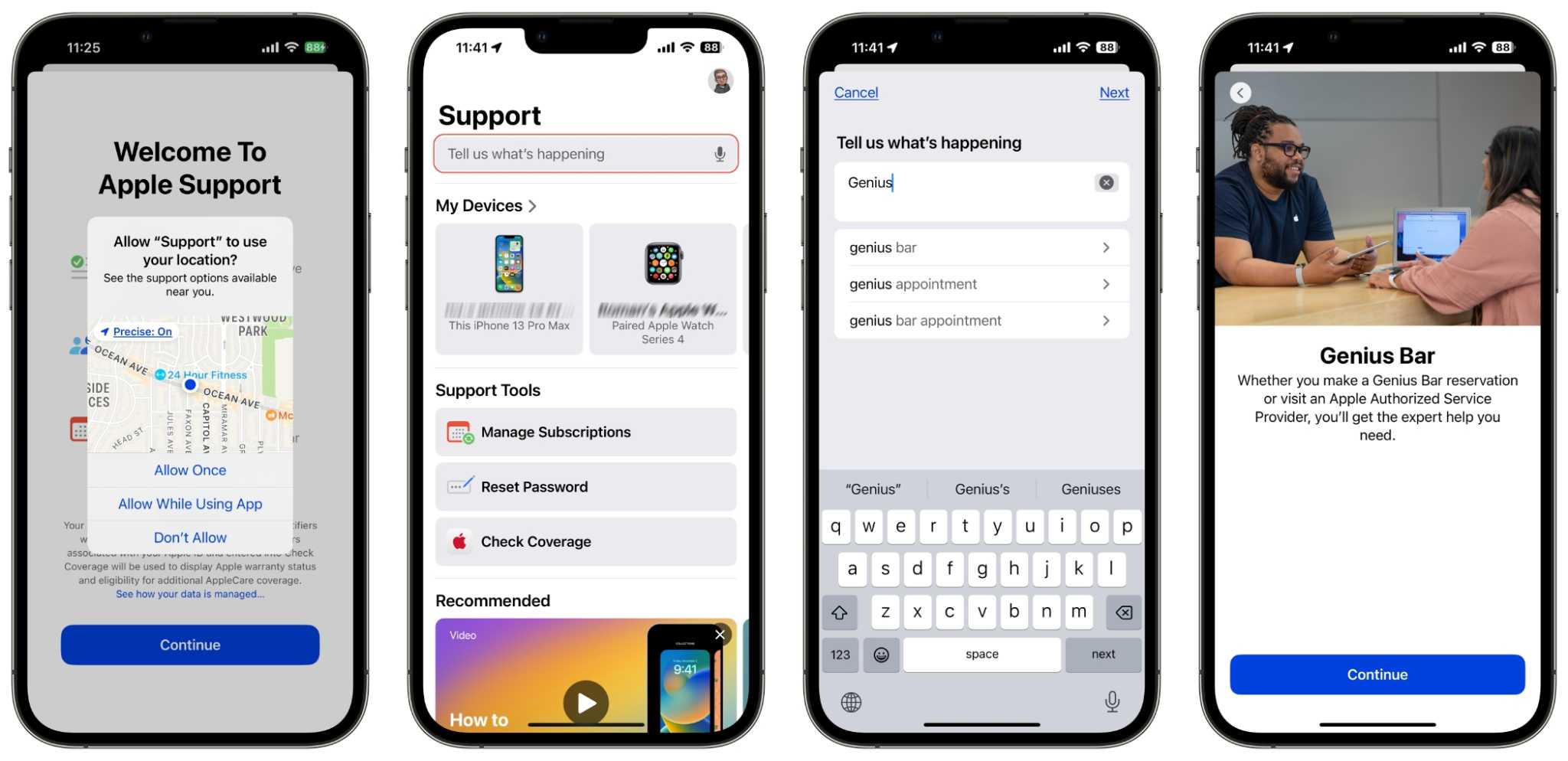
- Launch the Support Mechanism: Open the Apple Support app on any iOS device, or navigate to the official support website using a web browser. Log in with your Apple ID to automatically load your registered devices.
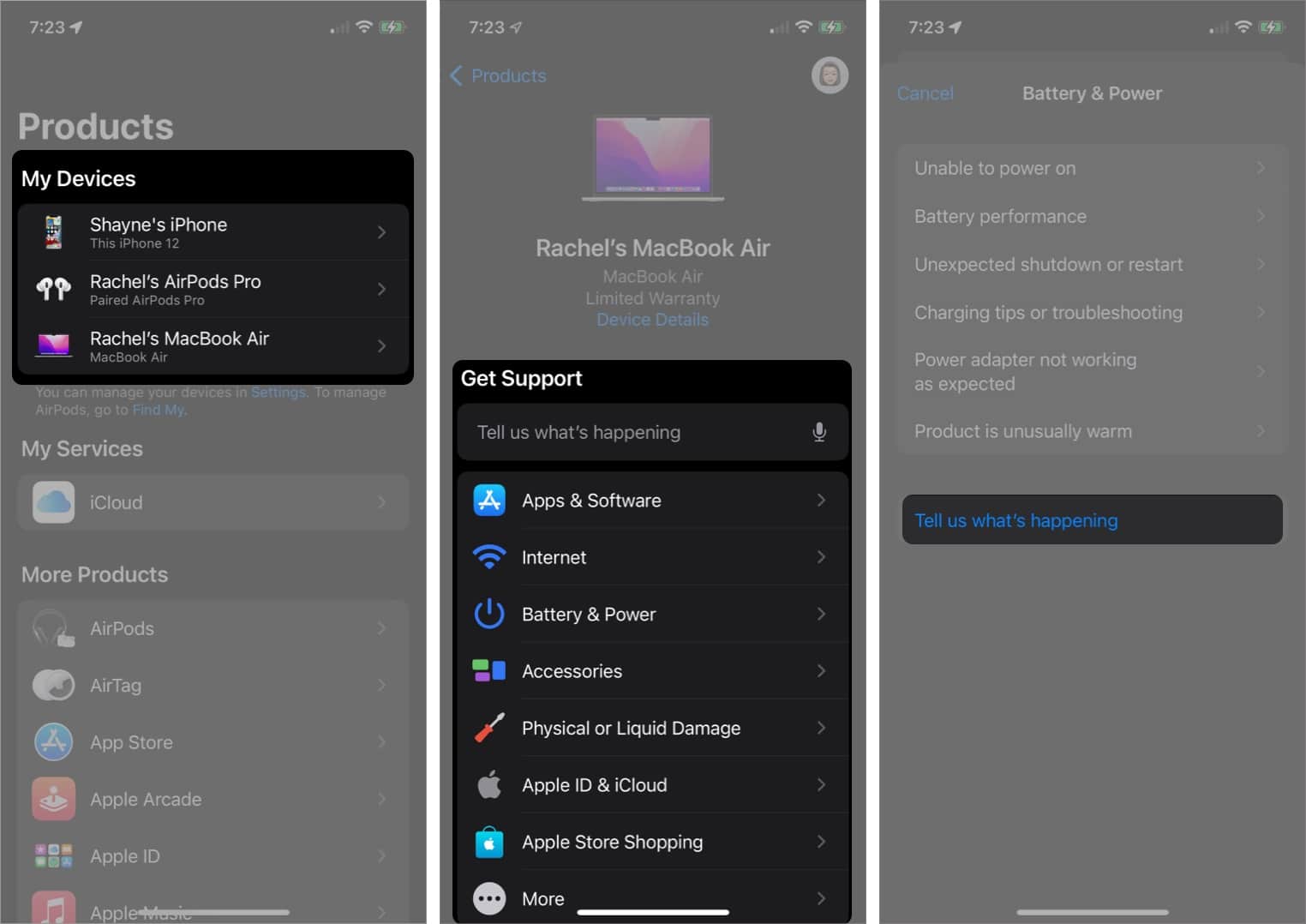
- Select Your Device and Issue: Choose the specific hardware requiring assistance from your device list. Select the category that best matches your problem, such as battery performance, display damage, or connectivity failures.
- Explore Remote Solutions First: The system will prompt you to run automated diagnostics or chat with a virtual assistant. If your issue requires physical repair, bypass these prompts by selecting the option for repair or physical service.
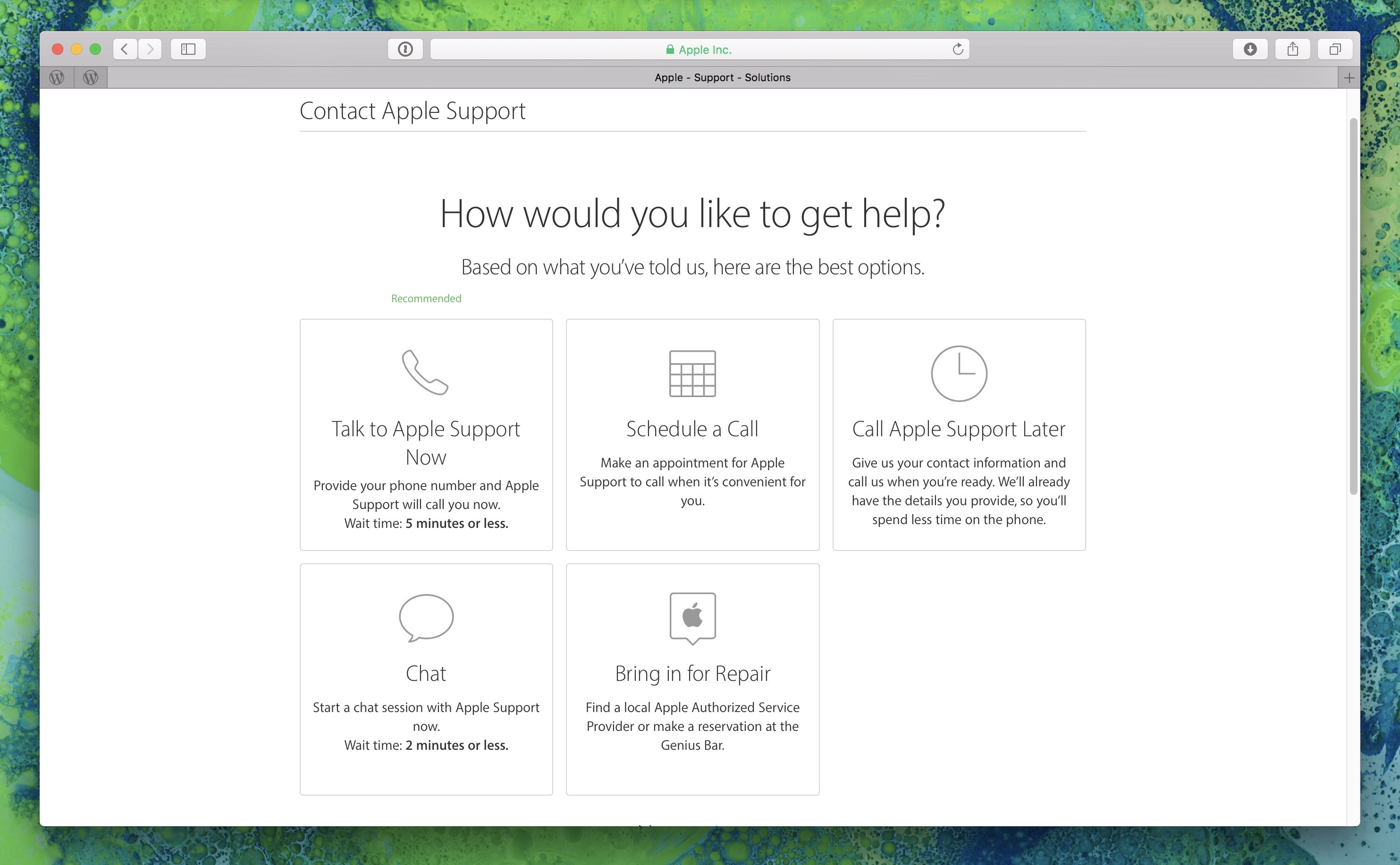
- Choose Physical Repair Options: Click on "Bring in for Repair" or "Find a Location." The system will use your current location or entered zip code to display nearby Apple Stores and Apple Authorized Service Providers (AASPs).
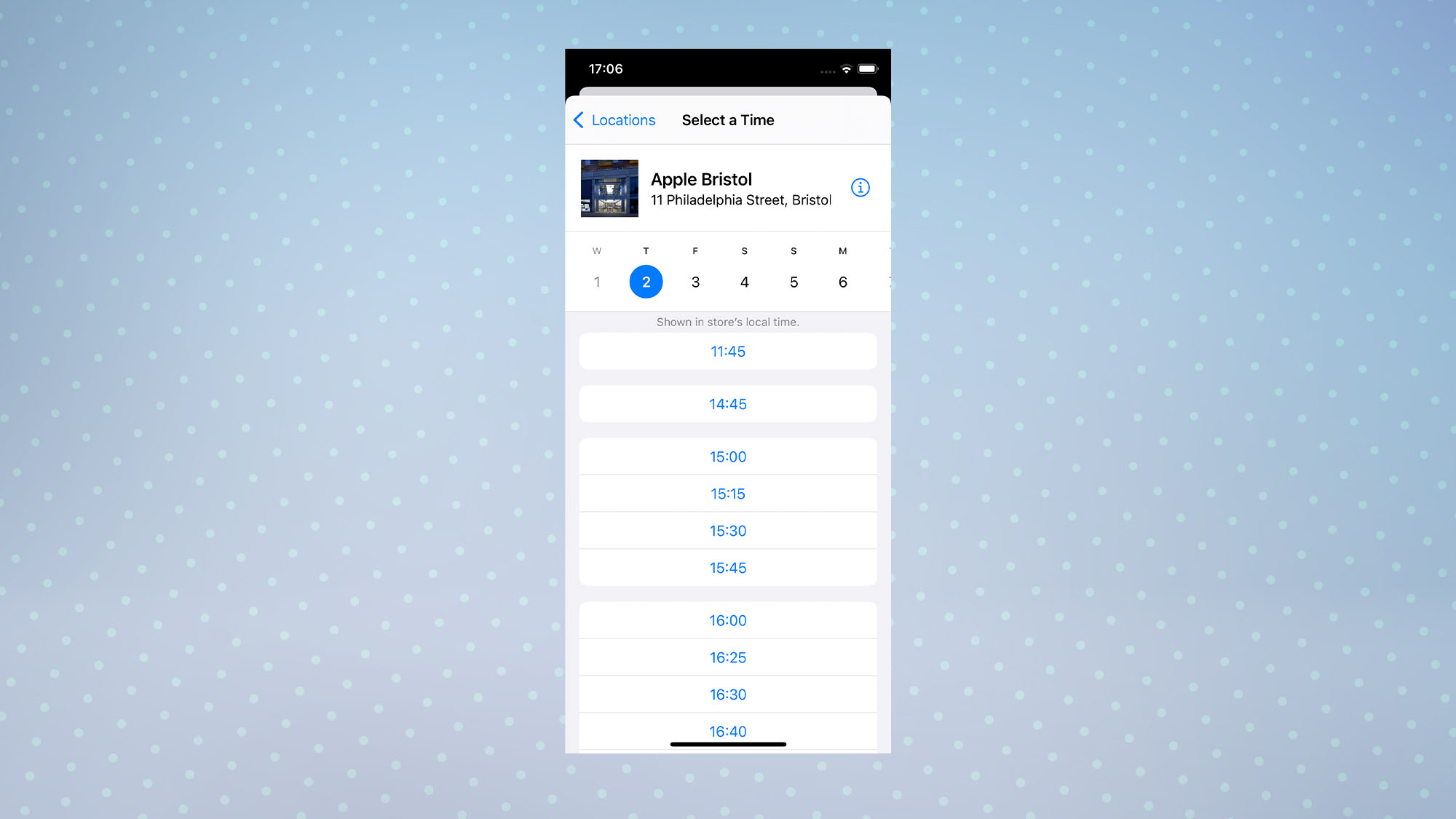
- Select Date and Time: Browse the available calendar slots for your chosen location. Select a time that aligns with your schedule and confirm the reservation.
- Review Confirmation Details: Ensure you receive a confirmation email or push notification containing your reservation reference number, the store address, and a checklist of preparation steps.
Comparing Official Apple Support Channels
Choosing the right support channel depends heavily on your warranty status, geographic location, and the severity of the hardware failure. The following matrix outlines the primary pathways available to consumers in 2026.
| Support Channel | Primary Use Case | Cost Structure | Turnaround Time | Warranty Impact |
|---|---|---|---|---|
| Apple Genius Bar | Hardware repairs, diagnostic testing, device swaps | Free diagnostics; varies by warranty/AppleCare+ | Same-day for most minor fixes | Fully preserves and validates warranty |
| Authorized Service Providers | Hardware fixes in regions without Apple Stores | Free diagnostics; varies by warranty/AppleCare+ | 1 to 3 business days | Fully authorized; maintains official warranty |
| Mail-In Repair Service | Complex logic board repairs, liquid damage, battery mail-ins | Free diagnostics; shipping covered if under warranty | 3 to 5 business days | Fully maintained through official depots |
| Online Chat and Phone | Software configuration, iCloud issues, billing inquiries | Free for standard support | Immediate response | N/A (Remote assistance only) |
Essential Preparation Steps Before Your Appointment
Walking into a retail location without preparation can lead to data loss or prolonged service times. Executing a few precautionary steps safeguards your personal data and expedites the technician's workflow.
Data Backup Protocols: Always create a complete, encrypted backup of your device via iCloud or a local Mac/PC before handing it over to a technician. While hardware repairs rarely touch storage media, unexpected logic board replacements or catastrophic component failures can require complete device swaps.
Credential Readiness: Disable Find My prior to major hardware interventions if requested by the technician, and ensure you have your Apple ID password readily available. Technicians cannot perform specific diagnostic or repair workflows on devices locked to an active iCloud account without owner verification.
Documentation and Proof of Purchase: Bring a valid government-issued photo ID along with your original receipt or proof of purchase if you are disputing warranty coverage or claiming consumer law protections.
Pros and Cons of Physical Genius Bar Visits
While visiting a retail technician offers unmatched tactile support, the process presents distinct operational trade-offs compared to mail-in or remote options.
Pros:
- Immediate face-to-face interaction with certified technicians who can physically inspect damage.
- Same-day turnaround for common repairs such as battery replacements, screen swaps, and camera module fixes.
- Direct access to genuine Apple parts, proprietary calibration machinery, and specialized diagnostic software.
- Opportunity to test repaired hardware immediately in-store before departing.
Cons:
- High demand and limited appointment availability can result in weeks of waiting during peak product launch cycles.
- Geographic limitations require living within a reasonable driving distance of an official Apple Store or AASP.
- In-store environments can be loud, crowded, and overwhelming for certain consumers.
- Technicians must strictly adhere to corporate repair guidelines, which may limit flexibility on out-of-warranty pricing exceptions.
Frequently Asked Questions
Can I walk into an Apple Store without an appointment for support?
Yes, walk-ins are permitted, but priority is strictly given to customers with pre-booked reservations. Walk-in customers often experience long wait times or may be turned away if the technical queue reaches full capacity for the day.
Do I need to pay for a Genius Bar diagnostic assessment?
Initial hardware diagnostics performed by certified technicians at the Genius Bar are completely free of charge, regardless of whether your device is covered under a standard warranty or AppleCare+.
What should I bring with me to my Genius Bar appointment?
You should bring the malfunctioning device, all relevant accessories if they are part of the issue (such as charging bricks or proprietary cables), a valid photo ID, and your appointment confirmation details.
How long does a standard screen replacement take at the Genius Bar?
Most standard display replacements for recent iPhone and iPad models are completed within one to two hours, allowing you to wait in the store or run errands while the repair is finalized.
What happens to my data if my device requires a complete replacement?
If a hardware failure necessitates a full device swap, your original data cannot be transferred by the technician unless you performed a backup prior to the appointment. Technicians prioritize data privacy and wipe defective units immediately upon intake.
Are Apple Authorized Service Providers identical to the Genius Bar?
AASPs utilize genuine Apple parts, specialized tools, and factory-trained technicians, mirroring the exact service standards of an official retail Genius Bar, though they operate as independent businesses.
Secure Your Support Pathway Today
Resolving technical difficulties efficiently requires leveraging the correct digital scheduling tools and preparing your hardware beforehand. Book your appointment through the official Apple Support application today to secure professional diagnosis and restore your device to optimal performance.
Image Gallery