Understanding and Maintaining the Detecto 750 Clinical Weight Indicator
The Detecto 750 clinical weight indicator is a precision electronic instrument designed for professional medical settings, providing rapid and accurate patient weight data. It serves as the primary interface for various digital clinica...
The Detecto 750 clinical weight indicator is a precision electronic instrument designed for professional medical settings, providing rapid and accurate patient weight data. It serves as the primary interface for various digital clinical scales, offering essential features such as weight locking, BMI calculation, and connectivity options for electronic health record (EHR) integration in demanding healthcare environments.
Contents
Core Functionality and Clinical Application
The Detecto 750 is engineered to function as the “brain” of medical weighing systems. In a clinical environment, the primary requirement for any weighing device is the ability to provide reliable data quickly, often while a patient is moving or unsteady. The 750 indicator addresses this through high-resolution weight sensing and specialized digital filtering algorithms.
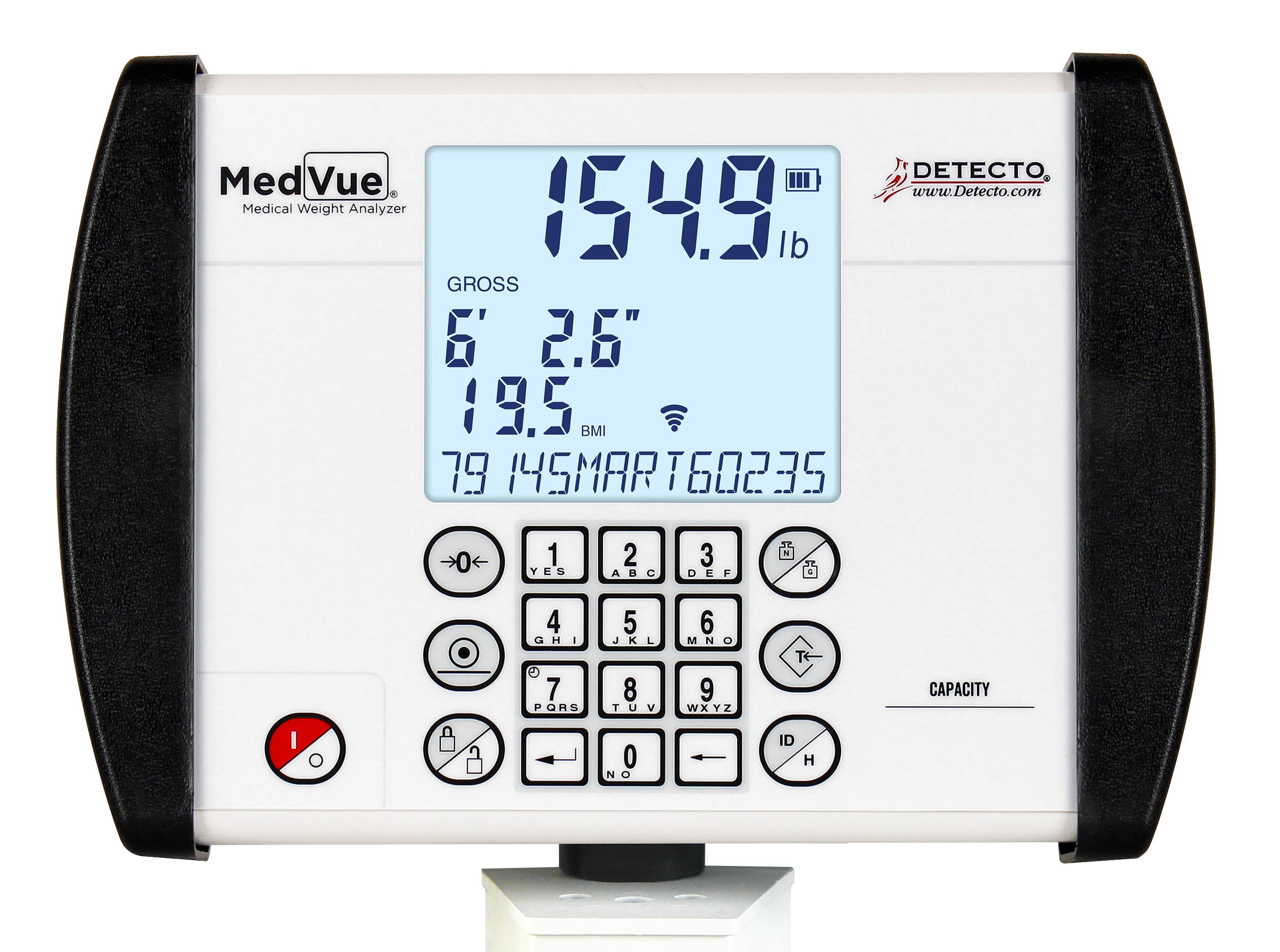
The indicator is typically found mounted on column-style physician scales or integrated into bariatric weighing platforms. Its interface is designed for high-visibility reading, ensuring that nurses, physicians, and clinical staff can interpret patient weight accurately from a standing position. Beyond basic weight acquisition, the 750 provides a suite of clinical functions that assist in diagnostic workflows, most notably the Body Mass Index (BMI) calculation. By inputting the patient’s height through the keypad, the indicator automatically calculates the BMI, reducing the risk of manual calculation errors during patient intake.
Technical Specifications and Operational Requirements
Understanding the technical envelope of the Detecto 750 is essential for both facility managers and biomedical technicians. The device is built to withstand the rigors of hospital use, which includes exposure to frequent cleaning agents and the physical demands of high-traffic areas.
- Display: High-contrast LCD (Liquid Crystal Display) designed for readability in various lighting conditions found in medical offices and hospital corridors.
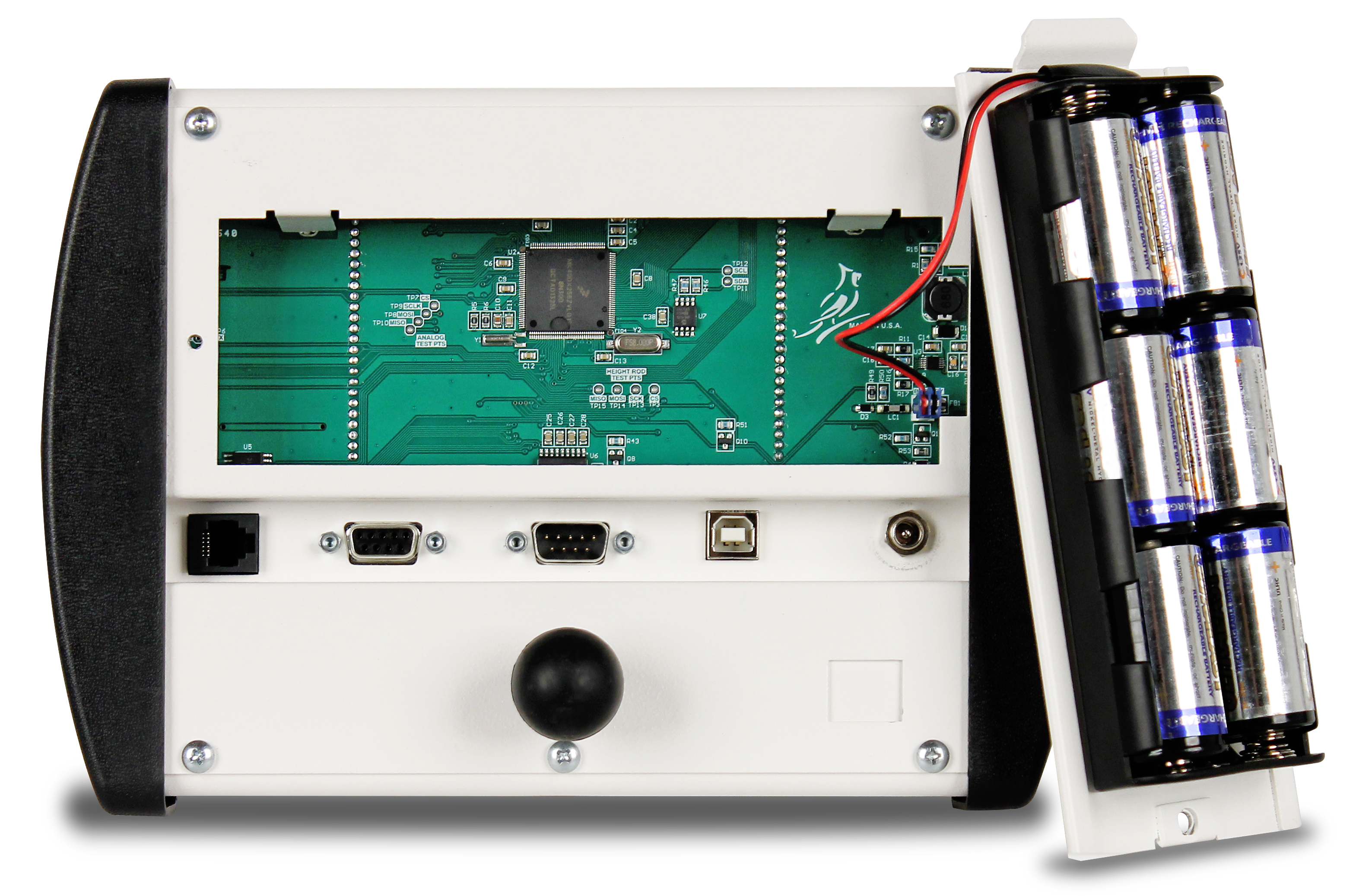
- Power Requirements: The unit is highly versatile, often supporting both AC power via a standard adapter and battery power (typically AA alkaline cells) to allow for mobile operations where wall outlets are unavailable.
- Connectivity: The 750 is frequently equipped with serial connectivity (RS232), allowing the scale to transmit weight data directly to a computer, terminal, or printer. This capability is vital for meeting modern healthcare requirements where manual transcription of patient weight is discouraged to maintain data integrity.
- Weight Locking: A key technical feature is its “Lock-in” weight function. This allows the indicator to capture and hold a stable weight reading even if the patient exhibits minor movement, which is critical when weighing pediatric patients or elderly individuals.
Comparison of Detecto Indicator Features
Selecting the correct indicator for a medical facility often involves balancing connectivity needs against budgetary constraints. While the 750 is a robust workhorse, comparing its features against broader requirements helps in identifying the correct deployment strategy.
| Feature | Detecto 750 Capability | Operational Value |
|---|---|---|
| BMI Calculation | Standard | Enables instant diagnostic data. |
| Connectivity | RS232 Serial Port | Integrates with EMR/EHR systems. |
| Movement Filtering | Advanced Digital | Maintains accuracy with moving patients. |
| Power Flexibility | Dual (AC/Battery) | Ensures uptime during power outages. |
| Display Type | Backlit LCD | High visibility in low-light rooms. |
Prerequisites for Proper Installation and Calibration
The accuracy of the Detecto 750 is contingent upon its initial setup and periodic verification. For the device to remain compliant with medical standards, calibration must be performed by qualified personnel using certified test weights.
Before placing an indicator into service, verify the local electrical environment. Ensure that the scale platform and the indicator are correctly matched according to the manufacturer’s documentation to prevent calibration drift. It is a common mistake to swap indicators between different platform sizes without updating the calibration parameters; always verify the capacity and increment settings within the indicator's configuration menu if a component replacement occurs.
Troubleshooting Common Issues
When the Detecto 750 encounters an error, it usually presents a specific code on the display. These codes are not merely arbitrary flashes; they indicate specific failures in the sensor bridge or the internal circuitry.
- Displaying "Err" or Zeroing Issues: Often caused by debris underneath the scale platform or an object touching the scale frame. Before resetting the indicator, inspect the mechanical environment of the platform.
- Unstable Weight: If the numbers jump uncontrollably, check for drafts, vibrations from nearby equipment, or a loose serial connection cable.
- Power Failures: If the unit fails to turn on, first verify the AC adapter output voltage. If using batteries, ensure that the battery contacts are free of corrosion. Even minor oxidation can increase resistance, leading to the device shutting down under load.
- Data Transmission Errors: When the indicator fails to communicate with an EHR system, check the baud rate and parity settings in the configuration menu to ensure they match the receiver’s requirements.
Maintenance and Clinical Hygiene
In a medical environment, the Detecto 750 must withstand regular sanitation. The exterior housing is generally constructed from durable plastic or, in some models, medical-grade composites that are resistant to common hospital-grade disinfectants. However, users should avoid soaking the indicator or applying aggressive solvents directly to the LCD screen, as this can degrade the screen finish or cause liquid ingress, damaging the internal printed circuit board (PCB).
Regular verification of the scale’s accuracy—often termed "calibration checks"—should be performed annually or according to the facility’s internal quality management policy. By keeping a log of these checks, clinical facilities can ensure they remain compliant with accreditation requirements, such as those set forth by health regulatory bodies regarding patient monitoring equipment.
Regulatory and Safety Considerations
Users should treat the Detecto 750 as a medical device. While it is a durable tool, it is not intended for use in environments with explosive gases or high-intensity electromagnetic interference (EMI) that might disrupt the sensor signals. Always follow the specific manufacturer guidelines regarding the electromagnetic environment. If the device is used in a clinical trial or for medical billing purposes, ensure that the calibration is tracked, as weight data is often a primary metric for determining medication dosages and patient health trends.
Frequently Asked Questions
Does the Detecto 750 automatically sync with my hospital EHR? The 750 is hardware-ready for transmission via its serial port, but it does not "sync" automatically out of the box. It requires a software interface or a data bridge (often provided by third-party healthcare middleware) to parse the serial string from the indicator into your specific EHR platform.
How do I calibrate my indicator? Calibration requires certified, traceable test weights. The procedure involves entering the setup mode through the keypad, placing a known weight on the scale platform, and verifying that the indicator reflects that value. If you are not authorized by your facility to perform this, contact a certified biomedical technician.
Can the 750 indicator be mounted to any scale? The 750 is designed for specific Detecto weight platforms. Mounting it to a different brand or an incompatible platform will likely lead to incorrect weight readings, as the load cell excitation voltage and signal sensitivity may differ.
What should I do if the screen is blank but the device is plugged in? First, check the AC adapter for damage. If the adapter is functioning, verify that the cable connection at the back of the indicator is secure. If these fail, the internal fuse or the power supply board may need inspection by a service technician.
Is the BMI calculation on the 750 medically validated? The indicator uses the standard height-weight formula for BMI. While the math is accurate, the utility of the result depends entirely on the accuracy of the height input provided by the operator and the weight captured by the platform.
Conclusion and Next Actions
The Detecto 750 clinical weight indicator is a fundamental component for accurate patient assessment. To ensure its longevity and continued precision, verify that your staff is trained on the proper weighing procedure—specifically ensuring patients remain centered on the platform—and that your maintenance team schedules regular calibration checks. If your unit is currently displaying an error or failing to communicate, consult the technical manual for your specific firmware version to identify the exact fault code, or contact an authorized service provider to prevent downtime in your clinical workflow.
Image Gallery