How Residential VoIP Phone Service Works
Residential Voice over Internet Protocol (VoIP) transforms traditional analog voice signals into digital data packets, transmitting them over a broadband internet connection rather than legacy copper telephone lines. This technology by...
Residential Voice over Internet Protocol (VoIP) transforms traditional analog voice signals into digital data packets, transmitting them over a broadband internet connection rather than legacy copper telephone lines. This technology bypasses traditional public switched telephone networks (PSTN) for the local loop, converting your voice into data at your router and routing it globally via the internet to reach any destination phone.
Contents
The Core Architecture of Residential VoIP
Understanding how residential VoIP works requires looking past the telephone handset sitting on a desk or counter. At its foundation, a residential VoIP ecosystem relies on an interplay of hardware interfaces, standard internet protocols, and cloud-based switching infrastructure provided by a VoIP service provider.
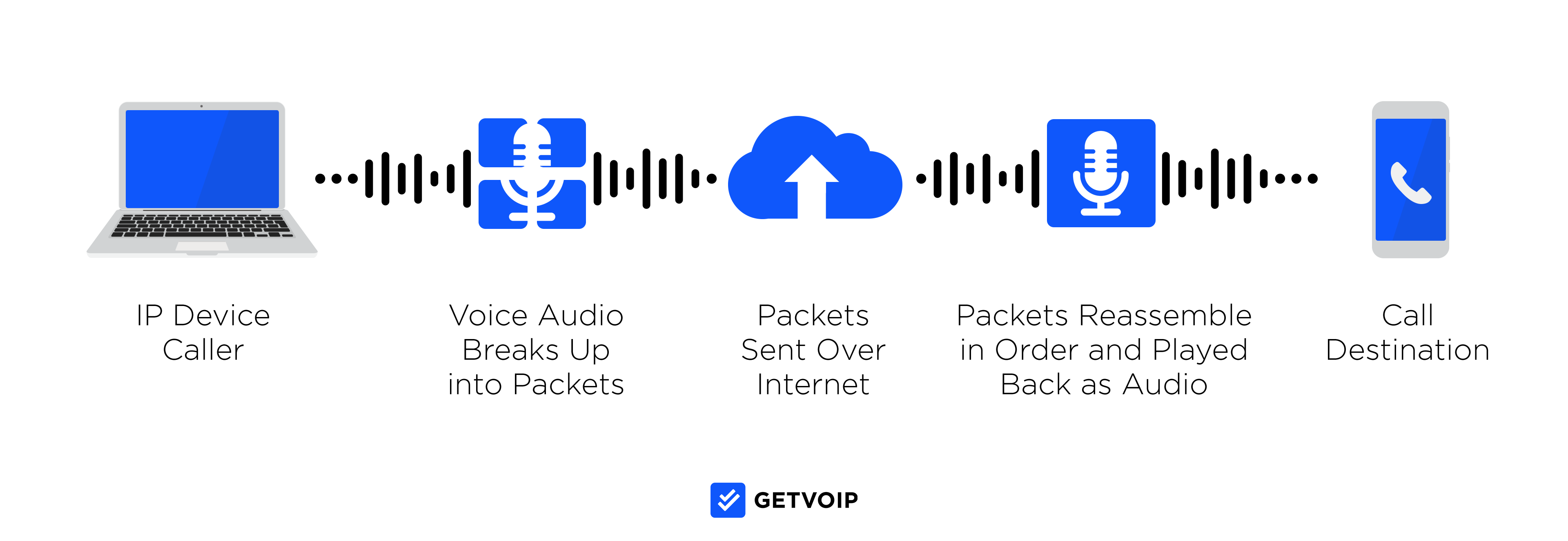
When you speak into a VoIP phone or an analog telephone connected to an adapter, the device captures the audio waves through a microphone or receiver element. An internal analog-to-digital converter (ADC) samples the continuous sound wave thousands of times per second, translating those physical vibrations into a digital binary stream. This stream is then broken down into small segments known as packets.
Protocols and Packet Transmission
Once the voice data is digitized and packetized, the system encapsulates these packets using specific communication rules, primarily the Real-time Transport Protocol (RTP) and the Session Initiation Protocol (SIP).
- Session Initiation Protocol (SIP): SIP acts as the signaling agent. It is responsible for establishing, maintaining, modifying, and terminating the communication session between your home and the dialed destination. When you punch in a phone number, your device sends a SIP invite request through your internet router to your provider's proxy server.
- Real-time Transport Protocol (RTP): Once SIP establishes the connection and negotiates the technical parameters of the call, RTP takes over the actual transmission of the audio data packets. RTP is optimized for low-latency delivery, ensuring that packets arrive sequentially and with minimal jitter so that conversation flows naturally without noticeable lag.
Essential Hardware and Network Prerequisites
To run a residential VoIP service successfully, your home network must meet specific technical requirements. Unlike traditional landlines that draw low-voltage electrical power directly from the telephone company's central office—allowing them to work even during neighborhood power outages—VoIP is entirely dependent on your home electricity and internet service.
1. Broadband Internet Connection
A stable, high-speed broadband connection (cable, fiber, or DSL) is mandatory. While modern VoIP codecs require relatively little bandwidth (often under 100 Kbps for an active G.711 or G.729 audio stream), network stability is far more critical than raw speed. Low latency (under 100 milliseconds), minimal packet loss (under 1%), and low jitter are necessary to prevent choppy audio, echoes, or dropped calls.
2. Terminal Hardware Options
You do not necessarily need a specialized phone to use VoIP. Depending on the service provider and your setup preferences, you can use one of three main hardware configurations:
- Analog Telephone Adapter (ATA): A small hardware box that features an Ethernet port on one side (to plug into your router) and a standard RJ-11 telephone jack on the other. An ATA bridges traditional analog phones with the digital VoIP network by handling the digital-to-analog conversion locally.
- IP Phones (SIP Phones): Dedicated desk phones that feature an integrated Ethernet switch and built-in VoIP client software. These plug directly into your broadband router and connect to your provider's servers without needing an intermediate adapter.
- Software Clients (Softphones): Applications installed on a computer, smartphone, or tablet. These utilize the device's built-in microphone and speakers (or a connected headset) to place and receive calls over your VoIP account.
Step-by-Step Call Routing Breakdown
When a call is placed from a residential VoIP line, it moves through a precise sequence of events within milliseconds.
Home Phone / ATA
- Converts voice to digital packets
Broadband Router
- Transmits via Internet using SIP/RTP
VoIP Provider Softswitch / SIP Server
- Routes call based on destination type
Public Switched Telephone Network (PSTN) or Destination IP Network
Initiation: You lift the handset and dial a telephone number. The ATA or IP phone generates dual-tone multi-frequency (DTMF) tones or digital signals, which the device packages into a SIP INVITE message.
Local Routing: The SIP message travels over your Ethernet cable or Wi-Fi network to your home router, which forwards the packet out to the public internet, directing it to your VoIP service provider's data center.
Call Mediation: The provider's softswitch—a software-based telephone switch—receives the request, authenticates your account credentials, and evaluates the destination number.
Gateway Hand-off: If the destination is another VoIP user, the call remains purely digital, routing directly to the recipient's IP address. If the destination is a traditional landline or mobile phone, the provider's gateway translates the digital packets back into traditional analog signals and routes the call onto the Public Switched Telephone Network (PSTN) for final delivery.
Comparing Traditional Landlines, Cable Digital Voice, and VoIP
Residential voice services have evolved significantly over the past few decades. The table below outlines how standalone VoIP compares to legacy landlines and cable-bundled digital phone services.
| Feature | Traditional Landline (PSTN) | Cable Digital Voice (VoIP-over-Cable) | Over-the-Top Residential VoIP |
|---|---|---|---|
| Infrastructure | Copper pairs connected to central office | Hybrid fiber-coaxial network (MSO owned) | Any independent broadband internet connection |
| Power Dependency | Powered by central office (works in most outages) | Requires subscriber battery backup unit | Requires local power for modem, router, and ATA |
| Portability | Fixed to a single physical wall jack | Fixed to cable modem ports inside the home | Highly portable (travels anywhere with internet) |
| Feature Set | Basic calling, caller ID, voicemail (add-on) | Advanced calling features bundled with TV/internet | Extensive cloud features (app integration, virtual numbers) |
Advanced Features Enabled by Cloud Switching
Because residential VoIP relies on cloud-based software switching rather than physical copper cross-connects, providers offer advanced features that are structurally impossible on legacy landline networks:
- Virtual Numbers and Geographic Flexibility: You can select a phone number with an area code entirely different from your physical location. For instance, a resident living in Florida can maintain a New York area code for family members to call locally.
- Voicemail-to-Email and Transcription: Voice messages are recorded digitally, converted into audio files (such as MP3 or WAV), and emailed directly to your inbox or transcribed into text for quick reading on your smartphone.
- Simultaneous Ring and Call Forwarding: Incoming calls can ring your desk ATA, a mobile softphone app, and an external cellular number at the same time, ensuring you never miss a call regardless of where you are in the house.
- Call Blocking and Spam Filtering: Cloud-based switches allow providers to integrate robocall mitigation protocols (such as STIR/SHAKEN frameworks) and custom blocklists to filter unwanted telemarketers before your phone ever rings.
Limitations and Practical Considerations
While residential VoIP offers extensive cost savings and flexibility, users must account for several structural limitations before making the switch from traditional services:
- Emergency 911 (E911) Constraints: Traditional landlines automatically transmit your exact physical street address to emergency dispatchers based on your physical copper line. VoIP is portable; because an ATA can be moved anywhere, emergency services rely on the service address you manually configure in your provider portal. If you move your equipment and fail to update your address, emergency services may be dispatched to your previous location.
- Power and Internet Outages: Because VoIP requires continuous electricity and active internet routing equipment, a broadband outage or a local power failure instantly disables your phone service unless you maintain an uninterruptible power supply (UPS) for your modem, router, and VoIP adapter.
- Fax and Security System Compatibility: Traditional analog fax machines and older home security alarm systems rely on precise analog timing signals (such as T.38 for faxing or specific pulse tones for alarms). While some ATAs support T.38 protocol extensions, high-speed data transmission over compressed VoIP codecs frequently results in dropped data packets, making faxing and alarm monitoring unreliable over standard residential VoIP without specialized configuration.
Frequently Asked Questions
Do I need to keep my internet service provider's phone plan to use VoIP?
No. Independent residential VoIP services operate independently of your internet service provider (ISP). You can subscribe to internet service from one company (such as a cable or fiber provider) and use a completely separate third-party VoIP provider for your phone service, provided your internet bandwidth meets performance requirements.
Can I keep my existing phone number if I switch to VoIP?
Yes. Federal and international telecommunications regulations generally allow local number portability (LNP). You can submit a port request to your new VoIP provider to transfer your existing landline or mobile number over to their network. The porting process typically takes anywhere from a few days to a couple of weeks, during which you should keep your old service active.
Why does my VoIP call sometimes sound delayed or robotic?
A delayed or robotic audio stream is typically caused by high network latency, packet loss, or jitter. When your internet connection is congested by heavy downloads, video streaming, or background tasks, voice packets are delayed or dropped. Implementing Quality of Service (QoS) rules in your router settings to prioritize voice traffic over data downloads usually resolves these audio artifacts.
Will my home security system work with a VoIP phone service?
Most traditional security systems that dial out via a standard landline will not reliably communicate over standard residential VoIP. Security monitoring companies generally recommend utilizing cellular communicators or dedicated IP-based alarm panels rather than routing alarm signals through a VoIP telephone adapter.
How much power does a VoIP setup consume during a normal day?
A typical residential VoIP setup—consisting of an analog telephone adapter and an internet router—draws very little electricity, usually between 10 to 20 watts combined. However, because it relies entirely on active household power, keeping a small backup battery or uninterruptible power supply (UPS) connected to your networking gear is recommended if you want to maintain phone access during short power blips.
Next Actions and Getting Started
If you plan to transition to a residential VoIP service, begin by evaluating your current home network stability and testing your broadband upload and download speeds. Next, audit your household communication needs—determine whether you require advanced cloud features like mobile app integration or simply want a basic, low-cost replacement for a traditional landline. Finally, compare providers to verify international rates, E911 registration policies, and equipment compatibility before initiating a number port request.
Image Gallery