Navigating the Process of Getting a Review Removed from Google
Getting a review removed from Google requires submitting a formal removal request through Google Business Profile Manager when the content violates Google's prohibited and restricted content policies, such as containing spam, hate spee...
Getting a review removed from Google requires submitting a formal removal request through Google Business Profile Manager when the content violates Google's prohibited and restricted content policies, such as containing spam, hate speech, or a clear conflict of interest. Business owners cannot manually delete customer feedback themselves; instead, they must flag the review and wait for Google’s moderation team to evaluate the report against established terms of service.
Contents
Managing an online reputation involves walking a fine line between addressing legitimate customer dissatisfaction and dealing with unfair, malicious, or policy-violating feedback. For local businesses, service providers, and medical practices alike, Google reviews carry immense weight. They influence local search rankings, shape consumer trust, and directly impact conversion rates. However, the open nature of user-generated content means that businesses occasionally fall victim to spam, competitor sabotage, or abusive language. Understanding how to systematically address and remove these reviews is an essential operational skill for modern business owners.
Understanding Google’s Review Policies and Guidelines
Before attempting to remove a review from your Google Business Profile, you must understand what Google considers actionable violations. Google does not remove reviews simply because they are negative, critical, or business-damaging. Constructive criticism—even if harsh or featuring complaints about pricing, wait times, or service quality—is protected under free expression and platform guidelines so long as it reflects a genuine customer experience.
To successfully petition for the removal of a review, the content must breach Google Maps User Contributed Content Policy. Recognizing these specific violations prevents wasted effort on reviews that comply with platform rules. Common policy violations include:
- Spam and Fake Content: Reviews posted by automated bots, competitors posing as customers, or paid actors attempting to artificially manipulate a business rating.
- Conflict of Interest: Reviews written by current or former employees, owners attempting to boost their own ratings, or direct competitors trying to lower a rival's score.
- Harassment and Hate Speech: Content that targets individuals with malicious intent, promotes discrimination, or uses slurs and offensive language.
- Personally Identifiable Information (PII): Reviews that expose private data, such as employee phone numbers, home addresses, or full financial account details.
- Irrelevant Content: Off-topic rants that have nothing to do with the actual experience of interacting with the business, including political statements or broad social grievances.
Familiarizing yourself with these boundaries ensures that your removal requests target genuinely non-compliant entries rather than legitimate customer grievances that require operational remediation or professional responses.
Step-by-Step Guide to Flagging a Review
When you identify a review that clearly violates Google’s terms of service, the primary method for removal involves flagging the review directly through your interface. This initiates a review cycle where Google's automated systems and human moderators assess the content.
Step 1: Access Your Google Business Profile
Log into the Google account associated with your verified Google Business Profile. You can navigate directly to the dashboard by searching for your business name while logged in, or by opening the Google Business Profile Manager.
Step 2: Locate the Target Review
Navigate to the "Reviews" tab within your dashboard. Scroll through the list to find the specific review you intend to report. Make sure you have noted the reviewer's display name, the date, and the star rating to ensure accuracy during the reporting process.
Step 3: Flag the Review for Removal
Click or tap the three vertical dots located next to the review. Select the "Report review" or "Flag as inappropriate" option from the drop-down menu.
Step 4: Select the Policy Violation Category
Google will direct you to a page managed by the Content Moderation Help Center. Here, you must categorize the type of violation the review represents—such as "Spam," "Bullying or harassment," or "Conflict of interest." Choose the category that most accurately reflects the breach.
Step 5: Monitor the Status
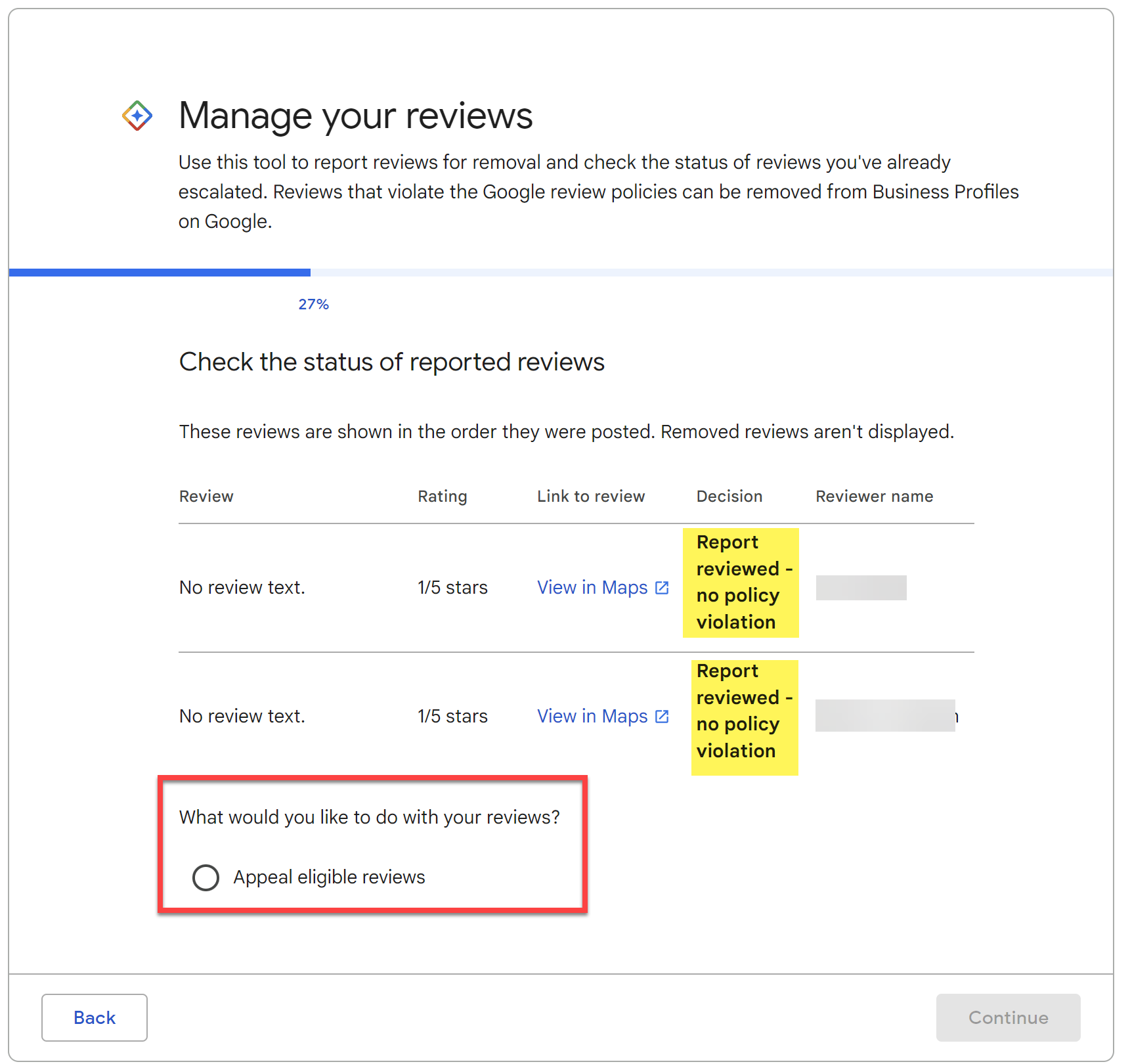
Once submitted, you will receive an acknowledgment from Google. You can track the status of your reported reviews by visiting the Google Business Profile Help community or the Review Management Tool, where you can check whether the flag is still pending, approved, or rejected.
| Violation Type | Description | Recommended Evidence to Gather |
|---|---|---|
| Spam / Fake | Content from accounts with no transaction history or automated posts. | Internal customer databases, booking logs, timestamp comparisons. |
| Conflict of Interest | Feedback from disgruntled former employees, vendors, or competitors. | Personnel files, termination records, vendor contracts. |
| Inappropriate Content | Reviews containing profanity, hate speech, threats, or explicit language. | Full screenshots of the review text and associated profile metadata. |
| Privacy Violation | Exposure of employee personal phone numbers, emails, or home addresses. | Highlighted portions of the review showing exposed PII. |
Utilizing the Google Business Profile Help Community
If flagging a review through your standard dashboard does not yield results—and you are certain the review violates Google policy—you can escalate the issue through the official Google Business Profile Help Community. This is a public forum monitored by Google Product Experts (trusted community volunteers) and Google employees who possess higher-level escalation paths.
To utilize this escalation channel effectively, you must create a new post detailing your case. Vague requests or complaints about unfair ratings will be summarily dismissed. Your community post should follow a structured approach:
- State the Business Details: Provide your exact business name, address, and the public URL of your Google Business Profile.
- Provide the Review Details: Share the reviewer's name, the star rating, the exact date of posting, and a direct link to the review if accessible.
- Explain the Policy Breach: Clearly articulate why the review violates Google's terms of service, citing the specific policy guideline broken. Avoid emotional arguments about how the review hurts your business; focus strictly on policy non-compliance.
- Provide Supporting Evidence: Upload clear screenshots showing the review and any context that proves the violation, such as internal records proving the person was never a customer.
Product Experts review these submissions and, if they agree the review violates policy, can escalate the ticket directly to Google engineering teams for manual removal. Keep in mind that this process can take several weeks, and abuse of the community forum can result in suspension of posting privileges.
Addressing Legitimate Negative Reviews
Not all negative reviews violate Google's policies. When a customer leaves a critical review based on a real, albeit disappointing, experience, the removal path is unavailable. In these scenarios, businesses must pivot from removal to mitigation. Ignoring or deleting legitimate feedback is impossible, but responding professionally transforms a negative public touchpoint into a demonstration of customer service excellence.
A well-crafted response serves future prospective customers far more than a pristine five-star rating. Consumers often look at how a business handles adversity rather than expecting perfection. When responding to a legitimate negative review, adhere to the following best practices:
- Respond Promptly: A timely response shows that management monitors operations and values customer feedback.
- Maintain Professionalism: Never argue, become defensive, or attack the reviewer. Keep emotions out of the response entirely.
- Acknowledge and Validate: Even if the customer's perspective is flawed, acknowledge their frustration regarding the specific service breakdown.
- Take the Conversation Offline: Provide a direct phone number or email address so the customer can discuss the resolution privately with a manager or owner.
By handling valid criticism constructively, you neutralize the damaging effects of the review while demonstrating accountability to everyone browsing your profile.
Common Mistakes to Avoid When Seeking Review Removal
Business owners desperate to clean up their online profiles frequently make tactical errors that delay resolution or result in permanent rejection of their removal requests. Avoiding these pitfalls streamlines the process and protects your standing with Google’s moderation systems.
The most common mistake is over-flagging legitimate reviews. If a business flags every single negative review it receives—regardless of whether it violates policy—Google's automated systems may begin ignoring the business's reports or flag the account for abuse. Flagging should be reserved strictly for clear, demonstrable policy breaches.
Another frequent error is engaging in public arguments before flagging. Replying to a spam review with aggressive accusations can complicate the moderation review. While you should document the interaction, escalating through formal channels while maintaining a calm public stance is far more effective.
Finally, relying on third-party services that promise guaranteed review removal for a fee often leads to wasted financial resources. No legitimate agency can guarantee the removal of a review unless it explicitly violates Google's guidelines, as the final decision rests entirely with Google's moderation team. Legitimate reputation management consultants focus on optimizing profiles, generating positive review volume, and correctly escalating policy-violating content through proper channels.
Frequently Asked Questions
Can I delete a Google review myself as a business owner?
No, business owners cannot directly delete customer reviews from their Google Business Profile. You can only flag reviews that violate Google's content policies and request that Google's moderation team evaluate them for removal.
How long does it take for Google to review a flagged review?
The timeline for Google to process a flagged review varies significantly, typically ranging from a few days to several weeks. If you escalated the issue through the Google Business Profile Help Community, the review process may take longer depending on support volume.
What should I do if my removal request is rejected by Google?
If Google rejects your initial flag, review the content policy again to ensure a violation actually occurred. If you have clear evidence of a violation (such as proof of a conflict of interest), you can escalate the case by posting details on the official Google Business Profile Help Community for Product Expert review.
Will a customer know if I flagged their review?
No, Google keeps the reporting process strictly confidential. The reviewer will not receive a notification stating that your specific business flagged or reported their content.
Are negative reviews always bad for a business profile?
Not necessarily. Consumers often view profiles with exclusively five-star ratings as suspicious or potentially manipulated. A balanced profile with mostly positive reviews and a few professionally handled negative responses builds authenticity and consumer trust.
Conclusion
Successfully navigating the removal of a Google review requires a methodical, policy-driven approach. By understanding Google's content guidelines, accurately identifying violations, utilizing proper reporting channels, and maintaining a professional posture toward genuine feedback, you can protect your brand's online reputation effectively. Focus your efforts on compliance, patience, and operational excellence to build a resilient and trustworthy digital footprint.
Image Gallery