How to Send Money When Your Bank Does Not Support Zelle
If your financial institution does not partner with Zelle, you can still send and receive money by downloading the standalone Zelle app and linking a supported Visa or Mastercard debit card. Alternatively, you can utilize third-party p...
If your financial institution does not partner with Zelle, you can still send and receive money by downloading the standalone Zelle app and linking a supported Visa or Mastercard debit card. Alternatively, you can utilize third-party peer-to-peer (P2P) platforms like Venmo or Cash App, or use traditional banking methods such as Same-Day ACH and wire transfers.
Contents
The landscape of digital payments in 2026 remains dominated by the Zelle Network, a service owned by Early Warning Services, LLC. While thousands of banks and credit unions are integrated directly into the Zelle interface, many smaller community banks, specific credit unions, and neobanks remain outside the official partner network. When you find yourself at a "bank not on Zelle," navigating the payment options requires an understanding of both standalone app workarounds and external P2P alternatives.
The Standalone Zelle App: The Primary Workaround
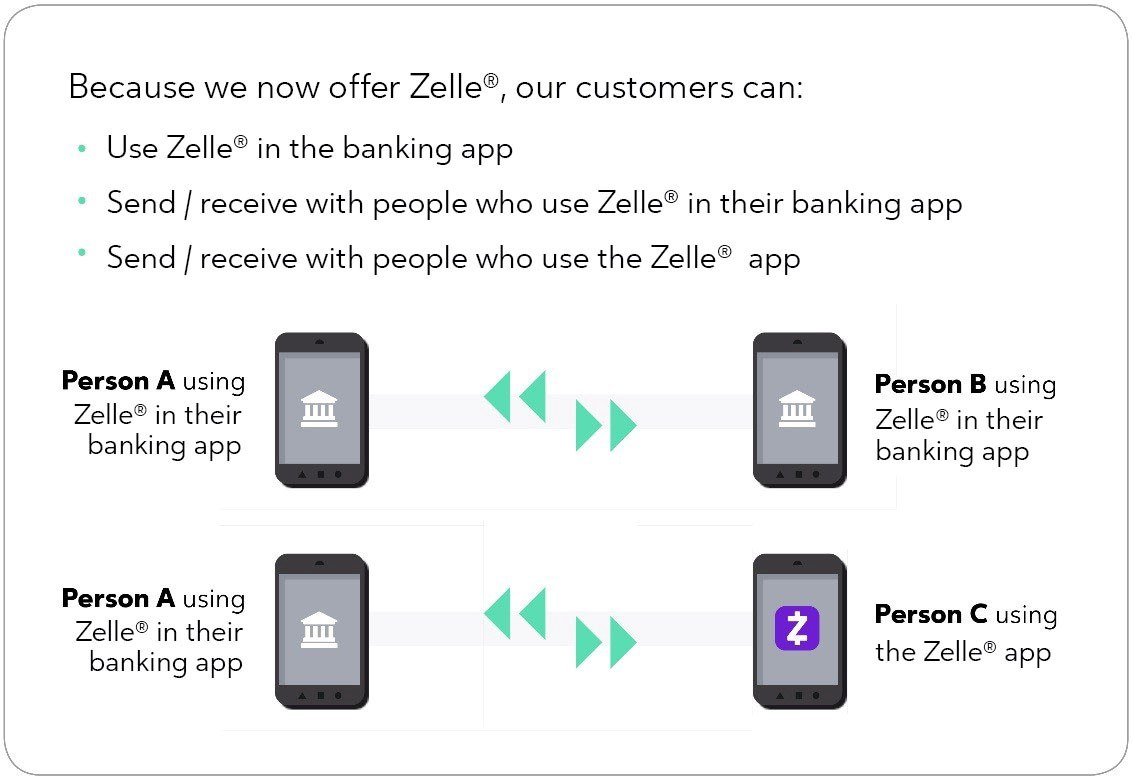
The most common misconception is that a bank must be a Zelle partner for a customer to use the service. While direct integration allows for higher transfer limits and a seamless experience within your bank’s own mobile app, Zelle offers a standalone application for users whose institutions are not yet participants.
Requirements for the Standalone App
To use Zelle without a partner bank, you must meet specific technical and financial criteria. This path essentially treats Zelle as a third-party processor rather than an integrated bank feature.
- Supported Debit Card: You must have a valid Visa or Mastercard debit card issued in the United States. Zelle does not support credit cards for this specific "out-of-network" setup.
- U.S. Mobile Number: A domestic mobile number is required for verification and to serve as your "token" for sending and receiving funds.
- Account Compatibility: The underlying bank account must be a domestic (U.S.-based) checking or savings account. Note that many prepaid cards and certain "fintech" accounts are often blocked from the standalone Zelle app to prevent fraud.
Limitations of Out-of-Network Usage
When using the standalone app with a non-partner bank, you face stricter constraints than integrated users. As of 2026, the standard weekly send limit for standalone Zelle users is typically capped at $500, and this limit cannot be increased by the user or their bank. In contrast, users with integrated accounts (like those at Chase, Bank of America, or Wells Fargo) often enjoy daily limits ranging from $2,000 to $5,000.
Furthermore, if your bank is not a partner, you cannot use Zelle for small business accounts via the standalone app. Business functionality is strictly reserved for those whose banks have a formal agreement with the Zelle Network.
Comparing Peer-to-Peer (P2P) Alternatives
When Zelle is not an option—either due to the $500 limit or technical incompatibility—several third-party platforms offer robust solutions. Each has unique fee structures and settlement speeds.
| Platform | Best For | Settlement Speed | Standard Fees |
|---|---|---|---|
| Venmo | Social payments and splitting bills | 1–3 days (Standard) or Instant (1.75% fee) | Free for basic bank/debit transfers |
| Cash App | Speed and casual transfers | 1–3 days (Standard) or Instant (0.5%–1.75% fee) | Free for basic transfers |
| PayPal | International and business payments | 1–3 days or Instant | Free for "Friends & Family" (U.S. only) |
| Apple Pay Cash | iPhone-to-iPhone transfers | Instant (to Apple Cash balance) | Free |
| Same-Day ACH | Large, formal bank-to-bank transfers | Same business day | Varies ($0–$30 depending on bank) |
Venmo and Cash App
These platforms operate as "closed-loop" systems. Unlike Zelle, which moves money directly between bank accounts, Venmo and Cash App maintain an internal balance. When you receive money, it stays in the app until you manually "cash out" to your bank. For a bank not on Zelle, these apps are the most natural substitutes for casual P2P needs.
Apple Pay and Google Pay
If you and your recipient use the same mobile operating system, digital wallets are highly effective. Apple Pay Cash allows for near-instant transfers that can be spent immediately via the digital wallet or transferred to a linked bank account. For banks that support Apple Pay but not Zelle, this is often the fastest path to liquidity.
Traditional Banking Options: ACH and Wire Transfers
For larger sums or more formal transactions where Zelle’s limits are prohibitive, traditional banking rails remain the gold standard for reliability.
Same-Day ACH (Automated Clearing House)
As of 2026, the National Automated Clearing House Association (NACHA) has expanded the processing windows for Same-Day ACH. Most banks not on Zelle still support outbound ACH transfers through their online banking portal.
- Pros: Highly secure; supports much larger dollar amounts than P2P apps.
- Cons: Often requires the recipient’s routing and account numbers, which may be sensitive information.
Domestic Wire Transfers
If a payment is time-sensitive and involves thousands of dollars, a wire transfer is the most definitive option. While Zelle is "instant," it is actually an ACH-based system with a fast frontend. A wire transfer is a real-time gross settlement (RTGS) transaction. It is typically irrevocable once sent, making it preferred for real estate or high-value vehicle purchases. Most banks charge between $20 and $35 for outbound domestic wires.
Online Bill Pay as a Substitute
Many people overlook the "Bill Pay" feature within their own bank's portal. Even if your bank is not on Zelle, their internal Bill Pay system can often send a physical check or an electronic payment to an individual. You simply enter the person’s name and address. If the system cannot find an electronic link to the recipient, the bank will mail a paper check on your behalf at no cost to you (in most cases). This is an excellent "no-fee" alternative for paying landlords or service providers who do not use P2P apps.
Security Considerations for Out-of-Network Payments
When a bank is not on Zelle and you use third-party apps, your consumer protections change. It is critical to understand the legal framework governing these transfers.
- Regulation E Protections: The Electronic Fund Transfer Act (Regulation E) provides some protection against unauthorized transactions. However, if you are scammed into voluntarily sending money to a fraudulent actor, most P2P services (including Zelle and Venmo) offer very little recourse for recovery.
- Verification Steps: Because out-of-network Zelle transfers rely on manual data entry into a standalone app, the risk of "fat-finger" errors (typing the wrong phone number) increases. Always send a $1 test payment first to ensure the recipient is correct.
- Privacy Policies: Third-party apps like Venmo often have social feeds (though they can be set to private). Banks integrated with Zelle generally offer higher levels of data privacy as the transaction remains within the banking ecosystem.
Troubleshooting Common Issues
If you are trying to use a bank not on Zelle and encounter errors, the following steps usually resolve the conflict:
- "Card Not Supported": This usually happens with "Neo-bank" debit cards (like Chime or Dave) or prepaid cards. If the Zelle app rejects the card, you must use Venmo or Cash App instead.
- "Phone Number Already in Use": This occurs if your mobile number was previously linked to a different bank account that was part of the Zelle network. You must contact Zelle support to "de-enroll" your number from the old institution before linking it to the new one.
- Delayed Funds: While Zelle is usually instant, out-of-network transfers can sometimes take 1–3 business days for the first transaction as the system verifies the new debit card connection.
Final Recommendation
When your bank is not a Zelle partner, your best course of action is to first attempt a setup via the standalone Zelle app using your debit card. This preserves the ability to receive money from the millions of people who already use Zelle. However, for transfers exceeding $500 or for business purposes, you should transition to Venmo or Cash App for casual use, or Same-Day ACH for professional and high-value transactions. Always verify the recipient's identity through a secondary channel before initiating any digital transfer to mitigate the risk of irrevocable fraud.
Frequently Asked Questions
Can I use Zelle with a credit card if my bank doesn't support it? No. The standalone Zelle app requires a Visa or Mastercard debit card linked to a U.S. checking or savings account. Credit cards are not supported for P2P transfers via Zelle, primarily because these are treated as cash advances which carry high fees and different legal protections.
Why does my bank say they don't support Zelle, but the app lets me sign up? This happens because Zelle operates two different "rails." One is a direct integration with bank cores, and the other is a "debit card rail." Your bank doesn't need to do anything for you to use the debit card rail; Zelle simply processes the transaction through the Visa or Mastercard network, similar to a store purchase.
Is there a fee for using the standalone Zelle app? Zelle itself does not charge a fee to send or receive money. However, because you are using a bank not on Zelle, you should confirm with your financial institution that they do not charge "external transfer" fees or "P2P fees" for debit card transactions, though such fees are rare in 2026.
What is the weekly limit for Zelle if my bank isn't a partner? The limit is strictly set by Zelle, not your bank. For most out-of-network users, the limit is $500 per week. If you need to send more than this, you will need to use an alternative like Venmo, a wire transfer, or an ACH transfer.
Image Gallery