How to Find Your Phone Make and Model: A Complete Guide
A phone’s make is the company that manufactured the device (such as Apple, Samsung, or Google), while the model is the specific product line and hardware generation (such as iPhone 15 Pro or Galaxy S24). You can instantly locate both i...
A phone’s make is the company that manufactured the device (such as Apple, Samsung, or Google), while the model is the specific product line and hardware generation (such as iPhone 15 Pro or Galaxy S24). You can instantly locate both in your phone’s settings menu under "About Phone" or "About," or by inspecting physical inscriptions on the device casing and SIM tray.
Contents
Understanding Phone Make, Model, and Model Number
To properly identify a mobile device, it is essential to distinguish between four distinct technical terms that are frequently conflated: the make, the model name, the model number, and the unique hardware identifiers.
- Make (Manufacturer) (e.g., Samsung)
- Commercial Model Name (e.g., Galaxy S23)
- Technical Model Number (SKU) (e.g., SM-S911U)
- Serial Number / IMEI (Unique Hardware ID)
1. The Phone Make (Manufacturer)
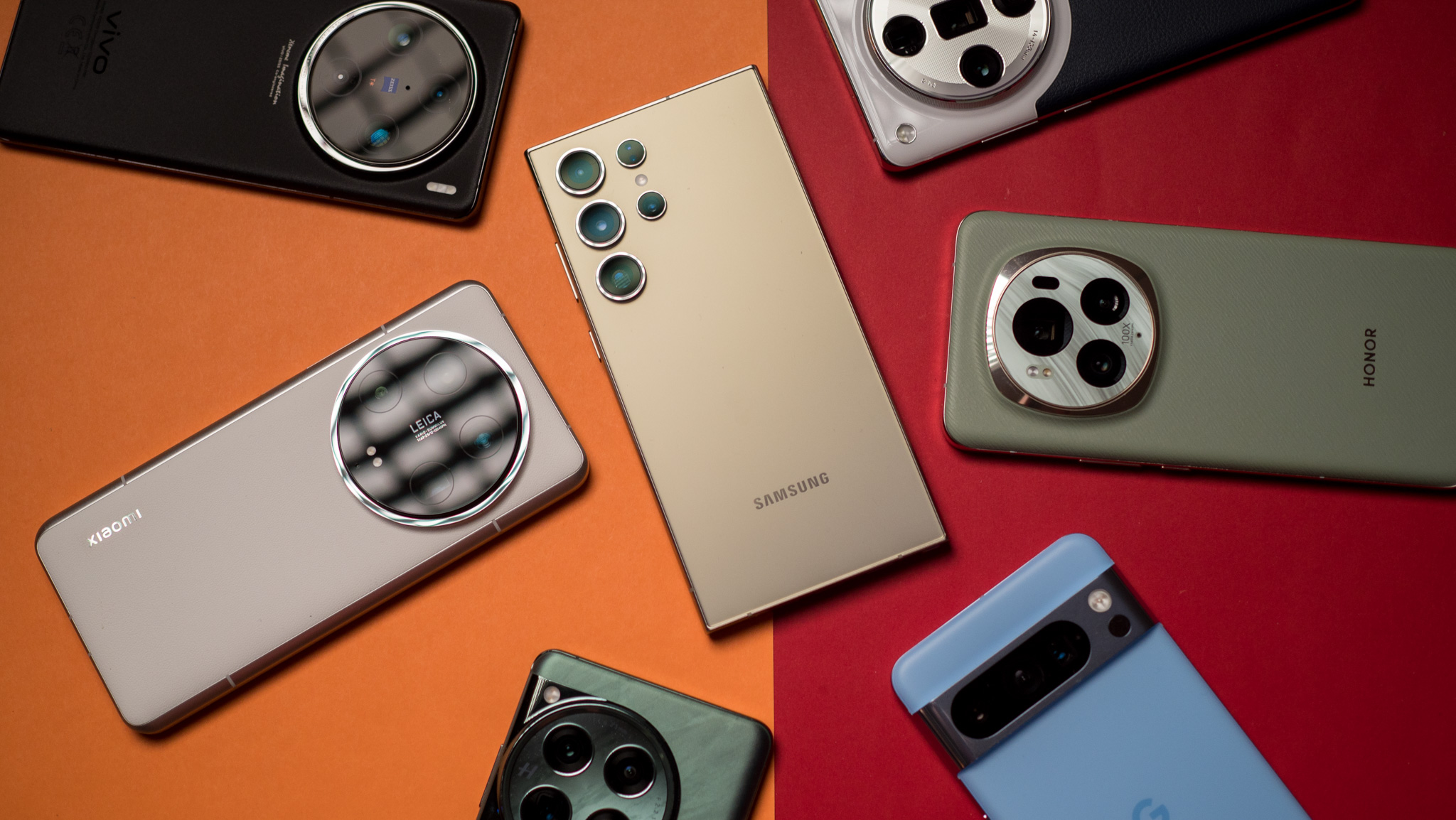
The make refers to the original equipment manufacturer (OEM) or parent brand responsible for designing and assembling the smartphone. Prominent global makes include Apple, Samsung, Google, Motorola, Xiaomi, OnePlus, Sony, and Asus. The make establishes the primary operating system ecosystem, design architecture, and official customer support framework.
2. The Model Name (Commercial Name)
The model name is the consumer-facing marketing title assigned to a specific generation or product tier. Examples include iPhone 15 Pro Max, Samsung Galaxy S24 Ultra, and Google Pixel 8a. The model name communicates general physical dimensions, screen size, release window, and core feature sets to buyers.
3. The Model Number (Hardware Variant / SKU)
The model number is an alphanumeric code assigned by the manufacturer to indicate exact technical specifications, regional radio frequency bands, carrier configurations, and internal storage capacities.
For instance:
- An Apple iPhone 15 Pro sold in the United States carries the model number A2848 (featuring satellite connectivity and no physical SIM tray), whereas the same commercial model sold in Europe or Asia carries model number A3102 (featuring a physical nano-SIM slot).
- A Samsung Galaxy S23 carry the commercial name "Galaxy S23," but its internal model number may read SM-S911B (Global unlocked variant), SM-S911U (US carrier variant), or SM-S911N (South Korean variant).
4. Serial Number and IMEI
The model number should never be confused with the Serial Number or IMEI (International Mobile Equipment Identity):
- Serial Number: A unique 8-to-12 character string generated by the factory to identify one specific physical unit for warranty and inventory tracking.
- IMEI: A globally unique 15-digit code used by cellular network operators to identify individual mobile stations on terrestrial networks. While every phone unit has its own unique IMEI and serial number, thousands of identical units share the exact same model number.
Why Knowing Your Exact Make and Model Matters
Determining your phone's exact make, model name, and alphanumeric model number is necessary for several practical technical, financial, and operational tasks.
Resell, Trade-In, and Valuation
Automated trade-in portals (such as carrier upgrade programs or third-party electronics buyers) require exact model identification. Selecting the wrong storage tier or regional variant can lead to altered quotes, delayed payouts, or rejected trade-in shipments.
Replacement Parts and Hardware Repair
If you need to replace a cracked display screen, degraded lithium-ion battery, or damaged charge port, ordering parts based solely on the commercial model name can result in purchasing incompatible components. Internal ribbon cables, battery connector pins, and screen digitizers vary substantially between regional sub-models of the same device generation.
Accessory and Case Compatibility
Physical dimensions, camera bump alignments, microphone hole cutouts, and button placements often differ by fractions of a millimeter between generation updates or variant tiers (e.g., iPhone 15 vs. iPhone 15 Pro, or Galaxy S23 vs. Galaxy S23 FE). Knowing the precise model prevents buying ill-fitting protective cases or glass screen protectors.
Carrier Band Compatibility and Unlocking
Cellular networks operate on specific LTE and 5G frequency bands. If you plan to switch network providers or travel internationally, verifying your exact model number ensures your device hardware contains the modem radios required to connect to local network frequencies.
Software Support and Firmware Flashing
Operating system updates, security patch lifespans, and custom software recovery installations depend entirely on model numbers. Attempting to flash system firmware designed for a US carrier model onto an international model can permanently disable (brick) the mobile hardware.
How to Find Phone Make and Model on Android Devices
Android runs across thousands of distinct hardware configurations. Depending on the manufacturer's software interface (such as Samsung One UI, Google Stock Android, Xiaomi HyperOS, or Motorola My UX), navigation paths vary slightly.
Method 1: Operating System Settings Menu
The most direct way to check your device details on an active Android phone is through the system settings menu:
- Open the Settings app on your Android device.
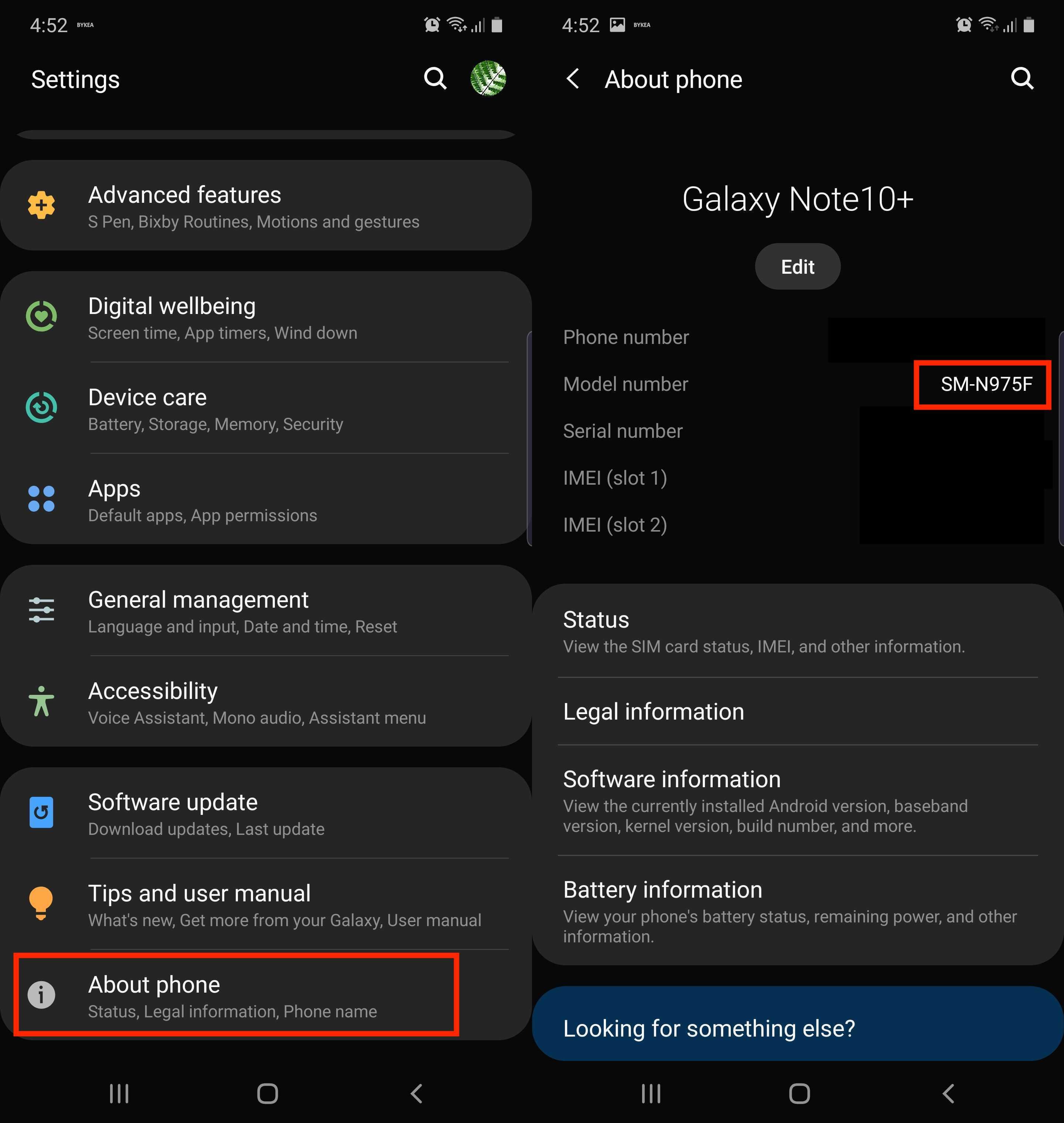
- Scroll to the bottom of the main menu and select About Phone, About Device, or System > About.
- Locate the entries titled Device Name, Model, or Hardware Info.
- Look for the technical model string (e.g., SM-G998B or Pixel 7 Pro).
On Samsung Galaxy devices running One UI, the top of the About Phone screen displays the commercial model name alongside the internal model number and IMEI. Toggling Status Information or Regulatory Information will reveal additional regional certification details.
Method 2: Inspecting Physical Hardware Markings
If the screen is unresponsive or the phone will not power on, examine the exterior physical chassis:
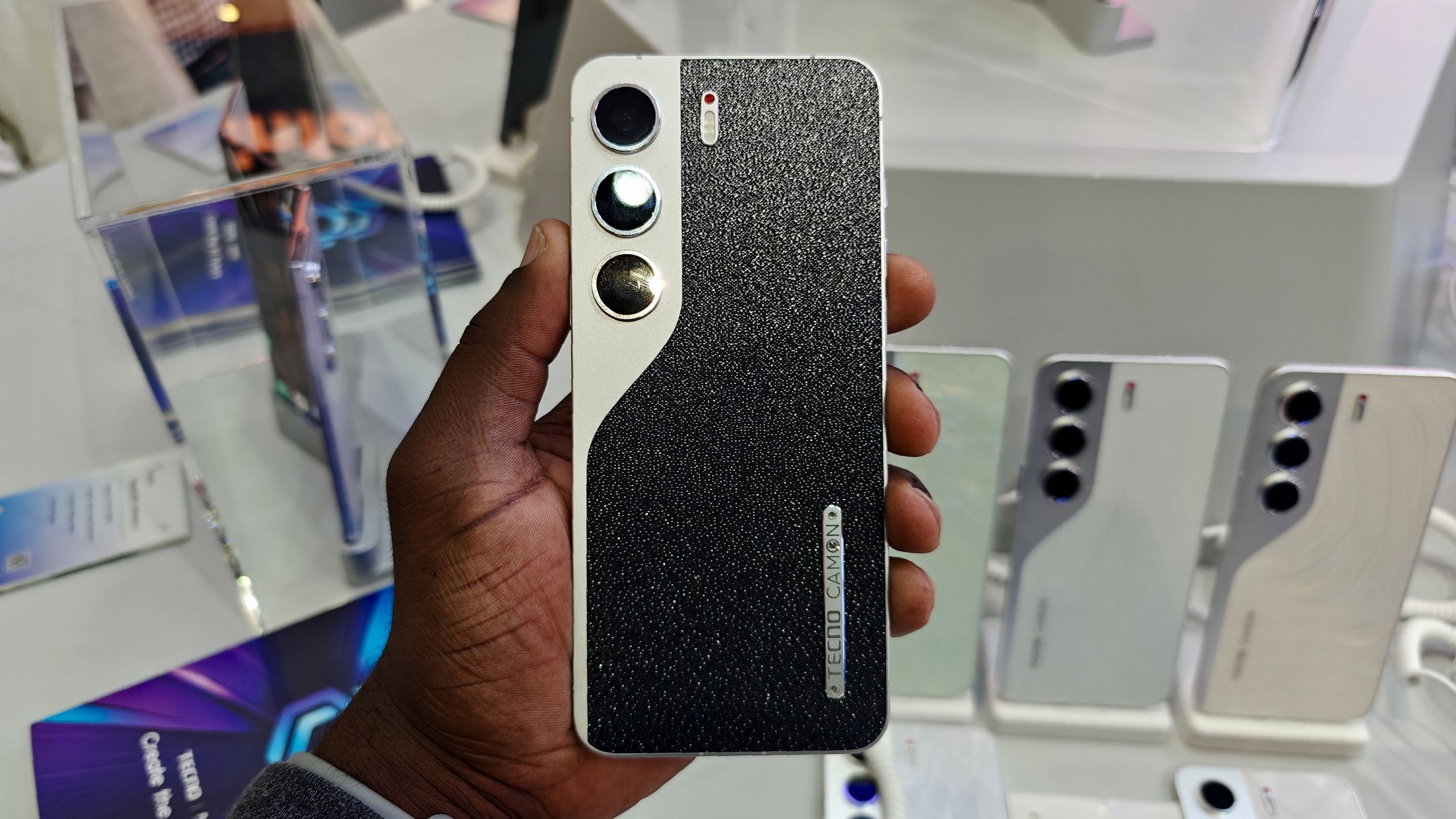
- Rear Glass or Metal Casing: Many Android manufacturers print fine, laser-etched regulatory text at the bottom of the back panel. Look for tiny print following labels such as "Model:", "Designed by Samsung," or "Made in Vietnam."
- SIM Card Tray: On modern sealed glass devices, remove the SIM tray using a SIM ejector tool. Look closely at the tray stem or inside the empty SIM slot cavity using a bright light. Manufacturers like Sony, Motorola, and Google often print the 15-digit IMEI or technical model code directly onto a plastic strip embedded within the slot.
- Removable Battery Compartment: On older or ruggedized Android phones with removable back covers, lift off the battery. A white sticker underneath the battery compartment displays the manufacturer name, exact model number, serial number, and IMEI.
Method 3: Using Android Recovery or Fastboot Mode
If your phone is stuck in a boot loop or the touch screen fails to register input, you can read hardware specifications from the system bootloader:
- Turn off the device completely.
- Press and hold the Power + Volume Down buttons simultaneously (or Power + Volume Up, depending on brand) until the screen turns on.
- The device will boot into the Android Recovery or Fastboot/Bootloader screen.
- Read the text displayed on the screen. The primary hardware code, bootloader revision, and baseband version will be listed near the top of the menu.
How to Find Phone Make and Model on Apple iPhone (iOS)
Apple provides a unified system for identifying hardware generations across all iOS devices.
Method 1: The iOS Settings Menu
To locate your iPhone's commercial model name and internal model number via software:
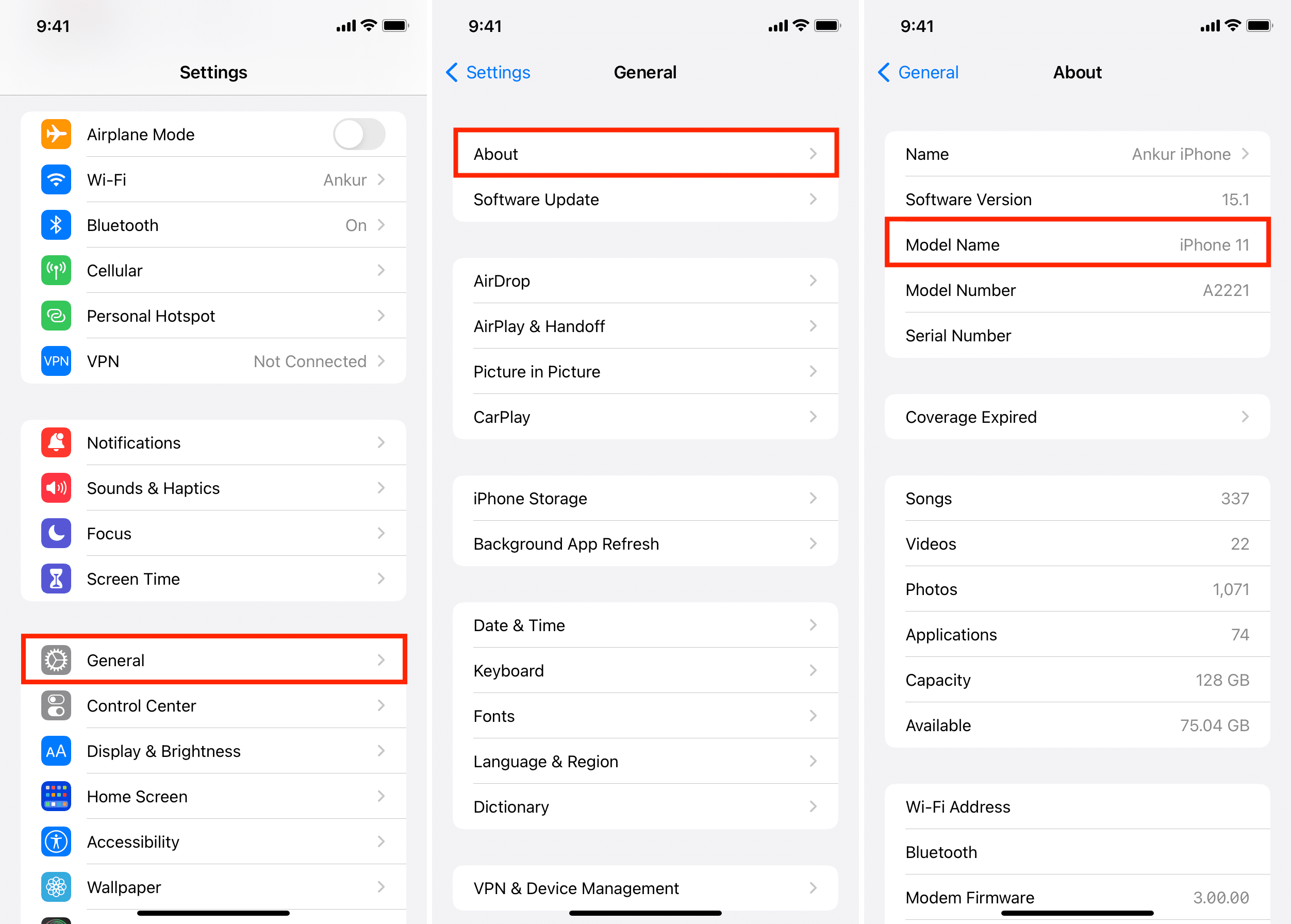
Open the Settings app.
Tap General, then tap About.
Locate the Model Name row to view the commercial title (e.g., iPhone 14 Pro).
Locate the Model Number row. By default, iOS displays an internal part number (such as MPXT3LL/A).
Tap directly on the Model Number string once. The text will switch to display the global regulatory model number, which begins with the letter "A" followed by four digits (such as A2659).
Settings
General
About
Model Number (Tap to toggle: MPXT3LL/A to A2659)
Method 2: Physical Markings on iPhone Hardware
The location of physical identification details on an iPhone depends on its release year:
- iPhone 7 and Earlier (Prior to late 2017): Flip the iPhone over. The model number is laser-etched on the lower back metal casing, formatted as
Model AXXXX. - iPhone 8 through iPhone 15 Series (With SIM Slots): Remove the SIM card tray using a paperclip or SIM tool. Hold the phone under a bright light and inspect the top lip of the SIM card slot opening. The
Model AXXXXstring is etched inside the upper housing edge. - US-Market iPhone 14, 15, and 16 Series (eSIM Only): These models omit a physical SIM slot and do not carry back-glass etchings. If the device cannot power on to show the Settings menu, hardware identification must be performed via a connected computer or carrier account portal.
Method 3: Connecting to Apple Finder or Devices App
If your iPhone screen is damaged but the internal logic board functions, connect the phone to a computer:
- Connect your iPhone to a Mac (using Finder) or a Windows PC (using the Apple Devices app or iTunes) via a Lightning or USB-C cable.
- Open the respective management application.
- Select your device from the sidebar.
- The main summary panel will display the iPhone generation, storage capacity, serial number, and internal UDID.
How to Identify a Phone That Won't Turn On or Has a Broken Screen
When a mobile device suffers catastrophic hardware failure, fluid damage, or a completely blacked-out screen, retrieving software settings is impossible. Use these alternative methods to identify the hardware:
1. Check Original Retail Packaging and Store Purchase Receipts
The retail box in which the phone was delivered contains a barcode sticker on the side or bottom panel. This label legally requires accurate hardware documentation, displaying:
- Commercial Brand and Model Name
- Internal Model Number (SKU)
- Color and Storage Capacity
- Serial Number and IMEI numbers
If you misplaced the box, review digital purchase receipts, invoice emails, or carrier equipment agreements sent at the time of purchase.
2. Query Carrier Billing Dashboards
Log into your wireless service provider's web portal (such as Verizon, AT&T, T-Mobile, Vodafone, or EE). Navigate to the Device Management, My Equipment, or Line Details tab. Wireless carriers track active devices on their network by reading the IMEI broadcast by the phone modem, which automatically maps to the exact make, model, and network capabilities of the hardware.
3. Check Cloud Device Management Dashboards
Both Apple and Google maintain online cloud portals that list every hardware unit tied to your user account:
- Apple ID Portal: Log in to appleid.apple.com or icloud.com/find. Scroll to the Devices section to view all connected iPhones, iPads, and Macs, complete with software versions and serial numbers.
- Google Find My Device: Navigate to google.com/android/find. Select your offline phone from the top device bar, then click the Device Information (gear icon) to reveal the device model name, IMEI, and first activation date.
Quick Identification Reference Matrix
The following matrix compares primary navigation paths and hardware identifier locations across major mobile ecosystems:
| Mobile Platform / OEM | Primary Settings Path | Physical Identifier Location | Cloud Account Lookup Portal |
|---|---|---|---|
| Apple iOS (iPhone) | Settings > General > About |
Inside SIM slot lip (or back casing on older models) | appleid.apple.com |
| Samsung Galaxy | Settings > About Phone |
Bottom back glass or inside SIM slot cavity | smartthingsfind.samsung.com |
| Google Pixel | Settings > About Phone |
Inside SIM tray slot stem | google.com/android/find |
| Xiaomi / Redmi / POCO | Settings > About Phone > Detailed Specs |
Rear lower casing or battery compartment sticker | i.mi.com |
| Motorola | Settings > System > About Phone |
Inside SIM tray slot or back cover etch | google.com/android/find |
| Legacy / Feature Phones | Menu > Settings > Phone Status |
Sticker beneath removable battery | N/A (Carrier Account Only) |
Common Pitfalls and Identity Misconceptions
When attempting to determine a phone’s make and model, several common technical traps can cause confusion.
1. Carrier Branding vs. True Manufacturer
Mobile network operators occasionally sell white-label devices produced by third-party original design manufacturers (ODMs). A phone branded as a "T-Mobile REVVL" or "AT&T Motivate" is marketed under the carrier's brand, but its underlying hardware make is built by OEMs like TCL, Wingtech, or Tinno. For repairs or software troubleshooting, identifying the actual OEM make is critical.
2. Marketing Names vs. Internal Sub-Models
Relying solely on marketing titles can cause compatibility errors. For example, the name "Samsung Galaxy A54" refers to an entire family of devices. However, the SM-A546B (International 5G), SM-A546U (US Carrier 5G), and SM-A5460 (China/Hong Kong) use different modem firmware, carrier configurations, and internal antenna layouts.
3. Refurbished and Re-Housed Hardware
Devices purchased through secondary marketplaces may have undergone third-party housing replacements. If an older iPhone or Android phone had its back glass replaced with a generic aftermarket panel, the physical model number etched on the rear casing may not match the actual internal motherboard. Always trust the operating system's software readout or bootloader specs over external physical etchings.
Frequently Asked Questions
What is the difference between a phone's model name and model number?
The model name is the public marketing name used by the manufacturer (e.g., iPhone 15 Pro or Samsung Galaxy S24). The model number is an internal alphanumeric code assigned to a specific hardware configuration, regional radio band set, and carrier variant (e.g., A2848 or SM-S928U).
How do I find my phone make and model if the screen is broken?
If the screen does not display image or respond to touch, you can find the make and model by inspecting the text inside the SIM card tray slot, reading the barcode label on the original retail packaging, logging into your mobile carrier's online account portal, or checking your connected Apple ID or Google Find My Device web dashboards.
Is the phone model number the same as the serial number or IMEI?
No. A model number is shared by thousands of identical devices manufactured to the same specifications. The serial number and IMEI are completely unique 1-to-1 identifiers assigned to a single physical hardware unit for inventory tracking and cellular network registration.
Why does my phone show a different model name in software than on the retail box?
This occurs when a phone runs localized or carrier-customized firmware. The retail box typically displays the standard consumer marketing title, while system software diagnostic tools may display the underlying hardware code name (such as Pixel 8 appearing internally as Shiba).
Can two different phone brands share the exact same model number?
While rare, alphanumeric overlap can occur across unrelated manufacturers because model numbers are created internally by each vendor. However, no two devices share the same manufacturer name (make) and model number combination.
Recommended Next Actions
Once you have identified your phone's make, model name, and specific model number, save these details for future reference:
- Record the Identifier: Write down the full model number, serial number, and IMEI, and store them securely in a password manager or digital note.
- Verify Compatibility Before Purchasing: When buying replacement screens, battery kits, or protective cases, match the vendor's compatible parts list against your specific model number, not just the commercial model name.
- Check Carrier Specs: If switching cellular providers, enter your exact model number or IMEI into the new carrier's online compatibility checker to ensure full 5G, VoLTE, and eSIM network support.
Image Gallery