Understanding Public IP Meaning: A Comprehensive Guide to Internet Connectivity
A public IP address is a unique numerical identifier assigned to your network hardware by your Internet Service Provider (ISP). It serves as your digital "home address" on the global internet, allowing data sent from external servers t...
A public IP address is a unique numerical identifier assigned to your network hardware by your Internet Service Provider (ISP). It serves as your digital "home address" on the global internet, allowing data sent from external servers to find and communicate directly with your specific router or gateway.
Contents
In the complex architecture of global networking, understanding the public IP meaning is essential for anyone looking to manage home servers, secure their online privacy, or troubleshoot connectivity issues. As of 2026, the landscape of IP addressing continues to shift from the traditional IPv4 standard toward the more expansive IPv6, making it more important than ever to understand how these identifiers function and why they are the backbone of the modern internet.
The Hierarchy of Internet Addressing
The distribution of public IP addresses is not a random process. It follows a strict global hierarchy managed by the Internet Assigned Numbers Authority (IANA). This organization oversees the global pool of IP addresses and distributes them to five Regional Internet Registries (RIRs) based on geographical location:
- ARIN: North America
- RIPE NCC: Europe, the Middle East, and parts of Central Asia
- APNIC: Asia Pacific
- AFRINIC: Africa
- LACNIC: Latin America and the Caribbean
These RIRs then allocate blocks of addresses to Internet Service Providers. When you sign up for a residential or business internet plan, your ISP assigns one (or more) of these public addresses to your modem or router. This address is what the rest of the world sees when you visit a website, send an email, or stream a video. Without a public IP, your local network would be an "island," unable to request or receive data from the wider web.
Public vs. Private IP Addresses: The Essential Distinction
One of the most common points of confusion is the difference between a public IP and a private IP. To understand this, imagine a large office building. The street address of the building is the public IP—it is how the post office finds the building. The room numbers inside the building are the private IPs—they are how people inside the building find each other.
Private IP Addresses
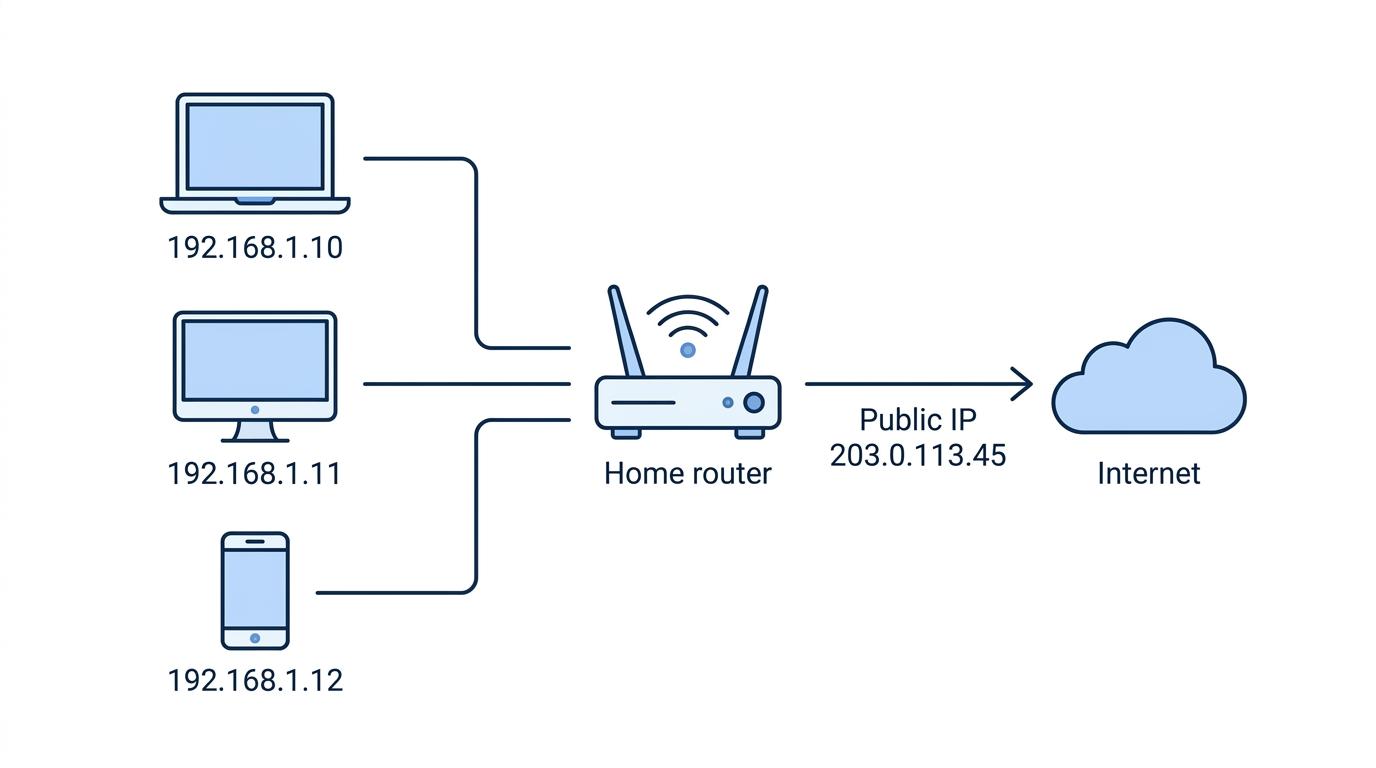
Your router creates a Local Area Network (LAN) inside your home or office. Every device connected to that router—your laptop, smartphone, smart fridge, and gaming console—is assigned a private IP address. These usually follow specific ranges reserved for private use, such as 192.168.x.x or 10.0.x.x. These addresses are not visible to the outside world and can be reused across millions of different homes.
Public IP Addresses
The public IP is assigned to the "WAN" (Wide Area Network) port of your router. When a device on your private network wants to access a website, the router uses a process called Network Address Translation (NAT). The router takes the request from your laptop (private IP), "repackages" it with the router’s public IP, and sends it to the internet. When the website sends the data back, the router knows which internal device requested it and forwards the data accordingly.
This distinction is vital for security. Because private IPs are hidden behind the public IP and the router's firewall, external hackers cannot easily target a specific device inside your home unless you specifically open a "port" to allow that traffic.
Types of Public IP Addresses: Static and Dynamic
Not all public IP addresses behave the same way. Depending on your ISP and your service contract, you may be assigned either a dynamic or a static address.
Dynamic IP Addresses
Most residential internet connections use dynamic IP addresses. As the name suggests, these addresses can change periodically. Your ISP maintains a pool of addresses and assigns them to customers using the Dynamic Host Configuration Protocol (DHCP).
- Why they are used: ISPs use dynamic addressing because it is more efficient. Since not every customer is online at the same time, the ISP can "recycle" addresses.
- Implications: For the average user, a changing IP address doesn't matter. However, if you are trying to host a website or a webcam from home, a changing IP makes it difficult for others to find your server.
Static IP Addresses
A static IP address never changes. It is permanently assigned to your account.
- Who needs them: Businesses, gamers hosting their own servers, and professionals who need reliable remote access to their systems.
- Cost and Availability: In 2026, static IPv4 addresses have become increasingly expensive due to scarcity. Many ISPs now charge a premium monthly fee for a static IP, or they may only offer them on business-tier plans.
The Evolution of Standards: IPv4 vs. IPv6 in 2026
The world is currently in a long-term transition between two versions of the Internet Protocol.
The IPv4 Limitation
IPv4 (Internet Protocol version 4) uses a 32-bit numbering scheme, which allows for approximately 4.3 billion unique addresses. While that sounded like a lot in the 1980s, the explosion of smartphones, IoT devices, and always-on connectivity led to "address exhaustion." By the early 2020s, the global supply of unallocated IPv4 addresses was effectively depleted.
The IPv6 Solution
IPv6 was designed to solve this problem permanently. It uses a 128-bit address, which looks like a string of hexadecimal numbers (e.g., 2001:0db8:85a3:0000:0000:8a2e:0370:7334). The number of possible IPv6 addresses is roughly 340 undecillion—enough to give every atom on the surface of the Earth its own IP address.
By 2026, most major ISPs have implemented "dual-stack" networking, where your router receives both a legacy IPv4 address (often shared with other users via Carrier-Grade NAT) and a unique, permanent IPv6 address. IPv6 eliminates the need for complex NAT configurations, potentially increasing the speed and efficiency of end-to-end communication.
Comparing Public and Private IP Characteristics
The following table summarizes the key differences between the two types of addresses that govern your connectivity.
| Feature | Public IP Address | Private IP Address |
|---|---|---|
| Scope | Global (the entire internet) | Local (your home or office network) |
| Assignment | Assigned by your ISP | Assigned by your local router |
| Uniqueness | Must be unique globally | Unique only within the local network |
| Visibility | Visible to all websites and servers | Hidden from the outside world |
| Cost | Included in ISP fee (Static costs extra) | Free (managed by your hardware) |
| Format Example | 93.184.216.34 (IPv4) |
192.168.1.5 |
Security and Privacy Implications
Your public IP address is a piece of metadata that can reveal a surprising amount of information about you. While it does not show your name or exact street address, it can be used to pinpoint your approximate geographic location (City and ZIP code) and identify your ISP.
Potential Risks
- Targeted Attacks: If a malicious actor knows your public IP, they can perform "port scanning" to look for vulnerabilities in your router’s security.
- DDoS Attacks: Distributed Denial of Service (DDoS) attacks involve flooding a specific public IP with so much traffic that the internet connection becomes unusable. This is a common issue in competitive online gaming.
- Tracking: Advertisers and websites use your IP address to build a profile of your browsing habits and serve localized ads.
How to Protect Your Public IP
Many users choose to mask their public IP to enhance their privacy.
- Virtual Private Networks (VPNs): A VPN creates an encrypted tunnel between your device and a remote server. To the rest of the internet, your public IP appears to be the IP of the VPN server, not your home router.
- Proxy Servers: Similar to VPNs, proxies act as intermediaries, though they often lack the full encryption provided by a VPN.
- Tor Browser: This specialized browser routes your traffic through multiple volunteer-run nodes, making it nearly impossible to trace your original public IP.
How to Find Your Public IP Address
Checking your public IP is a straightforward process. Because the public IP exists on the "outside" of your router, you cannot usually find it by looking at your computer's internal network settings.
- Search Engines: The fastest way is to go to a search engine like Google or DuckDuckGo and type "What is my IP?" The result will be displayed at the top of the page.
- Specialized Websites: Sites like
WhatIsMyIP.comorIPChicken.comprovide your IP address along with details about your ISP and estimated location. - Router Interface: You can log in to your router’s administrative console (usually by typing
192.168.1.1or192.168.0.1in your browser) and look for the "WAN Status" page. - Command Line: On Windows, you can use the command
curl ifconfig.mein the Command Prompt to see your public IP directly in the terminal.
Frequently Asked Questions
Can two devices have the same public IP address?
Yes, and this is actually the standard setup for most homes. All devices connected to your home Wi-Fi share the single public IP address assigned to your router. The router uses Network Address Translation (NAT) to manage the traffic so that data goes to the correct individual device. However, no two routers or gateways on the global internet can have the same public IP at the same time.
Does my public IP change when I restart my router?
If you have a dynamic IP address (which most people do), restarting your router or modem can sometimes trigger the ISP to assign you a new address from their pool. However, many modern ISPs use "sticky" dynamic addresses, where your lease on a specific IP is tied to your hardware's MAC address and may stay the same for months, even through restarts.
Can someone find my physical home address using my public IP?
Not usually. A public IP reveals your ISP and your general city or region. Only your ISP knows exactly which customer was using a specific IP at a specific time. In most jurisdictions, ISPs will only release your name and physical address to law enforcement agencies if they have a valid subpoena or warrant.
Why does my IP address show I'm in a different city?
IP geolocation is not an exact science. Databases map IP ranges to geographic locations based on where the ISP’s infrastructure is registered. If your ISP routes your traffic through a major data center in a neighboring city, geolocation services may report that city as your location rather than your actual town.
What is the difference between a Public IP and a WAN IP?
In most home networking contexts, "Public IP" and "WAN IP" refer to the same thing. The WAN (Wide Area Network) port on your router is the interface that connects to the internet, and the address assigned to that port is your public IP.
Practical Recommendation for 2026
If you are a standard home user, your current dynamic public IP configuration is likely sufficient for your needs. However, if you are planning to set up a home office, host a private cloud (like Nextcloud), or use high-definition security cameras, you should check if your ISP provides a Static IPv6 address.
Unlike IPv4, where static addresses are scarce and expensive, many ISPs in 2026 provide stable IPv6 prefixes as part of their standard service. This allows for easier remote access without the need for complex "Dynamic DNS" (DDNS) workarounds. Always ensure your router's firewall is active and up to date, as having a globally reachable public IP (especially in an IPv6 environment) makes robust device-level security a non-negotiable requirement.
Image Gallery