Dua Lipa TV Box Overview: Features, Performance, and Setup Guide
The Dua Lipa TV Box is a third-party Android-based media player designed to provide high-definition streaming and versatile app support for home entertainment systems. While not an official celebrity-endorsed product, this hardware has...
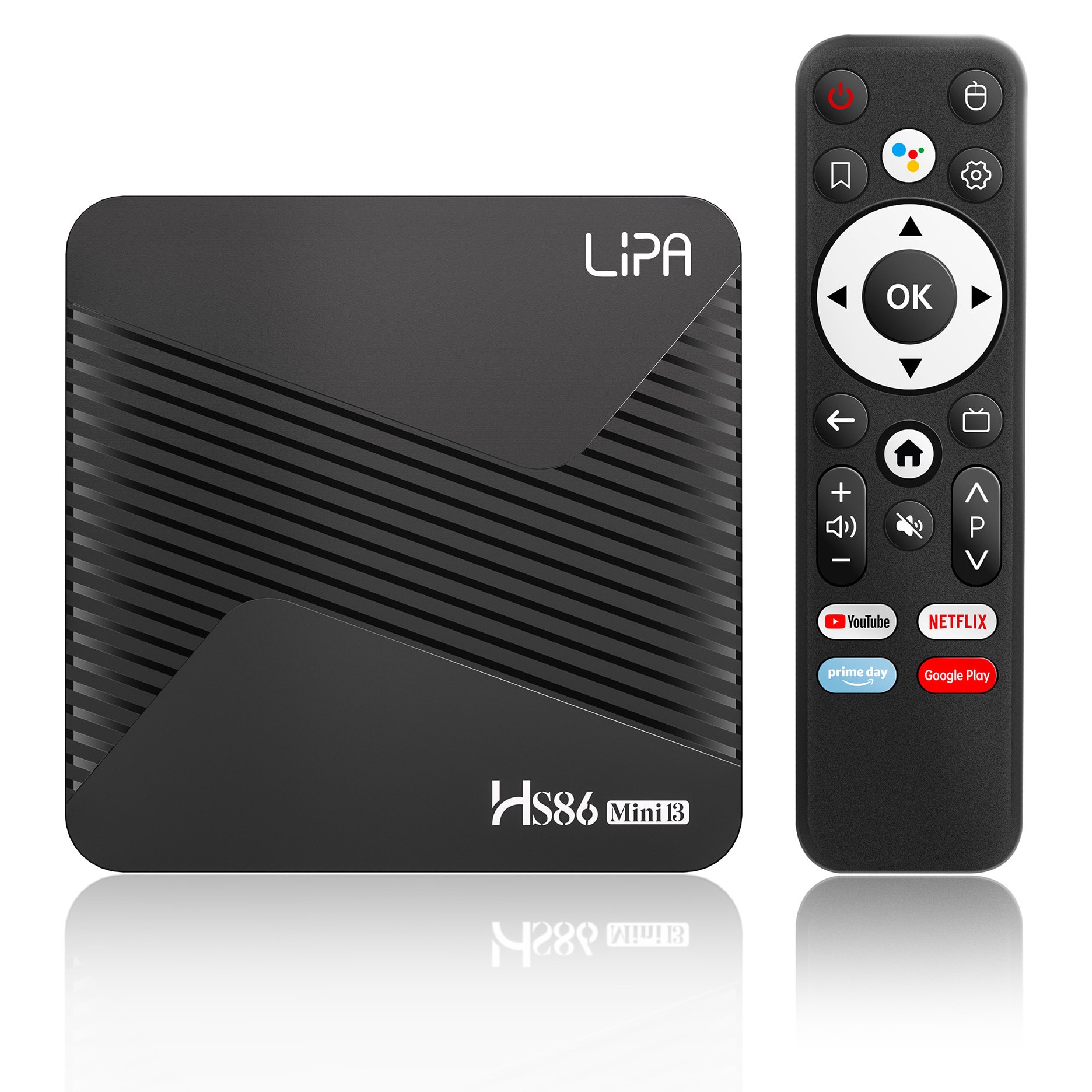
The Dua Lipa TV Box is a third-party Android-based media player designed to provide high-definition streaming and versatile app support for home entertainment systems. While not an official celebrity-endorsed product, this hardware has gained niche popularity as a budget-friendly 4K streaming solution, offering a customizable Android interface, multiple peripheral ports, and broad compatibility with various digital content formats.
Contents
The market for Android TV boxes has expanded significantly by 2026, with consumers seeking alternatives to locked-down ecosystems like those found in proprietary smart TV OS builds. The Dua Lipa TV Box enters this space as a "white-label" or rebranded hardware solution, often utilized by distributors to provide a pre-configured streaming experience. Understanding the technical specifications, software limitations, and performance metrics is essential before integrating this device into a modern home theater setup.
Understanding the Hardware: System on a Chip (SoC) and Architecture
At the heart of the Dua Lipa TV Box is typically an Amlogic or Rockchip processor, which are the industry standards for mid-range media players. As of 2026, most versions of this device utilize the Amlogic S905 series or similar, which provides four ARM Cortex-A53 or A55 cores. This architecture is optimized for power efficiency and video decoding rather than raw computational power, making it ideal for a dedicated streaming environment.
The Graphics Processing Unit (GPU) is usually a Mali-G31 MP2. While this GPU is not intended for high-end mobile gaming, it is more than capable of handling 4K UI rendering and basic 2D/3D applications found on the Google Play Store. The primary focus of the hardware is the Video Processing Unit (VPU), which supports hardware decoding for modern codecs such as AV1, H.265 (HEVC), and VP9 Profile-2. Support for AV1 is particularly important in 2026, as most major streaming platforms have transitioned to this codec to reduce bandwidth consumption without sacrificing image quality.
Memory and Storage Configuration
The Dua Lipa TV Box generally ships in two primary configurations:
- 2GB RAM / 16GB Storage: Suitable for users who primarily stream from apps like YouTube, Twitch, or local network Plex servers.
- 4GB RAM / 32GB or 64GB Storage: Recommended for users who intend to install numerous applications, store small media libraries locally, or use the device as a light retro-gaming console.
The use of DDR3 or DDR4 RAM significantly impacts the fluidness of the user interface. In 2026, models equipped with DDR4 RAM are preferred as they handle multitasking—such as switching between a live sports stream and a web browser—with much lower latency.
Software Environment and User Interface
One of the most critical aspects of the Dua Lipa TV Box is its operating system. Unlike "Android TV" or "Google TV" devices (like the Chromecast or Shield TV), many of these generic boxes run a standard mobile version of Android modified with a "Leanback" launcher.
Mobile Android vs. Android TV OS
Using a mobile version of Android on a television presents a unique set of challenges and advantages:
- App Compatibility: You have access to the full Google Play Store, meaning you can install apps that are usually restricted on official Android TV devices (such as certain browsers or specialized utility apps).
- Navigation: Because the OS thinks it is on a tablet or phone, some apps may require a "mouse toggle" or a wireless air mouse to navigate effectively. The standard directional pad on the included remote may not work in every menu.
- Customization: Users can install third-party launchers like Wolf Launcher or ATV Launcher to clean up the interface and remove any pre-installed bloatware or advertisements.
In the current 2026 landscape, these devices typically ship with Android 12 or 13. While manufacturers rarely provide over-the-air (OTA) updates for generic boxes, the underlying Android version is usually modern enough to support app updates for several years.
Connectivity and Peripheral Support
The physical design of the Dua Lipa TV Box prioritizes connectivity, often outperforming mainstream "sticks" that only offer a single HDMI plug. This makes it a preferred choice for users with extensive local media collections or those who require a stable wired internet connection.
Input/Output (I/O) Overview
- HDMI 2.1: Supports 4K output at 60fps with HDR10+ and HLG (Hybrid Log-Gamma) support.
- Ethernet Port (RJ45): Usually a 10/100 Mbps port, though some "Pro" versions may feature Gigabit Ethernet. A wired connection is highly recommended for streaming high-bitrate 4K REMUX files.
- USB Ports: Typically features one USB 2.0 and one USB 3.0 port. These are essential for connecting external hard drives, keyboards, or game controllers.
- MicroSD Slot: Allows for storage expansion, which is useful if the internal 16GB or 32GB fills up quickly with app data.
- Optical Audio (S/PDIF): Provides a direct digital audio connection to older soundbars or AV receivers that do not support HDMI ARC/eARC.
Wireless Standards
The device generally supports Dual-Band Wi-Fi (2.4GHz / 5GHz). In the 2026 market, it is vital to ensure the box supports at least Wi-Fi 5 (802.11ac) to handle the data loads required for 4K streaming. Bluetooth 5.0 is also standard, allowing for the connection of wireless headphones or Bluetooth speakers for private listening.
Performance Comparison: Dua Lipa TV Box vs. Competitors
To better understand where the Dua Lipa TV Box sits in the market, it is helpful to compare it to established streaming devices available in 2026.
| Feature | Dua Lipa TV Box | Amazon Fire TV Stick 4K | Xiaomi Mi Box S (Gen 2) |
|---|---|---|---|
| OS Type | Android (Mobile/AOSP) | Fire OS (Modified Android) | Google TV |
| Google Play Store | Full Access | Limited (Amazon Appstore) | Official TV Version |
| Expandable Storage | Yes (USB + MicroSD) | Limited (OTG Cable Required) | Yes (USB Only) |
| Widevine DRM | Usually L3 (SD/720p) | L1 (4K/Ultra HD) | L1 (4K/Ultra HD) |
| Max Resolution | 4K @ 60fps | 4K @ 60fps | 4K @ 60fps |
| Customizability | High (Root friendly) | Low (Locked Bootloader) | Medium |
The "Widevine" Limitation: A Critical Warning
A significant factor that potential users must understand is the Widevine DRM (Digital Rights Management) level. Most mainstream streaming services like Netflix, Disney+, and Prime Video require Widevine L1 certification to play content in 4K or even 1080p.
Because the Dua Lipa TV Box is often an uncertified generic device, it typically carries Widevine L3. This means that even if the box is capable of 4K output, these specific premium apps may limit playback to Standard Definition (480p or 720p).
Who is this box for? If your primary goal is using Netflix and Disney+, this box may not be the best choice. However, if you use apps like YouTube, Kodi, Stremio, Plex, or IPTV services, which do not rely on Widevine L1 for high-definition playback, the Dua Lipa TV Box performs exceptionally well.
Setup and Optimization Guide
Setting up the Dua Lipa TV Box is straightforward, but optimization is required to get the best performance.
Initial Configuration
- Connection: Connect the HDMI cable to your TV and the power adapter to a wall outlet. If possible, plug in an Ethernet cable for the most stable experience.
- Language and Wi-Fi: Follow the on-screen prompts to select your language and connect to your wireless network.
- Google Account: Sign in to the Google Play Store to enable app downloads and synchronization.
Recommended Optimizations
- Developer Options: Go to Settings > About Device and click "Build Number" seven times. In the newly unlocked Developer Options, set "Window animation scale," "Transition animation scale," and "Animator duration scale" to 0.5x. This makes the interface feel significantly snappier.
- External Storage: If using a MicroSD card, format it as "Internal Storage" when prompted to allow apps to be installed directly onto the card.
- Debloat: Remove or disable any pre-installed apps you do not recognize or intend to use. This frees up system RAM for your active streaming applications.
Troubleshooting Common Issues
Even in 2026, Android boxes can encounter occasional software glitches. Here are the most common solutions for the Dua Lipa TV Box:
- Buffering in 4K: Ensure you are using the 5GHz Wi-Fi band or a wired Ethernet connection. If the issue persists, check if the video codec of the file is supported for hardware acceleration in your media player settings (e.g., VLC or MX Player).
- Remote Not Responding: Most included remotes are IR (Infrared). Ensure there is a clear line of sight to the box. If you are using a Bluetooth remote, try unpairing and repairing it in the Bluetooth settings menu.
- Screen Flickering: This is often caused by an inferior HDMI cable. Ensure you are using an "Ultra High Speed" HDMI 2.1 cable, especially if you are attempting to run HDR content at 60Hz.
- App Crashes: Clear the cache of the specific app in Settings > Apps. If the crash continues, check for an update in the Play Store or reinstall the application.
Frequently Asked Questions
Is the Dua Lipa TV Box an official product from the singer Dua Lipa?
No. There is no evidence of an official partnership or hardware line released by the artist. In the electronics market, it is common for generic manufacturers to use popular names or trending search terms to brand their devices for better visibility in online marketplaces.
Can I watch Netflix in 4K on this device?
Generally, no. Most Dua Lipa TV Box models lack the Widevine L1 certification and Netflix ESN (Electronic Serial Number) required for 4K playback. Netflix will likely be limited to 480p or 720p. For 4K Netflix, a certified device like a Shield TV or Fire Stick is required.
Does it support voice search?
This depends on the remote included in the package. Many versions of this box ship with a basic IR remote that does not have a microphone. However, since the box has USB ports and Bluetooth, you can add a third-party G20 or G30 "Air Mouse" with a built-in microphone to enable Google Assistant voice search functionality.
Is it legal to use the Dua Lipa TV Box?
The hardware itself is entirely legal, as it is simply an Android computer for your TV. However, the legality of how it is used depends on the content accessed. Using it for legitimate apps like YouTube, Plex, and legal streaming services is encouraged. Using it to access copyrighted content through unauthorized IPTV services or pirated streaming apps may violate local laws.
Can I play games on the Dua Lipa TV Box?
Yes, it can handle casual Android games like Crossy Road or Asphalt 8. It is also a popular choice for retro gaming emulation (NES, SNES, Genesis, and PS1). For a better gaming experience, it is recommended to pair a Bluetooth controller.
Final Recommendation
The Dua Lipa TV Box is a specialized tool for a specific type of user. If you are an enthusiast who values I/O ports, local file playback, and OS flexibility, this device offers excellent value for its price point in 2026. It excels as a Kodi box, a Plex client, or a versatile tool for playing media from external hard drives.
However, for the average consumer who primarily relies on mainstream, subscription-based streaming services (Netflix, HBO Max, Disney+), the lack of official DRM certifications may be a dealbreaker. In those cases, opting for a certified "name-brand" streamer remains the more reliable path for a high-definition experience.
Image Gallery