The Best YouTube Channels to Learn Excel for Beginners
Finding the right YouTube channels to learn Excel for beginners can turn a frustrating spreadsheet experience into an intuitive, productive skill set. The best channels for novices combine clear step-by-step instruction, practical real...
Finding the right YouTube channels to learn Excel for beginners can turn a frustrating spreadsheet experience into an intuitive, productive skill set. The best channels for novices combine clear step-by-step instruction, practical real-world examples, and patient explanations of fundamental concepts like basic formulas, data sorting, and cell formatting without overwhelming you with advanced macros.
Contents
Microsoft Excel remains one of the most ubiquitous tools in the modern workplace, yet learning it from scratch can feel daunting. While textbooks and formal courses offer structured learning, YouTube provides a free, highly visual, and infinitely rewindable alternative. Whether you are preparing for a job interview, trying to organize your personal finances, or looking to boost your administrative productivity, selecting the right digital instructor is crucial. This guide explores the premier YouTube channels tailored specifically for beginners, evaluating their teaching styles, core strengths, and structural approaches to help you master spreadsheet fundamentals.
Understanding the Landscape of Excel Education on YouTube
The ecosystem of Excel tutorials on YouTube ranges from lightning-fast tips for professionals to deep, foundational curricula for absolute beginners. When starting your spreadsheet journey, it is vital to distinguish between creators who focus on quick shortcuts and those who build comprehensive conceptual understanding. Beginners require instructors who explain why a formula works, not just what buttons to click.
Choosing the right channel depends heavily on your learning style. Some learners prefer bite-sized, thirty-second shorts that solve an immediate problem, while others thrive in structured, multi-hour video courses that mirror a classroom environment. Before committing to a channel, consider your primary objective. Are you trying to pass a specific pre-employment assessment, or are you building your data literacy from the ground up? Clarifying this goal prevents tutorial fatigue and ensures steady progression from simple arithmetic to dynamic data visualization.
Top YouTube Channels for Beginner Excel Learners
Several standout creators have built reputations for making Microsoft Excel accessible, engaging, and easy to retain for novices. The following channels offer exceptional introductory content, clear pacing, and structured playlists designed to take you from a blank grid to confident data management.
ExcelIsFun
Run by Mike Girvin, ExcelIsFun is widely regarded as one of the most thorough and pedagogically sound channels on the platform. Girvin treats his viewers like college students, starting with the absolute basics and systematically building up complex skills.
- Teaching Style: Methodical, highly detailed, and concept-driven. Girvin explains the underlying logic of functions rather than just showing keystrokes.
- Best For: Learners who want a deep, comprehensive understanding of how Excel operates under the hood.
- Key Playlists: His foundational series covers basic arithmetic, cell referencing, and simple functions before moving into intermediate territory.
Kevin Stratvert
Kevin Stratvert brings a corporate training background to his channel, focusing on practical, digestible tutorials that solve everyday problems. Formerly a Microsoft employee, Stratvert has an innate knack for explaining features with extreme clarity and minimal jargon.
- Teaching Style: Friendly, fast-paced, and highly visual, often utilizing screen-in-screen demonstrations to keep viewers engaged.
- Best For: Busy beginners who want quick wins, practical workflow hacks, and clear answers to specific questions.
- Key Playlists: His "Excel for Beginners" and "10 Tips Every Excel User Should Know" series are essential viewing for anyone opening a spreadsheet for the first time.
MyOnlineTrainingHub
MyOnlineTrainingHub, hosted by Mynda Treacy, provides clean, professional, and beautifully structured tutorials. Treacy focuses on business applications, making this channel ideal for individuals looking to apply Excel skills directly to office environments.
- Teaching Style: Professional, structured, and direct, emphasizing clean design principles alongside technical functionality.
- Best For: Office workers, administrative professionals, and career switchers who need practical business-oriented spreadsheet skills.
- Key Playlists: Beginner-targeted playlists that cover formatting, basic conditional formatting, and introductory data organization.
Leila Gharani
Leila Gharani’s channel bridges the gap between basic utility and polished professional presentation. While she covers advanced topics, her beginner tutorials are legendary for their modern aesthetic and crystal-clear explanations of how to avoid common rookie mistakes.
- Teaching Style: Modern, polished, and focused on efficiency, aesthetics, and practical business scenarios.
- Best For: Visual learners who care about professional presentation, clean formatting, and modern spreadsheet design.
- Key Playlists: Introductory tutorials focusing on core shortcuts, layout design, and essential lookup functions explained simply.
Comparison of Leading Beginner Excel Channels
| Channel Name | Primary Instructor | Core Teaching Focus | Best Suited For |
|---|---|---|---|
| ExcelIsFun | Mike Girvin | Comprehensive fundamentals and conceptual logic | Deep, academic-style learning |
| Kevin Stratvert | Kevin Stratvert | Quick tips, practical workflows, and software basics | Fast-paced, practical skill acquisition |
| MyOnlineTrainingHub | Mynda Treacy | Business-focused productivity and data management | Workplace readiness and career skills |
| Leila Gharani | Leila Gharani | Modern design, efficiency, and error prevention | Visual learners and professional styling |
Essential Prerequisites Before You Start Watching
Jumping straight into complex financial models without understanding the physical layout of Excel will lead to frustration. Before diving deep into these YouTube channels, familiarize yourself with the basic terminology of the interface:
- Workbook and Worksheet: Understand that an Excel file is a workbook containing one or more individual worksheets (the grids).
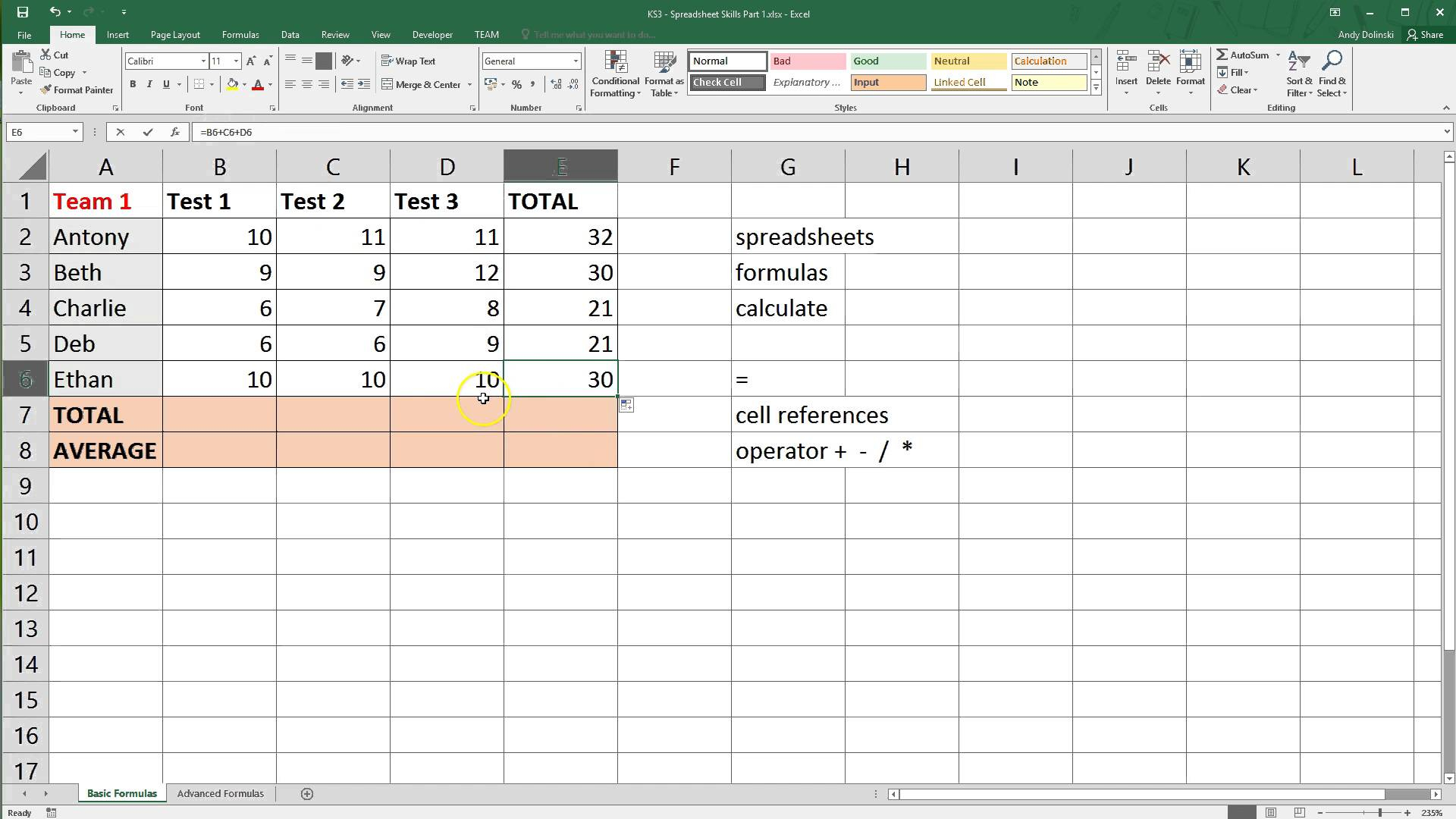
- Rows and Columns: Rows run horizontally and are identified by numbers (1, 2, 3); columns run vertically and are identified by letters (A, B, C).
- Cells and Cell Addresses: The intersection of a row and a column creates a cell (e.g., cell A1), which is the fundamental container for data.
- The Formula Bar: Recognize where formulas and text are entered and edited above the primary grid.
Having a dual-monitor setup or splitting your screen between the YouTube tutorial and a blank Excel workbook is the single most effective way to practice. Passive watching yields minimal retention; active, simultaneous execution builds muscle memory.
Step-by-Step Roadmap for Absolute Beginners
To maximize your time on YouTube, follow a structured progression rather than jumping randomly between unrelated videos.
Step 1: Master Data Entry and Formatting
Begin with videos that teach you how to type text, format numbers as currency or percentages, adjust column widths, and apply borders and background fills. A well-formatted spreadsheet prevents misinterpretation of data.
Step 2: Learn Basic Arithmetic and Simple Formulas
Move on to understanding that every formula in Excel begins with an equals sign (=). Practice basic addition, subtraction, multiplication, and division using cell references rather than hardcoded numbers (e.g., writing =A1+B1 instead of =10+20).
Step 3: Explore Foundational Functions
Once comfortable with basic operators, learn core functions like SUM, AVERAGE, COUNT, MIN, and MAX. Watch how instructors handle ranges of cells (e.g., =SUM(A1:A10)).
Step 4: Introduction to Sorting and Filtering
Learn how to organize your data tables by sorting alphabetically or numerically, and use basic filters to display only the rows that meet specific criteria.
Common Mistakes Beginners Make
Learning Excel independently via video tutorials presents a few common pitfalls that can stunt your progress. Avoiding these traps will accelerate your learning curve.
- Hardcoding Values: Typing final numbers into formulas instead of referencing the cells containing those numbers defeats the dynamic power of spreadsheets.
- Ignoring Keyboard Shortcuts: Relying entirely on the mouse slows down workflow significantly. Pay attention when instructors mention shortcuts like
Ctrl+C,Ctrl+V, orCtrl+Z. - Skipping Practice Files: Many creators provide downloadable practice workbooks in their video descriptions. Failing to download and use these files severely limits hands-on retention.
- Rushing into Advanced Topics: Attempting to learn macros, Power Query, or complex nested
XLOOKUPformulas before mastering relative versus absolute cell references ($A$1) leads to confusion.
Frequently Asked Questions
Can I really learn Excel entirely for free on YouTube?
Yes. YouTube hosts thousands of hours of world-class, structured instruction that rivals paid online courses. The key is maintaining discipline, following structured playlists, and actively practicing alongside the videos rather than watching passively.
Do I need to buy Microsoft Excel, or can I use free alternatives?
While the desktop version of Microsoft Excel offers the most robust feature set, you can learn and practice most basic to intermediate concepts using Microsoft 365 for the web (which is free) or Google Sheets, though menu layouts and some advanced function names may vary slightly.
How long does it take a beginner to become proficient in Excel?
Consistency matters more than total elapsed time. Dedicating thirty minutes a day to watching tutorials and practicing alongside them will typically take a beginner from total novice to confident everyday user within four to six weeks.
Should I start with Excel or Google Sheets?
If your goal is corporate employment, start with Microsoft Excel, as it remains the corporate global standard. However, the underlying logic, formula syntax, and data principles learned in Google Sheets translate directly to Excel and vice versa.
Are these YouTube channels updated for current software versions?
Reputable creators regularly update their foundational playlists to reflect modern features in Microsoft 365. However, basic arithmetic, cell referencing, and core functions like SUM and AVERAGE have remained fundamentally unchanged for decades.
Recommended Next Actions
To begin your Excel journey today, select one channel from this guide that matches your learning style—such as Kevin Stratvert for quick, practical tips or ExcelIsFun for deep conceptual learning. Open a blank spreadsheet on one half of your screen, search for their beginner playlist, download the practice workbook if available, and commit to completing the first three introductory videos without distraction.
Image Gallery