Why Scary FaceTime Numbers Keep You on Edge: The Psychology and Security Behind Unwanted Calls
Scary FaceTime numbers keep you on edge because video calls bypass traditional communication boundaries, forcing an immediate fear of visual exposure and privacy invasion. Unlike standard audio spam, unexpected FaceTime requests trigge...
Scary FaceTime numbers keep you on edge because video calls bypass traditional communication boundaries, forcing an immediate fear of visual exposure and privacy invasion. Unlike standard audio spam, unexpected FaceTime requests trigger a heightened fight-or-flight response, amplified by automated spam bots, group call exploits, and viral online legends surrounding mysterious callers.
Contents
The Psychological Trigger: Why Unexpected FaceTime Calls Induce Panic
Receiving an unexpected phone call can be mildly disruptive, but an unexpected FaceTime request from an unknown or bizarre number creates an immediate sense of urgency and dread. This reaction is not accidental; it is rooted in human psychology, sensory perception, and the specific way video calling technology operates on mobile devices.
- Incoming Call Alert
- Full-Screen Takeover
- Immediate Visual Risk
- Heightened Stress Response
The Intrusive Nature of Video vs. Voice Communication
Traditional voice calls request access only to your auditory environment. You can answer a voice call while walking through a house, working at a desk, or lying in bed without revealing your physical surroundings, your appearance, or your emotional state. FaceTime, by contrast, establishes a video conduit.
When a FaceTime call rings, the default interface presents options to accept via video. This immediately creates psychological pressure centered around visual exposure:
- Loss of Spatial Control: You are forced to consider what is visible behind you, including personal items, family members, or sensitive documents.
- Forced Vulnerability: Video demands physical readiness. An unexpected prompt triggers immediate self-consciousness regarding your appearance and current activity.
- Asymmetry of Information: The caller knows they are attempting to view you, while you typically have no visibility into who or what is on the other side of the connection until you accept.
Sensorimotor Startle Response and UI Takeover
On Apple devices, incoming FaceTime calls override the primary screen interface unless explicitly configured otherwise in notification settings. The full-screen alert combined with loud, persistent ringing creates an immediate sensorimotor startle response.
Because FaceTime is historically associated with close friends, family, and trusted colleagues, an incoming request breaks your baseline expectations. When the display reveals a string of strange digits, an odd email address, or a series of repeating characters (such as all zeroes or unnatural country codes), the brain attempts to resolve two conflicting pieces of information: the intimate nature of the communication platform versus the threatening anonymity of the caller.
The Role of Viral Trends, Creepypastas, and Cyber-Folklore
The anxiety surrounding "scary" FaceTime numbers is further reinforced by internet culture. Across platforms like TikTok, YouTube, and Reddit, stories circulate about creepy phone numbers that allegedly play unsettling audio, display ominous video feeds, or collect personal data when answered.
While the vast majority of these numbers are viral marketing stunts, alternate reality games (ARGs), or simple prank lines created by online pranksters, the cultural baseline established by these stories heightens real-world tension. When an unknown call rings late at night, public familiarity with digital urban legends causes people to interpret a routine spam dial as something far more malicious.
The Technical Reality: How FaceTime Spam and Ghost Calls Work
While the fear response is psychological, the mechanisms behind unexpected FaceTime calls are purely technical. Understanding how malicious actors, telemarketers, and automated scripts target FaceTime accounts clarifies why these calls occur and demystifies the phenomenon.
| Vector | Method |
|---|---|
| Data Breach Aggregation | Scraping emails/phones online |
| Sequential Apple ID Scripting | Automated pinging of numbers |
| Group FaceTime Exploits | Adding hundreds to a single call |
| Caller ID Spoofing | Altering caller display metadata |
Apple ID and Email-Based Account Harvesting
Unlike standard phone networks that rely strictly on ten-digit telephone numbers, FaceTime routes connections through Apple's push notification service (APNs) using registered identifiers. These identifiers include both phone numbers and email addresses associated with an Apple Account.
Spammers acquire these contact details through several common methods:
- Data Breaches: Large-scale credential leaks from third-party websites often contain user email addresses and phone numbers. Automated tools cross-check these databases against Apple's servers to identify active FaceTime accounts.
- Sequential Scripting: Automated software generates thousands of phone numbers sequentially and attempts to initiate FaceTime handshakes. If the server responds that the destination is reachable, the target is marked as active.
- Web Scraping: Publicly listed contact information on social media platforms, classified ads, and corporate directories is harvested by web scrapers to build marketing lists.
Group FaceTime Exploits and Ringing Loops
One of the most disruptive tactics used by spammers involves Group FaceTime features. A bad actor creates a Group FaceTime session and adds tens or hundreds of random Apple IDs or phone numbers to the call simultaneously.
This creates a self-sustaining harassment loop due to how FaceTime handles group connections:
- When any single participant declines or hangs up the call, the system often sends a notification status update to all other participants.
- In older iOS builds or unpatched software, this status update can cause the remaining devices to re-trigger the incoming call alert, resulting in continuous ringing.
- Even if you block the primary caller, other participants replying or dropping off can cause the call to keep ringing on your device until the entire session ends or you leave the group manually.
Caller ID Spoofing and Cryptic Identifiers
When a FaceTime call displays a strange string of text—such as 000-000-0000, a string of random alphanumeric characters, or an unfamiliar international code—it is usually the result of sender manipulation. Spammers use specialized VoIP tools and modified SIP headers to disguise their caller ID.
By displaying an unnatural or ominous identifier, spammers exploit human curiosity and fear. A call from a standard local area code might be ignored as routine telemarketing, but a call labeled with a cryptic email address or an impossible phone number forces the recipient to pay attention, increasing the likelihood that they will interact with the notification.
Comparing Unwanted FaceTime Threats and Spam Types
To respond effectively, it helps to identify the exact type of unexpected FaceTime request you are receiving. The table below outlines common threat profiles, their technical characteristics, risk levels, and immediate action steps.
| Call Type | Common Characteristics | Security & Privacy Risk Level | Recommended Action |
|---|---|---|---|
| Automated Spam Bots | Random email addresses, commercial pre-recorded audio, rapid single-ring attempts | Low (Nuisance / Activity Validation) | Ignore call; do not callback; turn on call filtering settings. |
| Group FaceTime Attacks | 10–30+ unknown participants listed, continuous re-ringing when declined | Medium (Device disruption / Battery drain) | Do not answer; tap options to Leave Call; block all listed contacts. |
| Spoofed / Creepy Numbers | Displaying all zeroes, shortcodes, or non-functional telephone formats | Low to Medium (Social Engineering / Pranks) | Silence caller; report as junk directly in the FaceTime app. |
| Targeted Phishing (Vishing) | Caller poses as Apple Support, bank representative, or law enforcement | High (Financial Fraud / Credential Theft) | Disconnect immediately; never share passwords or screen content. |
| Creepypastas / Viral Pranks | Late-night calls from publicized internet numbers playing distorted audio | Low (Psychological Intimidation) | Block contact; adjust FaceTime reachability to trusted contacts only. |
Step-by-Step Guide: How to Block and Stop Scary FaceTime Calls
You do not need to live with constant anxiety over unexpected FaceTime alerts. Apple provides robust, built-in controls across iOS, iPadOS, and macOS to restrict who can contact you via FaceTime.
- Settings
- Apps
- FaceTime
- Silence Unknown Callers
- Toggle ON
1. Enabling Silence Unknown Callers
The most effective line of defense against unknown numbers on iOS is enabling the feature that automatically silences callers not saved in your contacts list.
- Open the Settings app on your iPhone or iPad.
- Scroll down and select Apps, then tap FaceTime (or select FaceTime directly on earlier iOS versions).
- Scroll down to the call handling section.
- Locate Silence Unknown Callers and toggle the switch to ON.
Note: When this setting is enabled, calls from numbers you have never saved in your Contacts or communicated with previously will be silenced automatically and sent to your recents list without ringing your device.
2. Managing FaceTime Reachability Settings
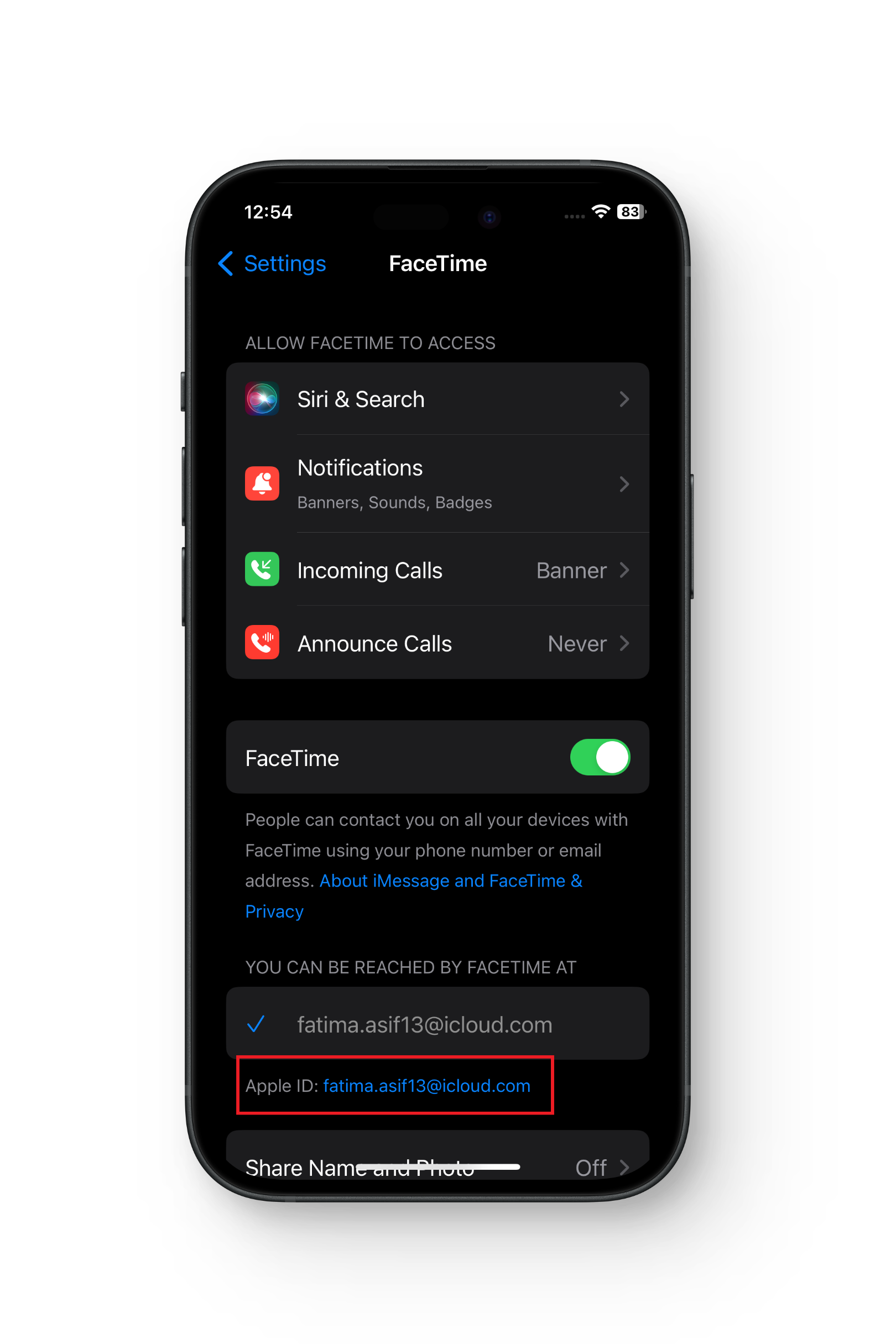
If spammers are targeting your primary email address rather than your phone number, you can restrict which identifiers can be used to initiate FaceTime calls to your device.
- Navigate to Settings > Apps > FaceTime.
- Under the section titled "You Can Be Reached By FaceTime At," review the checked items.
- Uncheck any secondary email addresses or identifiers that you do not strictly require for FaceTime calls.
- Ensure your primary telephone number remains selected for legitimate contacts.
| Identifier | Setting |
|---|---|
| [✓] +1 (555) 019-2831 | Keep active for personal use |
| [ ] personal_email@example.com | Uncheck if targeted by spam |
| [ ] work_alias@example.com | Uncheck if targeted by spam |
3. Handling and Exiting Group FaceTime Harassment Loops
If you are trapped in a Group FaceTime spam call that refuses to stop ringing even after you decline it, follow these steps to break the loop:
- Tap the incoming call notification to view the call details screen without enabling your video feed.
- Tap the Info (i) button or the participant list at the top of the display.
- Tap Leave or Leave Call at the bottom of the interface to permanently remove yourself from the session.
- In your FaceTime call log, swipe left on the group call entry and tap the Trash icon, or tap the Info (i) icon and select Block this Caller for the user who initiated the group invite.
4. Reporting Spam Directly to Apple
Reporting unsolicited calls helps train platform-level spam filters and assists Apple in identifying malicious Apple Accounts.
- Open the FaceTime app.
- Locate the unknown or suspicious call entry in your Recents list.
- Tap the Info (i) button next to the caller ID or email address.
- Scroll to the bottom of the details card and tap Report Junk.
- Confirm by tapping Block and Report Junk.
What to Do If You Accidentally Answer a Creepy FaceTime Call
Accidentally tapping the green answer button on a creepy or unknown call can cause immediate concern. Taking a structured, calm approach minimizes any potential privacy risks.
Immediate Hardware and Privacy Controls
If you answer an unsolicited call, immediately take these steps to secure your environment:
- Cover the Camera: Place your finger or a physical cover over your front-facing and rear camera lenses immediately.
- Mute the Microphone: Tap the Mute button on the screen to prevent the caller from recording your voice or ambient room sound.
- Disable Video: Tap the Camera icon on the active call screen to turn off your camera feed entirely, converting the session to audio-only.
- End the Call: Tap the red End Call button firm and clear.
Assessing Security Risks: Can Answering a FaceTime Call Hack Your Phone?
A common fear is that simply answering a FaceTime call from a strange number allows hackers to breach your phone, install spyware, or steal personal data.
In modern mobile operating systems, answering an incoming FaceTime call does not automatically grant remote access to your device, personal files, or password keychain. Apple employs strict sandboxing techniques that isolate the FaceTime application from the underlying operating system and core file storage.
However, risks do exist in specific social engineering contexts:
- Visual Harvesting: If your camera is active, the caller can record your face, your location, or sensitive information visible in your room.
- Voice Recording: The caller may record your voice to build audio samples for AI voice-cloning scams.
- Phishing Tactics: The caller may attempt to impersonate official figures to trick you into revealing verification codes or account passwords.
- Active Status Confirmation: Answering confirms to the spammer's automated script that your number is active, leading to an increase in future spam attempts.
Frequently Asked Questions
Can answering a FaceTime call from an unknown number compromise my iPhone security?
Answering a call does not execute code that can compromise your device operating system or extract saved files. Security risks are primarily observational: the caller can see what your camera captures and hear what your microphone picks up. To protect your privacy, mute your audio and obscure your camera immediately if you answer by mistake.
Why do I keep getting FaceTime calls from weird email addresses instead of phone numbers?
FaceTime allows calls to be placed using any email address linked to an Apple Account. Spammers frequently use scripted software to register hundreds of temporary, throwaway email accounts. They run automated programs that send call requests to lists of leaked numbers and emails because email-based accounts are cheap to generate and hard to track down instantly.
How do spammers get my specific phone number or Apple ID?
Spammers acquire contact details through commercial data breaches, public directory scraping, online surveys, marketing databases, and random number generation scripts. If your email address or phone number was included in a data breach from a third-party website, bad actors can easily run that information through tools that check for active FaceTime registrations.
Why does a Group FaceTime call keep ringing even after I press decline?
This occurs because of how group call state updates are broadcast across participants. When one member declines or drops off, the server sends a status update to everyone else in the group. In certain app states, this incoming update triggers a fresh alert or ring on your device. The best solution is to tap the group details and select Leave Call rather than simply declining it.
Is it safe to call back a scary or mysterious FaceTime number to see who it is?
No. Calling back an unknown or unsettling number is strongly discouraged. Calling back verifies to the spammer or bad actor that your number belongs to an active, attentive user who reacts to alerts. This typically results in your number being added to higher-priority target lists, increasing the total volume of spam and nuisance calls you receive.
Final Recommendation and Next Actions
The anxiety caused by scary FaceTime numbers stems from the sudden intrusion of video technology into your personal space. However, these calls are almost entirely automated spam attempts, group call exploits, or pranks designed to capitalize on fear and curiosity.
Immediate Action Plan:
- Open Settings > Apps > FaceTime and enable Silence Unknown Callers immediately.
- Check your "You Can Be Reached By FaceTime At" settings and disable unnecessary email aliases.
- Block and report any suspicious entries in your FaceTime Recents list by tapping the Info (i) icon and selecting Report Junk.
- If an unknown call gets through, cover your camera, mute your microphone, and end the call immediately without engaging.
By taking control of your device's communications settings, you eliminate the element of surprise and ensure that your phone remains a secure, predictable tool.
Image Gallery